How Do You Make Your Blog AI-Native and AI-Friendly? A Cloudflare-Hosted Website Guide

How Do You Make Your Blog AI-Native and AI-Friendly? A Cloudflare-Hosted Website Guide
In 2025, Cloudflare reported that more than half of all internet requests now come from machines rather than people (Cloudflare, "Agent Readiness", 2026). Yet since July 2025, that same company has blocked AI crawlers by default on every new domain — including yours. That means GPTBot, ClaudeBot, and PerplexityBot hit a wall before they ever read a word you wrote. Your content could be invisible to ChatGPT, Claude, and Perplexity not because it is bad, but because of a single dashboard toggle you never knew existed. This guide walks you through fixing that first, then goes further. You will learn the difference between making your blog AI-friendly (AI can find and read it) and AI-native (AI wants to cite it), and you will apply every step to a real Cloudflare-hosted domain — the same setup this blog, findns.cc, runs on.
Key Takeaways
- Since July 2025, Cloudflare blocks GPTBot, ClaudeBot, PerplexityBot, CCBot, and Google-Extended by default on new domains — one toggle each fixes it (Cloudflare, 2025).
- AI-friendly means AI can crawl and render your pages; AI-native means your content is structured so AI systems extract and cite it.
- GPTBot executes zero JavaScript across hundreds of millions of fetches — static sites like Hexo and Hugo have an inherent visibility advantage (Vercel, 2025).
- Answer-first paragraphs and citation capsules make your content quotable; llms.txt is cheap to add but its benefits are still unproven.
- Verify everything with
curlsimulating each bot's user-agent — never assume the crawler sees what you see.
What Is the Difference Between AI-Friendly and AI-Native?
Most guides conflate two distinct goals, so let's separate them. An AI-friendly blog is one AI systems can access, render, and parse: the crawler gets in, the HTML contains the full text, and the page loads fast enough to stay inside the extraction budget. An AI-native blog goes further — it's designed from the first draft for machine consumption. Headings read as questions, each section opens with a sourced, self-contained answer, and the content includes quotable citation capsules that an AI can lift verbatim into a response.
Why does the distinction matter? Because access without structure gets you crawled but rarely cited. Structure without access is invisible — the AI never sees the careful work you did. You need both, and the order matters: fix crawler access first, then optimize the content. Think of AI-friendly as opening the door and turning on the light. AI-native is arranging the room so a visitor can find what they need without having to ask.
Why Does Cloudflare Block AI Crawlers by Default?
In July 2025, Cloudflare changed the default for its Security > Bots > AI Crawlers setting: every known AI crawler is now blocked unless you explicitly allow it. The rationale was bot management hygiene — treat unknown agents as untrusted until reviewed. The side effect was that thousands of new domains became invisible to AI search overnight.
The default block list reads like a who's-who of AI indexing. GPTBot (OpenAI), ClaudeBot (Anthropic), PerplexityBot (Perplexity), CCBot (Common Crawl), and Google-Extended (Google's AI training bot) all start blocked. Only Applebot-Extended and the standard Googlebot are allowed by default. If you registered your domain after July 2025 and never visited this panel, there is a good chance your blog is on the wrong side of that wall.
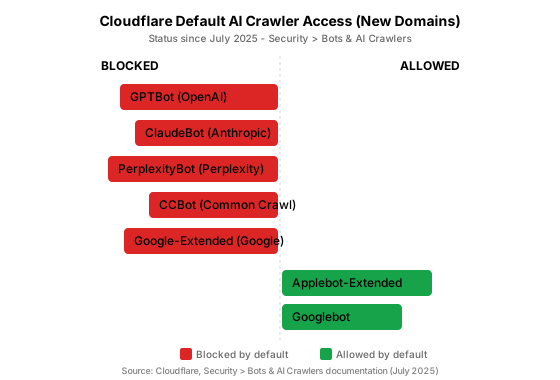
Citation capsule: Since July 2025, Cloudflare blocks GPTBot, ClaudeBot, PerplexityBot, CCBot, and Google-Extended by default on new domains — only Applebot-Extended and standard Googlebot are allowed without configuration (Cloudflare, Security > Bots & AI Crawlers, 2025). A domain that never had its AI Crawler settings reviewed is likely invisible to ChatGPT, Claude, and Perplexity.
The good news: the fix is a few clicks. The hard part is knowing to look.
How Do You Unblock AI Crawlers and Configure robots.txt?
Open the Cloudflare dashboard, navigate to Security > Bots > AI Crawlers, and toggle "Allow" for each crawler you want to permit. Start with the search-indexing bots — OAI-SearchBot, Claude-SearchBot, and PerplexityBot — because blocking those removes you from that platform's answers entirely. Training bots like GPTBot and ClaudeBot are your call; blocking them does not hurt your search visibility, but it does stop your content from shaping future model behavior.

Next, back up the dashboard setting with a correct robots.txt. AI crawlers respect robots.txt, and an absent rule can be interpreted either way depending on the platform. Be explicit. Allow the major bots and point them at your sitemap. Here is a minimal, AI-aware template — drop in your domain and sitemap URL:
# AI Search & LLM Crawlers
User-agent: GPTBot
Allow: /

User-agent: OAI-SearchBot
Allow: /

User-agent: ClaudeBot
Allow: /

User-agent: Claude-SearchBot
Allow: /

User-agent: PerplexityBot
Allow: /

User-agent: Google-Extended
Allow: /

User-agent: CCBot
Allow: /

# Traditional search
User-agent: Googlebot
Allow: /

User-agent: Bingbot
Allow: /

Sitemap: https://findns.cc/sitemap.xml
Treat each bot category differently. Search-indexing bots (OAI-SearchBot, Claude-SearchBot, PerplexityBot) control whether your content appears in live AI answers — allow them. Training bots (GPTBot, ClaudeBot, CCBot) shape future models; allow them if you want influence, block them if you don't. Retrieval bots (ChatGPT-User, Perplexity-User) are triggered by live user queries and may fetch content regardless of robots.txt, so don't rely on that file alone for privacy.
Verify the change before moving on. Simulate each bot with curl and watch for a clean 200 — not a 403 and not a Cloudflare challenge page:
curl -s -o /dev/null -w "%{http_code}" \
  -A "Mozilla/5.0 AppleWebKit/537.36 (KHTML, like Gecko; compatible; GPTBot/1.0; +https://openai.com/gptbot)" \
  https://findns.cc/
A 200 means the crawler gets in. Anything else means something's still in the way — recheck the dashboard toggle and any page rules that might challenge unknown agents.
How Do You Make Content Visible Without JavaScript?
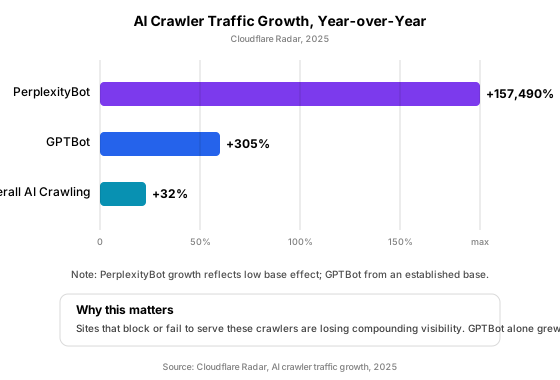
Here's the uncomfortable truth about AI crawlers: they don't execute JavaScript. In 2025, Vercel analyzed more than 500 million GPTBot fetches and found zero evidence of JavaScript execution (Vercel, "GPTBot rendering analysis", 2025). GPTBot reads raw HTML, period. Content that loads via React hydration, Vue mounting, or any client-side framework is invisible to it. The same holds for ClaudeBot and PerplexityBot. Only Googlebot, AppleBot, and the new agentic tools like ChatGPT Operator render pages.
This is where your choice of platform matters more than any content tweak. Static-site generators — Hexo, Hugo, Jekyll, Eleventy — ship finished HTML to the edge. That HTML is fully visible to every AI crawler without extra work. If you run one of these, you've got an inherent visibility advantage that a client-side React blog has to engineer back in with SSR or prerendering.
Test your own pages the way a crawler sees them. Pull the raw HTML and grep for your main content — if it is not there, the AI does not see it either:
curl -s https://findns.cc/your-post | grep -c "<article"
curl -s https://findns.cc/your-post | grep -c "id=\"__next\""
A healthy <article count and an empty __next check tell you the content lives in the HTML source. If instead you find an empty <div id="root"></div> or your text only appears inside a <noscript> tag, your content is behind JavaScript and invisible to most AI systems.
How Do You Structure Content for AI Citations?
Getting crawled is necessary. Getting cited requires a different kind of work. In 2025, Ahrefs found that 76 percent of AI Overview citations pull from the top 10 organic results, and 28.9 percent of all AI citations go to just 50 domains (Ahrefs, "AI Overviews citation study", 2025). Being in the room is not enough — you need to be the clearest voice in it.
The most effective tactic is answer-first formatting. Open every H2 section with a 40-to-60-word paragraph that contains a specific statistic, a named source, and a direct answer to the heading's implicit question. AI extraction systems reward this inverted-pyramid style because it matches how they build responses: claim first, evidence second. A section titled "How Does Page Speed Affect AI Crawling?" should open with a number and a source, not a throat-clearing anecdote.

Alongside answer-first paragraphs, add citation capsules — self-contained, 40-to-60-word passages that make sense in isolation. Each capsule carries one claim, one data point, and one source attribution. Write them in a declarative, quotable tone. When an AI system scans your page looking for a sentence to lift, the capsule is the obvious candidate. This post uses them throughout; you are reading the technique right now.
Keep heading hierarchies clean: one H1, H2s for main sections (roughly two-thirds as questions), H3s only as children of an H2. Include your primary keyword in two or three headings naturally. And keep paragraphs short — 40 to 80 words — because dense walls of text resist extraction.
How Do You Add llms.txt and Structured Data?
Two signals sit at the intersection of AI-friendly and AI-native: a machine-readable site summary and explicit schema markup. They're not magic bullets, but they're cheap to implement and they remove ambiguity about what your site contains.
Structured data is the more proven of the two. In 2024, JSON-LD usage grew 21 percent (from 34 to 41 percent of pages), and Schema.org markup now covers 45 million domains with more than 450 billion objects (Web Almanac 2024, Structured Data). For a blog, add BlogPosting schema to every post and FAQPage schema to your FAQ section. JSON-LD in your <head> or <body> helps Google build rich results and gives AI systems explicit entity-and-relationship data instead of forcing them to guess at your structure.
llms.txt is the newer, riskier bet. Proposed by Anthropic in 2024, it's a markdown file at your site root (findns.cc/llms.txt) that lists your key pages and their purpose for LLM consumption. Claude actively reads it. Perplexity has expressed alignment with the idea. OpenAI hasn't confirmed support (llmstxt.org, 2026). Google's Gary Illyes stated in July 2025 that Google doesn't use it, and Semrush testing recorded zero AI crawler visits to llms.txt files across nine test sites. Implement it — it costs an hour — but don't rely on it as your visibility strategy.
A minimal llms.txt looks like this:
# Your Blog

> A technical blog about web development, AI visibility, and content strategy.

## Essential

- [Home](https://findns.cc/): Latest articles and topic clusters
- [About](https://findns.cc/about): Author background and site mission

## Popular Articles

- [How to Make Your Blog AI-Friendly](https://findns.cc/blog/ai-friendly-blog): Step-by-step guide to AI crawler access and content structure.
Keep it under 10KB — LLMs may truncate larger files. Update it when you publish significant new content. And remember: it supplements sitemap.xml, never replaces it.
Citation capsule: JSON-LD adoption grew 21 percent between 2022 and 2024 (from 34 to 41 percent of pages), and Schema.org markup now spans 45 million domains with over 450 billion objects (Web Almanac 2024, Structured Data; schema.org, 2024). For blogs, adding BlogPosting and FAQPage schema gives AI systems explicit entity data rather than making them guess your structure.
How Do You Verify AI Crawler Access End-to-End?
You have toggled the dashboard, written your robots.txt, confirmed your HTML is static, and added schema. Now prove it — because assumptions are how invisible blogs stay invisible.
Run this checklist for every major AI crawler:
| Check | Command | Pass condition |
|---|---|---|
| Bot reaches the page | curl -A "<bot-ua>" -o /dev/null -w "%{http_code}" URL |
Returns 200, not 403 or challenge |
| Content is in HTML source | curl -s URL | grep -c "your-unique-heading" |
Count > 0 |
| No JS-only rendering | curl -s URL | grep -c "id=\"root\"" |
Count == 0 |
| Schema is present | curl -s URL | grep -c "application/ld+json" |
Count > 0 |
| Sitemap is reachable | curl -o /dev/null -w "%{http_code}" URL/sitemap.xml |
Returns 200 |
If any check fails, you have found the gap before a search engine does. The most common failure is the first one: a clean dashboard toggle that some page rule or rate limit still overrides. Test from a fresh URL the crawler has never seen, and test every bot you claim to allow — GPTBot, ClaudeBot, and PerplexityBot each have their own user-agent string and their own behavior.
Common Mistakes to Avoid
Blocking AI crawlers and not knowing it. The July 2025 Cloudflare default is the most common failure mode right now. If you did not explicitly allow AI bots, they are blocked. Check the dashboard today.
Confusing AI-friendly with AI-native. Crawler access without content structure gets you indexed but not cited. Content structure without crawler access is invisible. Do both, in that order.
Relying on llms.txt as a strategy. It is a nice-to-have signal with no confirmed payoff from two of the three major AI platforms. Spend your real time on answer-first content and schema.
Injecting schema via JavaScript. AI crawlers that do not execute JavaScript will never see client-side schema injection. Put JSON-LD in the server-rendered HTML, not in a React effect.
Assuming the crawler sees your page. It does not. It sees raw HTML. If your content loads client-side, the crawler sees an empty shell. Always verify with curl.
Frequently Asked Questions
Does making my blog AI-friendly hurt my Google ranking?
No — the two goals reinforce each other. In 2025, Ahrefs found that 76 percent of AI Overview citations come from the top 10 organic results, so strong traditional SEO is a prerequisite for AI visibility, not a competitor to it. The techniques here — clean HTML, fast load times, structured data — are core Google ranking signals too.
Do I need to allow every AI crawler?
No. Prioritize search-indexing bots (OAI-SearchBot, Claude-SearchBot, PerplexityBot) because those drive live citations. Training bots (GPTBot, ClaudeBot) are optional — blocking them limits your influence on future models but does not affect current visibility. You can allow the ones that matter and ignore the rest.
Is llms.txt worth implementing?
Yes, as a low-cost signal — but not as a strategy. Claude reads it; ChatGPT and Google do not confirm using it. Build it in an hour, keep it under 10KB, and move on to the higher-impact work of schema markup and answer-first content.
My blog runs on a static-site generator. Is it already AI-friendly?
Largely, yes. Static HTML is fully visible to AI crawlers without extra rendering. You still need to verify crawler access (the Cloudflare toggle), add schema markup, and structure content for citation — but you skip the hardest step, which is making client-side content visible.
How do I know if Cloudflare is blocking my AI crawlers?
Simulate a bot with curl and check the HTTP status. A 200 means the crawler gets in. A 403, a redirect, or an HTML challenge page means it is blocked. Test GPTBot, ClaudeBot, and PerplexityBot by name, since each is toggled separately in the dashboard.
Conclusion
Making your blog AI-native and AI-friendly is not one change — it is a short sequence done in the right order. Unblock the crawlers at the edge, confirm your content ships in raw HTML, then structure that content so an AI system can quote it without rewriting it. Verify every step with curl, because the crawler's view of your page is the only view that matters.
Start with the single most effective move: open Cloudflare, go to Security > Bots > AI Crawlers, and toggle "Allow" for the search-indexing bots. That change takes under a minute and fixes the most common reason blogs are invisible to AI in 2026. Then work through the rest of this guide in order.
Sources
- Cloudflare, "Agent Readiness and AEO metrics", blog.cloudflare.com/aeo/, retrieved August 10, 2026
- Cloudflare, Security > Bots > AI Crawlers documentation, July 2025
- Cloudflare Radar, "AI crawler traffic growth year-over-year", 2025
- Vercel, "GPTBot rendering analysis — 500M fetches, zero JavaScript execution", 2025
- Ahrefs, "AI Overviews citation study — top domains and CTR impact", ahrefs.com/blog, 2025
- Web Almanac 2024, "Structured Data", almanac.httparchive.org/en/2024/structured-data, 2024
- schema.org, "45 million domains, 450 billion objects", 2024
- llmstxt.org, "llms.txt standard and adoption", retrieved August 10, 2026
- Anthropic, "llms.txt proposal and Claude crawler support", 2024–2026
- Stack Overflow, "Developer Survey 2025 — AI tool usage", 2025