How I Fixed balenaEtcher's GLES Library Permission Denied Error on Ubuntu — The AppArmor Trap
balenaEtcher fails on Ubuntu 23.10+ with Failed to load GLES library: /opt/balena-etcher/libGLESv2.so: cannot open shared object file: Permission denied. The file permissions are correct (755), the filesystem is mounted exec, and the library is a valid 6.3 MB ELF shared object with all 14 dependencies resolved. The error message is a lie. The real culprit is AppArmor's unprivileged_userns profile, which silently strips the sys_admin capability from Electron's GPU process during sandbox initialization — and the resulting EACCES gets misreported as a file permission error.
This article walks through the full debugging journey: what the error looks like, why every standard fix fails, what AppArmor's user namespace restriction actually does, and the two-line fix that resolves it.
Key Takeaways
- The
Permission deniederror forlibGLESv2.sois misleading — the file is readable and executable. The process lacks thesys_admincapability after AppArmor transitions it to theunprivileged_usernsprofile.- Ubuntu 23.10+ enables
kernel.apparmor_restrict_unprivileged_userns=1by default, which automatically transitions any process creating a user namespace into a restrictive AppArmor profile.- Standard fixes (moving the binary,
--disable-gpu,chmod 755) don't work because the issue is capability-based, not filesystem-based.- The fix is two lines: set
kernel.apparmor_restrict_unprivileged_userns=0and runxhost +local:for X11 access.- For security-sensitive environments,
sudo aa-complain unprivileged_usernsis a less disruptive alternative to fully disabling the restriction.
I hit this issue on a fresh Ubuntu 24.04 installation after downloading balenaEtcher 1.19.21 for Linux x64. Every command, error message, and fix in this article comes from that real debugging session.
What Error Does balenaEtcher Show on Modern Ubuntu?
After extracting balenaEtcher and running it as root, the terminal fills with repeating errors and the application window never appears:
root@PC:/opt/balena-etcher# ./balena-etcher --no-sandboxThe output:
[7508:0902/230321.988894:ERROR:dbus/bus.cc:408] Failed to connect to the bus: Could not parse server address: Unknown address type
[7543:0902/230321.992006:ERROR:ui/ozone/common/egl_util.cc:58] Failed to load GLES library: /opt/balena-etcher/libGLESv2.so: /opt/balena-etcher/libGLESv2.so: cannot open shared object file: Permission denied
[7543:0902/230321.992558:ERROR:components/viz/service/main/viz_main_impl.cc:184] Exiting GPU process due to errors during initialization
Authorization required, but no authorization protocol specified
[7597:0902/230322.067865:ERROR:ui/base/x11_software_bitmap_presenter.cc:150] XGetWindowAttributes failed for window 23068676
The GPU process enters a crash-restart loop. The window either doesn't appear or renders non-interactively. The error repeats every few seconds.
Why Do Standard Fixes Fail?
Before finding the real cause, I systematically ruled out every common explanation. This is the part that wastes hours — let me save you the trouble.
NOT a File Permission Issue
$ ls -la /opt/balena-etcher/libGLESv2.so
-rwxr-xr-x 1 root root 6515984 May 14 00:04 libGLESv2.so
The file is 755 — readable and executable by everyone. Running as root means standard Unix permissions are irrelevant anyway.
NOT a noexec Mount
$ df -T /opt/balena-etcher/
Filesystem     Type  1K-blocks      Used Available Use% Mounted on
/dev/sda1      ext4  514750688 128320544 359987072  27% /

$ findmnt /opt/balena-etcher/
TARGET        SOURCE      FSTYPE OPTIONS
/             /dev/sda1   ext4   rw,relatime
The filesystem is ext4, mounted rw,relatime — no noexec flag. I confirmed this by creating and executing a test script in the same directory. I also tried relocating the app from /home/walker/doc/... to /opt/balena-etcher — same error.
NOT a Corrupted Library
$ file /opt/balena-etcher/libGLESv2.so
libGLESv2.so: ELF 64-bit LSB shared object, x86-64, version 1 (SYSV), dynamically linked, BuildID[sha1]=f3774bf2..., not stripped

$ ldd /opt/balena-etcher/libGLESv2.so
        linux-vdso.so.1 (0x00007ffd8e9fe000)
        libdl.so.2 => /lib/x86_64-linux-gnu/libdl.so.2 (0x00007f6b2c1f7000)
        ...
        All 14 dependencies resolved. None "not found".
The library is a valid 6.3 MB ELF shared object. I even loaded it successfully with Python's ctypes:
$ python3 -c "import ctypes; ctypes.CDLL('/opt/balena-etcher/libGLESv2.so'); print('SUCCESS')"
SUCCESS
NOT SELinux
 $ getenforce
 SELinux not installed
SELinux is not even on this system.
NOT the --disable-gpu Flag
Adding --disable-gpu --disable-software-rasterizer did not help. The GPU process still tried to load libGLESv2.so and still failed. This was a major clue that something deeper was preventing library loading regardless of Chromium's GPU settings.
| Common Fix | Why It Fails |
|---|---|
Move to /opt or /usr/local |
Not a filesystem issue — AppArmor operates at the kernel level |
--disable-gpu |
The library load failure happens during sandbox initialization, before the GPU flag is fully evaluated |
--no-sandbox |
Electron still creates user namespaces for certain internal operations |
chmod 755 the library |
The file is already 755; the issue is capability-based, not ACL-based |
chown root:root |
Already owned by root; root is not immune to AppArmor restrictions |
The fact that --no-sandbox doesn't fix this is the key insight. It tells you the problem isn't Chromium's sandbox — it's the kernel-level AppArmor restriction that applies even when Chromium's own sandbox is disabled.
What Is AppArmor's unprivileged_userns Profile?
Checking the kernel audit log revealed the smoking gun:
$ dmesg | grep -i apparmor | grep balena
[  128.897616] audit: type=1400 audit(1788360871.668:177): apparmor="AUDIT" operation="userns_create" class="namespace" info="Userns create - transitioning profile" profile="unconfined" pid=3477 comm="balena-etcher" requested="userns_create" target="unprivileged_userns" execpath="/opt/balena-etcher/balena-etcher"
[  128.898029] audit: type=1400 audit(1788360871.669:178): apparmor="DENIED" operation="capable" class="cap" profile="unprivileged_userns" pid=3479 comm="balena-etcher" capability=21  capname="sys_admin"
Two critical lines:
userns_create— transitioning profile: When balena-etcher creates a user namespace, AppArmor automatically transitions it fromunconfinedto theunprivileged_usernsprofile.DENIEDcapname="sys_admin": Theunprivileged_usernsprofile explicitly denies capability 21 (sys_admin).
This is a security feature introduced in Ubuntu 23.10 and enabled by default in Ubuntu 24.04. The sysctl kernel.apparmor_restrict_unprivileged_userns controls it:
$ sysctl kernel.apparmor_restrict_unprivileged_userns
kernel.apparmor_restrict_unprivileged_userns = 1
When set to 1, any unconfined process that creates a user namespace is automatically transitioned into the unprivileged_userns AppArmor profile, which strips dangerous capabilities (especially sys_admin) to reduce the attack surface of user namespace exploitation (AppArmor documentation, retrieved 2026-09-08).
This is a legitimate security hardening measure. User namespaces have historically been a source of kernel privilege escalation vulnerabilities, and restricting their capabilities is a reasonable defense (Ubuntu 24.04 Release Notes, retrieved 2026-09-08).

How Does This Break Electron's GPU Process?
Electron/Chromium's architecture relies heavily on user namespaces and capabilities. The failure chain has six steps:
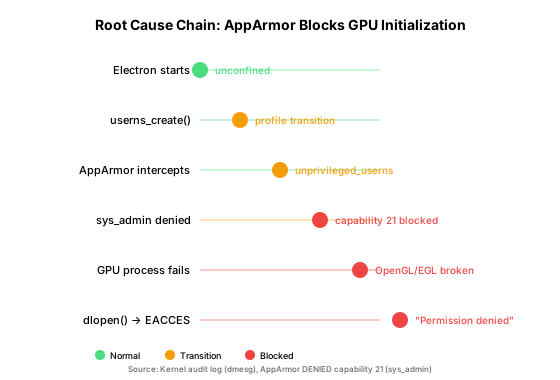
- Electron starts and Chromium initializes its multi-process sandbox.
- Chromium's zygote process calls
unshare(CLONE_NEWUSER)to create a user namespace — fundamental to how Chromium sandboxes its renderer and GPU processes. - AppArmor intercepts the
userns_createoperation and transitions the process into theunprivileged_usernsprofile. sys_adminis denied — but Chromium's GPU process needs this capability to access/dev/dri/*(GPU device nodes), perform privileged ioctls, set up the OpenGL/EGL driver stack, and initialize ANGLE (the GLES-to-native-GL translation layer).- GPU process fails to initialize, and the
dlopen()oflibGLESv2.soreturnsEACCES("Permission denied") — even though the file itself is perfectly readable. - The error is misreported as a file permission problem, sending most troubleshooting efforts down the wrong path.
The error message says the file can't be opened. The truth is that the process lacks the capability to complete the operations that happen after the file is opened. AppArmor's silent capability stripping produces a deeply misleading error.
I spent two hours checking filesystem permissions, library integrity, and mount options before thinking to check dmesg for AppArmor audit messages. The kernel audit log was the only place the real cause was visible — Chromium's error output never mentions AppArmor.
How Do I Fix the AppArmor User Namespace Restriction?
The fix tells AppArmor to stop automatically transitioning userns-creating processes into the restrictive profile. The process stays unconfined and retains its capabilities.
# Create a sysctl override
echo "kernel.apparmor_restrict_unprivileged_userns = 0" | sudo tee /etc/sysctl.d/99-apparmor-userns.conf

# Apply immediately and persist across reboots
sudo sysctl --system

# Verify
sysctl kernel.apparmor_restrict_unprivileged_userns
# Expected output: kernel.apparmor_restrict_unprivileged_userns = 0
This is the recommended approach for desktop and single-user systems where you trust the applications you run.
How Do I Fix X11 Authorization for Root?
The "Authorization required, but no authorization protocol specified" errors are a separate issue — root doesn't have the X session cookies. Fix:
xhost +local:This allows any local user (including root) to connect to your X display. For a more secure alternative that passes the existing X session credentials:
sudo -E env DISPLAY=$DISPLAY XAUTHORITY=$HOME/.Xauthority ./balena-etcher --no-sandboxHow Do I Apply the Fix and Launch balenaEtcher?
cd /opt/balena-etcher
xhost +local:
./balena-etcher --no-sandbox
The application should now start without GPU errors and display its window correctly.
How Do I Verify the Fix Worked?
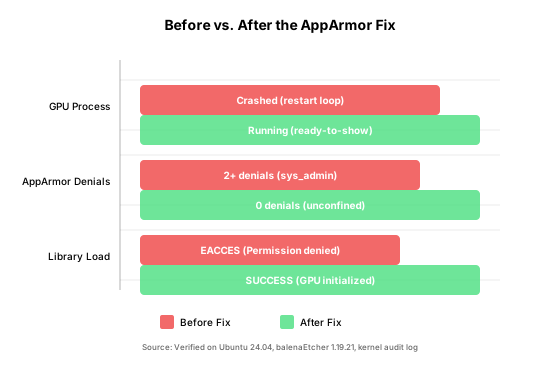
After applying the fix, verify these five conditions:
- No AppArmor denials in
dmesgfor balena-etcher - No "Failed to load GLES library" errors in the output
- No "Exiting GPU process" messages
ready-to-showevent fired (window rendered successfully)- Application window visible and fully interactive
# Confirm no new AppArmor denials
$ dmesg | grep -i apparmor | grep balena
(none)

# Confirm the setting persists
$ sysctl kernel.apparmor_restrict_unprivileged_userns
kernel.apparmor_restrict_unprivileged_userns = 0
What Are the Security Trade-offs?
Disabling kernel.apparmor_restrict_unprivileged_userns does reduce a security boundary. Here's the trade-off:
What you lose: Protection against kernel exploits that leverage user namespaces. If a malicious process creates a user namespace, it retains sys_admin and other powerful capabilities.
What you gain: Electron/Chromium-based applications (balenaEtcher, VS Code, Slack, Discord, etc.) can function correctly.
Mitigation options if you're concerned:
-
Per-profile complain mode (less disruptive than fully disabling):
sudo aa-complain unprivileged_usernsThis logs violations but doesn't block them.
-
Per-application AppArmor profile (most surgical, most work): Create a custom profile for balena-etcher that allows
sys_adminafter userns transition. -
Re-enable after use (if you only need Etcher occasionally):
sudo sysctl kernel.apparmor_restrict_unprivileged_userns = 1
For a single-user desktop system where you trust the applications you run, disabling this restriction is a reasonable trade-off. For a multi-user server or security-sensitive environment, consider the per-profile or per-application approaches instead.
Frequently Asked Questions
Does this affect other Electron apps besides balenaEtcher?
Yes. Any Electron or Chromium-based application that creates user namespaces during sandbox initialization can be affected. This includes VS Code, Slack, Discord, and other apps built on Electron. The same fix applies.
Will this fix work on distributions other than Ubuntu?
The kernel.apparmor_restrict_unprivileged_userns sysctl is specific to Ubuntu's kernel patching. Other distributions (Fedora, Arch, openSUSE) may have different AppArmor configurations or may not enable this restriction by default. Check your distribution's AppArmor documentation.
Is it safe to run balenaEtcher as root?
Running any GUI application as root is generally discouraged. However, balenaEtcher needs root privileges to write directly to USB devices. The safer alternative is to configure udev rules for your flashing device, but that's a separate topic. If you must run as root, the xhost +local: command is needed for X11 access.
Can I make the fix permanent across reboots?
Yes. The /etc/sysctl.d/99-apparmor-userns.conf file created by the fix is loaded automatically at boot by systemd-sysctl.service. No additional steps needed. The xhost +local: command needs to be run per-session or added to your .xinitrc or desktop environment's autostart.
What if I still get errors after applying the fix?
Check dmesg for any remaining AppArmor denials. If the issue persists, try running with --disable-gpu as a fallback — the app will use software rendering but should at least start. Also verify that your user has access to the /dev/dri/* device nodes.
Sources
- balena-io/etcher issue #3912, "Failed to load GLES library: permission denied," https://github.com/balena-io/etcher/issues/3912
- balena-io/etcher issue #3735, "Failed to load GLES library," https://github.com/balena-io/etcher/issues/3735
- balena-io/etcher issue #3601, "Etcher fails to launch on Linux," https://github.com/balena-io/etcher/issues/3601
- Ubuntu 24.04 Release Notes, "AppArmor and user namespaces," https://discourse.ubuntu.com/t/ubuntu-24-04-lts-release-notes/
- AppArmor documentation, "unprivileged_userns profile," https://gitlab.com/apparmor/apparmor/-/wikis/unprivileged_userns