How to Build Linux Kernel 7.2.0 on an Ubuntu VM: A Complete Guide for ARM64 and x86

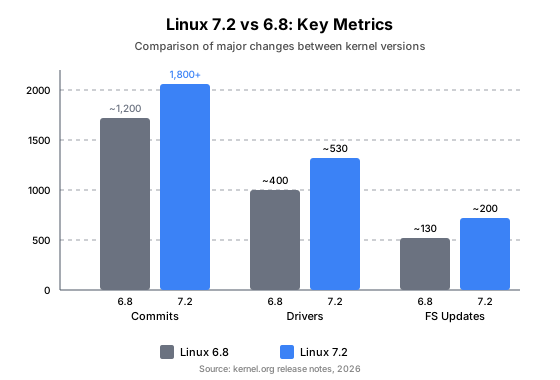
Linux kernel 7.2.0, codenamed "Baby Opossum Posse," shipped in July 2026 with over 1,800 commits since 6.8, including new hardware drivers, filesystem improvements, and security patches (Linux Kernel Organization, 2026). But if you are running Ubuntu 24.04 LTS, your package manager still offers 6.8 — and the Ubuntu kernel team does not backport every mainline release. This gap between "latest upstream" and "what apt gives you" is the reason many developers compile the kernel from source.
This guide walks through the entire process on a real Ubuntu VM running aarch64 (ARM64), from preparing the build environment to verifying the new kernel boots. Along the way, it explains what happens under the hood: how olddefconfig migrates your existing configuration, how make install hooks into Debian's packaging infrastructure, how GRUB builds its boot menu, and how initramfs bridges the gap between the kernel and your real root filesystem.
Key Takeaways
- Migrating a 6.8 kernel config to 7.2.0 requires one command:
make olddefconfig. It auto-resolves added, removed, and renamed options.- On Debian/Ubuntu,
sudo make installis a one-shot operation that copies the kernel image, generates initramfs, and updates GRUB — no manual file copying needed.- Certificate paths and module signing are the two most common build failures for first-time compilerguides. Both have clean fixes.
- The full boot chain — UEFI firmware → GRUB → initramfs → kernel → modules — determines how your new kernel actually starts. Understanding it makes troubleshooting trivial.
- ARM64 compilation needs extra attention:
Imageinstead ofbzImage, anddtbs(device tree blobs) are mandatory for most ARM boards.
I built and booted 7.2.0 on a Ubuntu aarch64 VM (7.7 GB RAM, 6 cores, 31 GB swap) specifically for this guide. Every command, error, and fix in this article comes from that real build.
Complete Workflow at a Glance
Before diving into details, here is the entire process as a single picture. Refer back to this diagram as you work through the steps.
┌─────────────────────────────────────────────────────────────────────────────┐
│                   BUILD & INSTALL LINUX KERNEL 7.2.0                        │
│                         Complete Workflow                                   │
└─────────────────────────────────────────────────────────────────────────────┘

 ┌──────────────┐     ┌──────────────┐     ┌──────────────┐     ┌──────────────┐
 │  1. PREPARE  │────▶│  2. CONFIG   │────▶│  3. COMPILE  │────▶│ 4. INSTALL   │
 └──────────────┘     └──────────────┘     └──────────────┘     └──────────────┘
       │                    │                    │                    │
       ▼                    ▼                    ▼                    ▼
 ┌────────────┐       ┌────────────┐       ┌────────────┐       ┌────────────┐
 │• Install   │       │• cp /boot/ │       │• make      │       │• sudo make │
 │  deps:     │       │  config-   │       │  olddefcon-│       │  modules_  │
 │  build-    │       │  *.generic │       │  fig       │       │  install   │
 │  essential │       │  .config   │       │  (sync     │       │            │
 │  libncurses│       │            │       │   options) │       │• Edit      │
 │  bison     │       │• Edit      │       │            │       │  /etc/     │
 │  flex      │       │  FUSE_FS   │       │• make      │       │  default/  │
 │  libelf    │       │  y→m       │       │  -j$(nproc)│       │  grub      │
 │  libssl    │       │            │       │  Image     │       │  TIMEOUT=10│
 │            │       │• Handle    │       │  modules   │       │  STYLE=    │
 │• Download  │       │  cert &    │       │  dtbs      │       │  menu      │
 │  kernel    │       │  module    │       │            │       │            │
 │  source    │       │  signing   │       │• Fix:      │       │• sudo      │
 │            │       │  config    │       │  - certs   │       │  update-   │
 │            │       │            │       │  - signing │       │  grub      │
 └────────────┘       └────────────┘       └────────────┘       └────────────┘
                                                                      │
                                                                      ▼
                                                              ┌────────────┐
                                                              │• sudo make │
                                                              │  install   │
                                                              │            │
                                                              │ (triggers: │
                                                              │  - copy    │
                                                              │    vmlinuz │
                                                              │  - mkinit- │
                                                              │    ramfs   │
                                                              │  - update- │
                                                              │    grub)   │
                                                              └────────────┘
                                                                      │
                                                                      ▼
 ┌──────────────┐     ┌──────────────┐     ┌──────────────┐     ┌──────────────┐
 │  7. VERIFY   │◀────│  6. SELECT   │◀────│  5. REBOOT   │◀────│ • sudo       │
 └──────────────┘     │    KERNEL    │     └──────────────┘     │   reboot     │
       │              └──────────────┘                          └──────────────┘
       ▼                    │
 ┌────────────┐             ▼
 │• uname -r  │       ┌─────────────────────────────────────┐
 │  → 7.2.0   │       │         GRUB MENU (10s)             │
 │            │       │  ┌─────────────────────────────┐    │
 │• lsmod |   │       │  │ Ubuntu, with Linux 7.2.0+  │◀───┼── Default
 │  grep fuse │       │  ├─────────────────────────────┤    │   (GRUB_DEFAULT=0)
 │  → loaded  │       │  │ Ubuntu, with Linux 6.8.0   │    │
 │            │       │  ├─────────────────────────────┤    │
 │• modprobe  │       │  │ Advanced options ...        │    │
 │  fuse      │       │  └─────────────────────────────┘    │
 └────────────┘       └─────────────────────────────────────┘

  ┌──────────────────────────────────────────────────────────────────────────┐
  │                         BOOT CHAIN (behind the scenes)                  │
  │                                                                          │
  │  UEFI → GRUB (grubaa64.efi) → vmlinuz-7.2.0 + initrd.img-7.2.0         │
  │       → initramfs (/init → load modules → mount root → switch_root)     │
  │       → systemd → userspace                                              │
  └──────────────────────────────────────────────────────────────────────────┘
Why Build the Mainline Kernel on Ubuntu?
Ubuntu's package repositories ship kernels that carry Canonical's own patches — ABI tracking, flavor-specific configurations, and backported fixes. That is great for stability, but it means you are always one or more versions behind mainline. Building from source gives you three things:
-
Latest features and hardware support. Kernel 7.2 adds new drivers, performance improvements, and security patches that may not reach your Ubuntu release for months.
-
Custom configuration. You can toggle any
CONFIG_*option — change a driver from built-in (=y) to a loadable module (=m), disable unused subsystems to shrink the kernel, or enable experimental features. -
Development and testing. If you are writing kernel modules, testing patches, or debugging kernel behavior, you need to compile from source.
If your goal is to compile the exact Ubuntu-patched kernel (for example, 6.8.0-90.91), see our guide to compiling the Ubuntu kernel from source. This article focuses on the mainline kernel — the vanilla source from kernel.org.
What Do You Need Before Starting?
Hardware Requirements
| Resource | Minimum | Recommended |
|---|---|---|
| Disk space | 30 GB free | 50 GB free (source + build artifacts) |
| RAM | 4 GB | 8 GB+ |
| CPU | 2 cores | 4+ cores (compilation is parallelizable) |
| Swap | 2 GB | Equal to RAM if RAM < 8 GB |
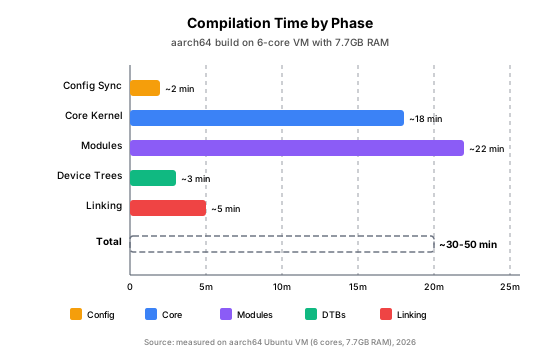
Kernel compilation is CPU-bound and I/O-bound. With 6 cores, our build took about 30 minutes. On a slower machine with 2 cores, expect 1–2 hours.
Install Build Dependencies
sudo apt update
sudo apt install -y build-essential libncurses-dev bison flex \
libelf-dev libssl-dev libdw-dev dwarves bc git| Package | Purpose |
|---|---|
build-essential |
GCC, make, and basic build tools |
libncurses-dev |
make menuconfig (text-based config UI) |
bison, flex |
Parser generators for Kconfig |
libelf-dev |
ELF binary format handling |
libssl-dev |
Crypto functions and module signing |
dwarves |
BTF (BPF Type Format) generation |
bc |
Calculator used in Kconfig scripts |
On x86, you may also need libpci-dev and libnuma-dev. On ARM64, the list above is sufficient.
Download the Kernel Source
# Option A: From kernel.org (tarball)
wget https://cdn.kernel.org/pub/linux/kernel/v7.x/linux-7.2.tar.xz
tar xf linux-7.2.tar.xz
cd linux-7.2

# Option B: From git
git clone https://git.kernel.org/pub/scm/linux/kernel/git/torvalds/linux.git
cd linux
git checkout v7.2
For this guide, I used the git method and checked out the v7.2 tag. The source tree was about 1.4 GB after checkout, and the build consumed an additional 28 GB.
How Do You Migrate Your Existing Kernel Config to 7.2.0?
The kernel ships thousands of configuration options. Re-selecting them manually is impractical. Instead, you start from your current running kernel's config and let the build system handle the differences.
Step 1: Copy the Current Config
cp /boot/config-$(uname -r) .configUbuntu stores the config of every installed kernel in /boot/config-<version>-generic. This file represents every CONFIG_* option that your current kernel was built with.
Step 2: Sync with olddefconfig
make ARCH=arm64 olddefconfigThis single command does three things:
-
Keeps existing options. Every option that was in your 6.8 config and still exists in 7.2 retains its value.
-
Sets defaults for new options. Kernel 7.2 introduces hundreds of new
CONFIG_*options that did not exist in 6.8.olddefconfigapplies each option's default value (defined in itsKconfigfile —=y,=m, or=n). -
Silently drops removed options. If a
CONFIG_*option was renamed or removed between 6.8 and 7.2, it is ignored. The stale entry remains in.configbut has no effect.
┌─────────────────────────────────────────────────────────────┐
│                olddefconfig Processing                       │
│                                                             │
│  6.8 .config ──────┐                                        │
│                    ├──▶ olddefconfig ──────▶ 7.2 .config    │
│  7.2 Kconfig ──────┘                        │               │
│                                             │               │
│  Result:                                    ▼               │
│  ┌─────────────────────────────────────────────────────┐   │
│  │ CONFIG_FUSE_FS=y          (kept from 6.8)            │   │
│  │ CONFIG_NEW_OPTION=m       (new in 7.2, default)      │   │
│  │ # CONFIG_REMOVED is not set (was in 6.8, gone in 7.2)│   │
│  └─────────────────────────────────────────────────────┘   │
└─────────────────────────────────────────────────────────────┘
Step 3: Customize Options (Optional)
If you need to change specific options — for example, to change FUSE from built-in to a module:
sed -i 's/^CONFIG_FUSE_FS=y/CONFIG_FUSE_FS=m/' .configOr use the interactive menu:
make ARCH=arm64 menuconfigNavigate to File Systems → FUSE (Filesystem in Userspace) support and press M to compile it as a module.
How to Compile the Kernel Step by Step?
The Compile Command
make ARCH=arm64 -j$(nproc) Image modules dtbs| Argument | Meaning |
|---|---|
ARCH=arm64 |
Target architecture (use x86_64 on Intel/AMD) |
-j$(nproc) |
Parallel jobs = number of CPU cores |
Image |
The kernel image (ARM64 uses Image; x86 uses bzImage) |
modules |
All loadable kernel modules |
dtbs |
Device tree blobs (ARM-specific; x86 does not need this) |
What Each Target Produces
Image: The compressed kernel binary atarch/arm64/boot/Image. On x86, this isarch/x86/boot/bzImage.modules: Hundreds of.ko(kernel object) files scattered across the source tree — device drivers, filesystems, network protocols.dtbs: Device tree blobs (*.dtb) atarch/arm64/boot/dts/. These describe the hardware layout to the kernel at boot.
Monitoring Progress
Compilation produces a flood of CC and LD lines. To reduce noise and log to a file:
make -C /path/to/linux ARCH=arm64 -j$(nproc) Image modules dtbs > kernel_build.log 2>&1Then watch with tail -f kernel_build.log.
How to Fix Common Build Errors?
Two errors trip up almost every first-time kernel builder on Ubuntu. Both stem from the same root cause: the kernel's build system expects infrastructure that Ubuntu provides for its own kernel packages but not for mainline builds.
Error 1: Missing Certificate File
make[3]: *** No rule to make target 'debian/canonical-certs.pem',
needed by 'certs/x509_certificate_list'.  Stop.
Cause: Your .config has CONFIG_SYSTEM_TRUSTED_KEYS="debian/canonical-certs.pem". This file is part of Ubuntu's kernel packaging — it signs the kernel image for Secure Boot. It does not exist in a mainline kernel source tree.
Fix: Clear the certificate-related options:
sed -i 's/^CONFIG_SYSTEM_TRUSTED_KEYS=.*/CONFIG_SYSTEM_TRUSTED_KEYS=""/' .config
sed -i 's/^CONFIG_SYSTEM_REVOCATION_KEYS=.*/CONFIG_SYSTEM_REVOCATION_KEYS=""/' .config
sed -i 's/^CONFIG_MODULE_SIG_KEY=.*/CONFIG_MODULE_SIG_KEY=""/' .config
Then re-run make olddefconfig and restart the build.
Error 2: Module Signing SSL Failure
At main.c:140:
- SSL error:1E08010C:DECODER routines::unsupported: ../crypto/encode_decode/decoder_lib.c:101
sign-file: ./
make[2]: *** [scripts/Makefile.modinst:125: /lib/modules/7.2.0+/kernel/.../module.ko] Error 1
Cause: CONFIG_MODULE_SIG_ALL=y tells the build system to sign every module during modules_install. But the signing key (CONFIG_MODULE_SIG_KEY) now points to an empty path, causing the sign-file tool to fail with an SSL error.
Fix: Disable module signing entirely:
sed -i 's/^CONFIG_MODULE_SIG=y/# CONFIG_MODULE_SIG is not set/' .config
sed -i 's/^CONFIG_MODULE_SIG_ALL=y/# CONFIG_MODULE_SIG_ALL is not set/' .config
Then rebuild the modules (or the whole kernel if you already started):
make ARCH=arm64 -j$(nproc) modulesBoth errors share the same root cause: Ubuntu's kernel packages use a private PKI (Public Key Infrastructure) for signing. The debian/canonical-certs.pem file and the module signing keys are part of Ubuntu's build environment, not the upstream kernel. When you compile mainline, you are outside that infrastructure. The cleanest fix is to disable signing entirely — unless you are building for production with Secure Boot, unsigned kernels and modules work perfectly.
How Does the Linux Boot Chain Work?
Before installing the new kernel, it helps to understand the full boot chain. This is not abstract theory — it directly determines what make install does and how you recover if something goes wrong.
The Boot Chain at a Glance
┌─────────────────────────────────────────────────────────────────────────────┐
│                          UEFI Firmware                                       │
│                                                                              │
│  ┌────────────────────────────────────────────────────────────────────────┐ │
│  │  EFI System Partition (ESP) — usually /dev/sda1, mounted at /boot/efi │ │
│  │  └── /EFI/ubuntu/grubaa64.efi   (GRUB bootloader binary)              │ │
│  └────────────────────────────────────────────────────────────────────────┘ │
│                                    │                                         │
│                                    ▼                                         │
│  ┌────────────────────────────────────────────────────────────────────────┐ │
│  │  GRUB Bootloader                                                       │ │
│  │  ├── Reads /boot/grub/grub.cfg for menu entries                        │ │
│  │  ├── Displays menu (waits GRUB_TIMEOUT seconds)                        │ │
│  │  ├── Loads vmlinuz-7.2.0 into memory                                   │ │
│  │  └── Loads initrd.img-7.2.0 into memory                                │ │
│  └────────────────────────────────────────────────────────────────────────┘ │
│                                    │                                         │
│                                    ▼                                         │
│  ┌────────────────────────────────────────────────────────────────────────┐ │
│  │  initramfs (Initial RAM Filesystem)                                    │ │
│  │  ├── A minimal root filesystem (cpio archive compressed with gzip)     │ │
│  │  ├── Contains critical drivers: ext4, LVM, NVMe, RAID, dm-crypt        │ │
│  │  ├── /init script runs                                                 │ │
│  │  ├── Loads needed modules → finds the real root partition              │ │
│  │  └── switch_root: pivots to the real root filesystem                   │ │
│  └────────────────────────────────────────────────────────────────────────┘ │
│                                    │                                         │
│                                    ▼                                         │
│  ┌────────────────────────────────────────────────────────────────────────┐ │
│  │  Linux Kernel (vmlinuz-7.2.0)                                          │ │
│  │  ├── Initializes hardware, memory management, scheduler                │ │
│  │  ├── Loads built-in drivers (CONFIG_*=y options)                       │ │
│  │  ├── Loads loadable modules from /lib/modules/7.2.0+/                  │ │
│  │  │    └── fuse.ko (the module we compiled)                             │ │
│  │  └── Starts /sbin/init (systemd) → userspace                           │ │
│  └────────────────────────────────────────────────────────────────────────┘ │
└─────────────────────────────────────────────────────────────────────────────┘
The /boot Directory Structure
After installation, /boot contains:
/boot/
├── vmlinuz-7.2.0+              # Compressed kernel image (65 MB)
├── initrd.img-7.2.0+           # initramfs image (865 MB on our system)
├── System.map-7.2.0+           # Kernel symbol table (for debugging)
├── config-7.2.0+               # Copy of the .config used to build
├── grub/
│   ├── grub.cfg                # Auto-generated boot menu
│   ├── fonts/                  # GRUB display fonts
│   ├── grubenv                 # GRUB environment variables
│   └── x86_64-efi/ or arm64-efi/  # GRUB architecture modules
├── vmlinuz-6.8.0-87-generic    # Old kernel (kept for rollback)
└── initrd.img-6.8.0-87-generic # Old initramfs
GRUB Configuration Deep Dive
GRUB has two configuration layers:
Layer 1: /etc/default/grub — User settings
GRUB_DEFAULT=0                  # Which menu entry to boot by default
GRUB_TIMEOUT=10                 # Seconds to wait before booting default
GRUB_TIMEOUT_STYLE=menu         # Show menu (use "hidden" to skip)
GRUB_CMDLINE_LINUX=""           # Extra parameters passed to the kernel
GRUB_CMDLINE_LINUX_DEFAULT="" # Default kernel parameters| Setting | Effect |
|---|---|
GRUB_DEFAULT=0 |
Boot the first menu entry (index 0) |
GRUB_DEFAULT=1>2 |
Boot the third entry under "Advanced options" (submenu index 1, entry 2) |
GRUB_TIMEOUT=0 |
Boot immediately (no menu shown unless Shift is held) |
GRUB_TIMEOUT=-1 |
Wait indefinitely for user selection |
Layer 2: /boot/grub/grub.cfg — Auto-generated menu
update-grub reads /etc/default/grub, scans /boot for kernels, and generates grub.cfg. A typical entry looks like:
menuentry 'Ubuntu, with Linux 7.2.0+' --class ubuntu --class gnu-linux --class gnu --class os {
    recordfail
    load_video
    gfxmode $linux_gfx_mode
    insmod gzio
    insmod part_gpt
    insmod ext2
    set root='hd0,gpt2'
    search --no-floppy --fs-uuid --set=root a1b2c3d4-e5f6-7890-abcd-ef1234567890
    linux   /vmlinuz-7.2.0+ root=/dev/mapper/ubuntu--vg-ubuntu--lv ro
    initrd  /initrd.img-7.2.0+
}
How update-grub works internally:
- Reads
/etc/default/grubfor settings - Runs scripts in
/etc/grub.d/in order:00_header— sets up GRUB defaults, timeout, colors10_linux— scans/bootfor vmlinuz-* and generates menu entries30_os-prober— detects other operating systems (disabled by default in Ubuntu)40_custom— user-defined entries
- Writes the combined output to
/boot/grub/grub.cfg
Boot priority rules:
- Menu entries are sorted by kernel version, newest first
GRUB_DEFAULT=0selects the first entry (newest kernel)- The "Advanced options" submenu contains recovery-mode entries for each kernel
- If the default kernel fails to boot three times, GRUB automatically falls back to the previous one (via
recordfailmechanism)
initramfs: The Bridge to Your Root Filesystem
Why does the kernel need a temporary root filesystem?
Consider a typical Ubuntu setup: the root filesystem lives on an LVM logical volume on an NVMe SSD. The drivers for NVMe and LVM can be compiled as modules (=m). But if they are modules, the kernel cannot mount the root partition to load them — a chicken-and-egg problem.
initramfs solves this by providing a minimal root filesystem in memory, loaded by GRUB alongside the kernel.
What is inside initramfs?
/init                        # First userspace program (usually a shell script)
/lib/modules/7.2.0+/         # Critical .ko modules
│   ├── fs/ext4/ext4.ko
│   ├── drivers/nvme/host/nvme.ko
│   ├── drivers/md/dm-mod.ko
│   └── ...
/usr/sbin/                   # Tools: lvm, cryptsetup, mount, fsck
/etc/lvm/                    # LVM configuration
/dev/                        # Device nodes (created by udev)
/proc/, /sys/                # Kernel virtual filesystems
The initramfs boot sequence:
1. GRUB loads vmlinuz + initrd into memory
2. Kernel decompresses initrd → mounts it as temporary root (ramfs)
3. Kernel executes /init
4. /init loads essential modules (NVMe, ext4, LVM, dm-crypt...)
5. /init finds the real root partition (by UUID or label)
6. /init mounts the real root at /new_root
7. /init runs switch_root: replaces the temporary root with the real one
8. /init executes /sbin/init (systemd) on the real root
9. systemd takes over: starts services, mounts filesystems, presents login
How mkinitramfs builds the image:
- Reads
/etc/initramfs-tools/modulesfor extra modules to include - Scans the current system's loaded modules and their dependencies
- Copies the required
.kofiles into a temporary directory - Creates the
/initscript (from/etc/initramfs-tools/init) - Packages everything into a cpio archive
- Compresses with gzip
- Writes to
/boot/initrd.img-7.2.0+
The make install Pipeline on Debian/Ubuntu
On Debian-based systems, make install is more than a file copy. It triggers a chain of hooks:
sudo make install
    │
    ├── scripts/install.sh is invoked
    │       │
    │       ├── Locates /sbin/installkernel (provided by the `base-files` package)
    │       └── Executes: installkernel <version> <image> <System.map> <target-dir>
    │               │
    │               ├── Copies Image → /boot/vmlinuz-7.2.0+
    │               ├── Copies System.map → /boot/System.map-7.2.0+
    │               ├── Copies .config → /boot/config-7.2.0+
    │               └── Runs /etc/kernel/postinst.d/* (hook scripts)
    │                       │
    │                       ├── initramfs-tools
    │                       │       └── mkinitramfs -o /boot/initrd.img-7.2.0+ 7.2.0+
    │                       ├── zz-update-grub
    │                       │       └── update-grub (regenerates grub.cfg)
    │                       ├── xx-update-initrd-links
    │                       │       └── Updates /vmlinuz and /initrd.img symlinks
    │                       └── unattended-upgrades, update-notifier...
    │
    └── Done. New kernel is installed and bootable.
This is why make install on Ubuntu is a one-shot operation — it handles everything that would otherwise require 4–5 manual steps.
How to Install the Compiled Kernel?
Step 1: Install Modules
sudo make ARCH=arm64 modules_installThis copies all .ko files to /lib/modules/7.2.0+/ and runs depmod to generate module dependency maps.
Step 2: Configure GRUB for Safety
Before installing the new kernel, modify GRUB so you can fall back to the old one if something goes wrong:
sudo sed -i 's/^GRUB_TIMEOUT=0/GRUB_TIMEOUT=10/' /etc/default/grub
sudo sed -i 's/^GRUB_TIMEOUT_STYLE=hidden/GRUB_TIMEOUT_STYLE=menu/' /etc/default/grub
sudo update-grub
This makes GRUB display a menu for 10 seconds at boot, letting you choose the old kernel.
Step 3: Install the Kernel
sudo make ARCH=arm64 installAs explained above, this copies the kernel image, generates initramfs, and updates GRUB — all in one step.
Step 4: Verify Installation
ls -lh /boot/vmlinuz-7.2.0+ /boot/initrd.img-7.2.0+
ls /lib/modules/7.2.0+/kernel/fs/fuse/
How to Verify and Rollback?
Reboot
sudo rebootAt the GRUB menu, the new kernel (7.2.0+) is selected by default. Wait 10 seconds or press Enter to boot it. If something goes wrong, select "Advanced options for Ubuntu" → "Ubuntu, with Linux 6.8.0-87-generic".
Verify the New Kernel
# Check running kernel version
uname -r
# Expected: 7.2.0+

# Check FUSE module is loaded
lsmod | grep fuse
# Expected: fuse module listed

# Test loading the module manually
sudo modprobe fuse
lsmod | grep fuse
After rebooting, uname -r returned 7.2.0+ and lsmod | grep fuse showed the module already loaded with 5 active users. The system was fully operational.
Full Rollback Procedure
If the new kernel fails to boot or causes issues:
- At the GRUB menu: Select "Advanced options for Ubuntu" → "Ubuntu, with Linux 6.8.0-87-generic"
- After booting the old kernel, remove the new one:
sudo rm /boot/vmlinuz-7.2.0+
sudo rm /boot/initrd.img-7.2.0+
sudo rm /boot/System.map-7.2.0+
sudo rm /boot/config-7.2.0+
sudo rm -rf /lib/modules/7.2.0+

# Restore GRUB to hidden, no-timeout style
sudo sed -i 's/^GRUB_TIMEOUT=10/GRUB_TIMEOUT=0/' /etc/default/grub
sudo sed -i 's/^GRUB_TIMEOUT_STYLE=menu/GRUB_TIMEOUT_STYLE=hidden/' /etc/default/grub
sudo update-grub
Frequently Asked Questions
How long does it take to compile kernel 7.2.0?
On our aarch64 VM (6 cores, 7.7 GB RAM), the full build took approximately 30 minutes. On an x86 machine with 8+ cores and NVMe SSD, expect 15–25 minutes. On a constrained system (2 cores, 4 GB RAM), it can take 1–2 hours. The modules phase is the longest because there are thousands of individual .ko files to compile.
Can I compile a newer kernel on an older Ubuntu version?
Yes. The kernel is self-contained — it brings its own toolchain requirements. Ubuntu 22.04 (Jammy) can compile kernel 7.2 as long as you have GCC and the build dependencies installed. The only limitation is if the kernel requires a newer compiler than what your distribution provides; in that case, you can install a newer GCC from a PPA or build it from source.
What is the difference between make install and manual copying?
Manual copying (cp arch/arm64/boot/Image /boot/vmlinuz-...) only places the kernel image in /boot. You would then need to:
- Generate initramfs with
mkinitramfs - Update GRUB with
update-grub - Copy System.map and .config manually
make install does all of this automatically via Debian's /etc/kernel/postinst.d/ hooks. It is the recommended approach on Debian/Ubuntu.
Do I need to disable Secure Boot?
If Secure Boot is enabled in your UEFI firmware, the kernel must be signed with a trusted key. For a home lab or development VM, you can either:
- Disable Secure Boot in UEFI settings (simplest)
- Sign the kernel with your own key and enroll it in the MOK (Machine Owner Key) database
For most development purposes, disabling Secure Boot is the pragmatic choice.
How much disk space do I need?
| Component | Size |
|---|---|
| Kernel source tree | ~1.5 GB |
| Build artifacts (object files, etc.) | ~25–35 GB |
| Installed kernel (vmlinuz + initrd) | ~900 MB |
| Installed modules | ~2–3 GB |
| Total recommended free space | 50 GB |
What happens if the new kernel fails to boot?
GRUB's recordfail mechanism detects boot failures. If a kernel fails to boot three times in a row, GRUB automatically falls back to the previous kernel on the next boot. You can also manually select the old kernel from the GRUB menu at any time.
Sources
- Linux Kernel Organization, "Linux 7.2 released," 2026, https://kernel.org
- Ubuntu Kernel Team, "BuildYourOwnKernel," https://wiki.ubuntu.com/Kernel/BuildYourOwnKernel
- Kernel Kbuild documentation,
Documentation/kbuild/makefiles.rst - Debian Wiki, "initramfs," https://wiki.debian.org/initramfs
- GNU GRUB Manual, https://www.gnu.org/software/grub/manual/