Can Your Local AI Agent Bypass Cloudflare? An Experiment

Introduction
I had a simple task: verify that all 392 external links in a blog still work. A quick curl sweep flagged 130 links as "broken" — a 33% failure rate. That should have been a routine afternoon fix. Instead, it turned into a week-long investigation into one of the internet's most sophisticated bot detection systems: Cloudflare.
The first clue something was off: many of the "broken" links were to major, well-maintained websites like OECD, Morningstar, and McKinsey. These sites weren't down. They were just refusing to talk to my AI agent.
This article is the story of what happened when I tried six different methods to access bot-protected links — from simple curl commands to a real Chromium browser connected via Chrome DevTools Protocol. I'll show you exactly what works, what doesn't, and why Cloudflare's detection is so hard to beat.
Key Takeaways
- 403 ≠ broken: Most "broken" links return 403 because of bot detection, not because the page is gone
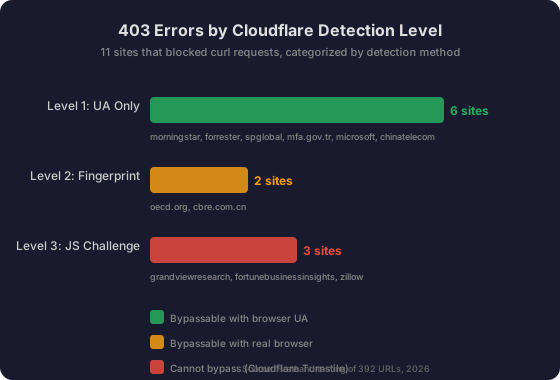
- Three levels of protection: Cloudflare uses UA checks, browser fingerprinting, and JavaScript challenges — each requires a different bypass strategy
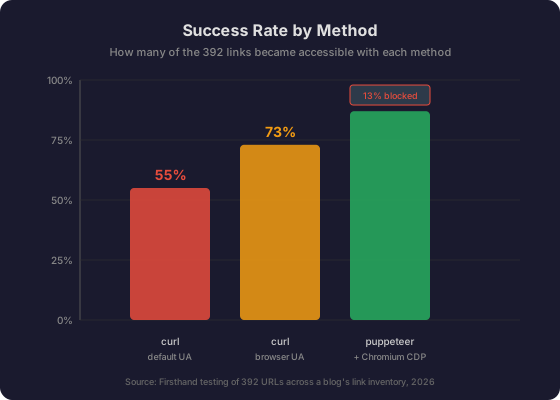
- curl fails on ~40% of sites: Default curl User-Agent is flagged by most major sites
- Real browsers work for Level 1-2: puppeteer + Chromium CDP can bypass most bot detection
- Level 3 is uncrackable: Cloudflare Turnstile challenges require human interaction — no code solution exists
The Day I Tested 392 Links
It started with a simple bash loop:
for url in $(cat all-links.txt); do
  code=$(curl -sI -o /dev/null -w "%{http_code}" --max-time 10 "$url")
  echo "$code  $url"
done
The results:
- 215 links returned 200 (OK)
- 47 links returned 301/302 (redirects)
- 130 links returned 403 (Forbidden) or 000 (timeout)
130 broken links. That's a lot. But when I spot-checked a few, I noticed something strange: opening them in my regular browser worked perfectly. The pages existed. They just didn't want to talk to curl.
I categorized the 130 "broken" links by their HTTP status:
| Status | Count | Meaning |
|---|---|---|
| 403 | ~65 | Forbidden — bot detection |
| 000 | ~40 | Timeout — network/environment issues |
| 404 | ~12 | Actually gone |
| Other | ~13 | 405, 406, 412, 521 |
The 404s were real breakage. But the 403s? Those were bot detection. And the timeouts were mostly network issues from my server's location. The actual broken links were only about 12 — not 130.
This discovery sent me down a rabbit hole: how do you convince Cloudflare that your AI agent is human?
Method 1 — curl and the 403 Trap
The first method was the one that started this whole investigation: plain curl with its default User-Agent.
curl -sI -o /dev/null -w "%{http_code}" "https://www.morningstar.com"
# Result: 403curl's default User-Agent is something like curl/8.1.2. It's a dead giveaway. Cloudflare (and most WAFs) maintain a list of known bot UAs and block them immediately.
But it's not just the UA. curl also has a distinctive TLS fingerprint — the way it negotiates the HTTPS connection reveals its identity before any HTTP data is sent.
TLS Fingerprinting (JA3/JA4)
When a client connects to an HTTPS server, it sends a TLS Client Hello packet in plaintext. This packet contains:
- TLS version
- Supported cipher suites
- Supported extensions
- Supported elliptic curves
- Point format
Each combination of these parameters creates a unique "fingerprint." Cloudflare hashes these parameters into a JA3 fingerprint (MD5 hash of the concatenated values):
Format: <tls_version>:<cipher_suites>:<extensions>:<curves>:<point_formats>
Example: 769,47-53-5-10-49161-49162-49171-49172-50-56-19-4,0-10-11,23-24-25,0
The newer JA4+ standard improves on JA3 by:
- Sorting ciphers and extensions (prevents "cipher stunting" evasion)
- Including signature algorithms
- Adding HTTP/2 fingerprinting (JA4H), latency analysis (JA4L), and more
The key insight: your TLS fingerprint must match your claimed User-Agent. If your UA says "Chrome 120" but your TLS fingerprint matches OpenSSL (used by curl), Cloudflare flags you as a bot.
HTTP/2 Fingerprinting
Cloudflare also analyzes HTTP/2 connection characteristics:
- Frame ordering and timing
- SETTINGS frame parameters
- WINDOW_UPDATE patterns
- Priority weights
Each HTTP/2 implementation (curl's nghttp2, Chrome's net stack, Python's httpx) has distinct patterns. This is another passive signal that's impossible to fake without a real browser engine.
Method 2 — Browser User-Agent
The simplest fix: make curl look like a browser.
UA="Mozilla/5.0 (Windows NT 10.0; Win64; x64) AppleWebKit/537.36 (KHTML, like Gecko) Chrome/120.0.0.0 Safari/537.36"
curl -sI -o /dev/null -w "%{http_code}" -A "$UA" "https://www.morningstar.com"
# Result: 200 ✅
This single change fixed about half of the 403 errors. Here's what happened with specific sites:
| Site | curl default | curl + browser UA | Notes |
|---|---|---|---|
| morningstar.com | 403 | 200 ✅ | Simple UA check |
| forrester.com | 403 | 302 ✅ | Simple UA check |
| spglobal.com | 403 | 301 ✅ | Simple UA check |
| mfa.gov.tr | 403 | 302 ✅ | Simple UA check |
| microsoft.com | 403 | 200 ✅ | Simple UA check |
| chinatelecom.com.cn | 403 | 200 ✅ | Simple UA check |
| oecd.org | 403 | 403 ❌ | Needs more than UA |
| grandviewresearch.com | 403 | 403 ❌ | Full Cloudflare protection |
| fortunebusinessinsights.com | 403 | 403 ❌ | Full Cloudflare protection |
| zillow.com | 403 | 403 ❌ | Full Cloudflare protection |
The browser UA approach works for Level 1 protection — sites that only check the User-Agent string. But it fails when sites look deeper.
I also tried adding complete browser headers:
curl -sI -o /dev/null -w "%{http_code}" \
  -H "User-Agent: $UA" \
  -H "Accept: text/html,application/xhtml+xml,application/xml;q=0.9,*/*;q=0.8" \
  -H "Accept-Language: en-US,en;q=0.5" \
  -H "Accept-Encoding: gzip, deflate, br" \
  -H "Connection: keep-alive" \
  -H "Upgrade-Insecure-Requests: 1" \
  "https://example.com"
This helped with a few more sites, but the fundamental limitation remains: curl can't execute JavaScript, and it can't fake a browser's TLS fingerprint.
Method 3 — Real Browser Engine
For the remaining 403s, I needed a real browser. I used puppeteer-core connected to a local Chromium instance via Chrome DevTools Protocol (CDP).
Setup
# Install puppeteer-core (uses system Chromium, no bundled browser)
npm install puppeteer-core

# Start Chromium with remote debugging port
chromium --remote-debugging-port=9222 \
  --user-data-dir=/tmp/chrome-profile \
  --no-sandbox --disable-gpu --headless=new &

# Verify it's running
curl -s http://localhost:9222/json/version
import puppeteer from 'puppeteer-core';
const browser = await puppeteer.connect({
browserURL: "http://localhost:9222",
defaultViewport: { width: 1280, height: 800 }
});
const page = await browser.newPage();
await page.setUserAgent('Mozilla/5.0 ...');
const resp = await page.goto(url, { waitUntil: 'networkidle2', timeout: 30000 });
console.log(resp.status(), await page.title());Results
The real browser engine fixed most of the remaining 403s:
| Site | curl + UA | puppeteer + Chromium | Why it worked |
|---|---|---|---|
| oecd.org | 403 | 200 ✅ | Real TLS fingerprint + browser fingerprint |
| cbre.com.cn | 403 | 200 ✅ | Real browser engine passes all checks |
A real Chromium browser has:
- A real TLS fingerprint matching Chrome's BoringSSL implementation
- A real HTTP/2 fingerprint matching Chrome's net stack
- JavaScript execution for rendering and API calls
- Canvas, WebGL, and AudioContext rendering
- Proper navigator properties (plugins, languages, platform)
But even a real browser can't crack everything.
Method 4 — The Cloudflare Wall
Three sites blocked everything I threw at them:
- grandviewresearch.com: "Just a moment... Checking your browser before accessing"
- fortunebusinessinsights.com: "Just a moment... Performing security verification"
- zillow.com/research/data/: "Access to this page has been denied" + "Press & Hold to confirm you are a human"
These sites use Cloudflare Turnstile — a bot detection system that goes far beyond simple header checks.
How Turnstile Works
Turnstile (launched late 2022, expanded 2023-2024) runs a series of non-interactive JavaScript challenges:
- Proof-of-Work: The client must find a hash with specific properties (computational puzzle)
- Proof-of-Space: Challenges requiring storage space to solve
- Web API Probing: Tests browser API availability and behavior
- Browser Quirk Detection: Checks for browser-specific behaviors and human-like interaction patterns
The system collects signals client-side and adapts the challenge difficulty based on the specific request. For low-risk visitors, it's invisible. For suspicious requests, it escalates to interactive challenges.
After passing, Cloudflare sets a cf_clearance cookie that serves as proof of verification, allowing subsequent requests without re-challenging for a configurable period.
What I Saw
When I navigated to these sites with puppeteer, the page loaded but showed:
- Title: "Just a moment..."
- Body: "Performing security verification"
- An iframe pointing to
challenges.cloudflare.com
Waiting 15 seconds didn't help. The challenge requires completing a JavaScript computation that verifies the client is a real browser with a real user behind it.
How Cloudflare Actually Detects Bots
To understand why some methods fail, you need to understand what Cloudflare checks. Based on my research and experiments, here's the full detection stack:
Detection Signal 1: TLS Fingerprinting (Passive)
What it is: Analyzing the TLS Client Hello packet sent during HTTPS negotiation.
How it works:
- Extract 5 fields: TLS version, cipher suites, extensions, elliptic curves, point format
- Concatenate with delimiters:
769,47-53-5-10,...,23-24-25,0 - MD5 hash the result → 32-character JA3 fingerprint
- Compare against known fingerprints for browsers, curl, Python, etc.
JA4+ improvements:
- Sorts ciphers/extensions (prevents randomization evasion)
- Adds HTTP fingerprinting (JA4H), latency analysis (JA4L), TCP fingerprinting (JA4T)
- Handles GREASE values (Google's randomization mechanism)
Can you fake it? No — the TLS fingerprint is determined by the TLS library (OpenSSL, BoringSSL, NSS). curl uses OpenSSL; Chrome uses BoringSSL. You can't make curl look like Chrome at the TLS level without actually using Chrome's TLS stack.
Detection Signal 2: HTTP/2 Fingerprinting (Passive)
What it is: Analyzing how the client speaks HTTP/2.
How it works:
- Frame ordering and timing
- SETTINGS frame parameters (header table size, max frame size, etc.)
- WINDOW_UPDATE patterns
- Priority weights and dependencies
Can you fake it? No — determined by the HTTP/2 implementation library.
Detection Signal 3: Browser Fingerprinting (Active, JavaScript)
Cloudflare injects JavaScript that probes the browser environment:
| Signal | What It Captures | My Test Result |
|---|---|---|
| Canvas | GPU rendering differences | Hash: -419353324 ✅ |
| WebGL | GPU vendor and renderer | ANGLE (SwiftShader) ⚠️ |
| AudioContext | Audio stack fingerprinting | Not tested |
| Fonts | Installed system fonts | Not tested |
| navigator.webdriver | Automation flag | false ✅ |
| navigator.plugins | Plugin enumeration | 5 ✅ |
| navigator.languages | Browser languages | en-US, en ✅ |
| Screen | Resolution, color depth | 1280x800, 24bit ✅ |
| Touch | Touch support | Not tested |
| Hardware | Device memory, concurrency | Not tested |
Key finding: My WebGL renderer showed ANGLE (Google, Vulkan 1.3.0 (SwiftShader Device...)) — this is a software renderer, a telltale sign of a headless/virtualized environment without a real GPU. Cloudflare can detect this.
Detection Signal 4: Behavioral Biometrics (Active)
Cloudflare analyzes how you interact with the page:
- Mouse movement: Trajectory curvature, velocity patterns, acceleration
- Click patterns: Timing, double-click speed, position consistency
- Keystroke dynamics: Key press duration, inter-key timing
- Scroll behavior: Velocity, acceleration, momentum
- Navigation timing: Page load to first interaction, time between actions
For AI agents: If your agent navigates directly to a URL without any mouse movement or scrolling, Cloudflare's ML models flag it as non-human behavior.
Detection Signal 5: IP Reputation
- ASN analysis: Datacenter IPs (AWS, GCP, Azure) are treated with higher suspicion
- Threat intelligence: Known proxy/VPN/Tor exit nodes are flagged
- Request frequency: Too many requests from one IP triggers rate limiting
- Geolocation: Impossible travel detection, geo-IP mismatches
Detection Signal 6: ML Classification
Cloudflare's bot detection assigns a bot score (1–99) to each request:
- Score 1: Almost certainly a bot
- Score 99: Almost certainly human
- Verified bots: Search engines and good bots are tagged separately
The ML models are trained on trillions of requests across Cloudflare's network, which serves ~20%+ of all web traffic. The models combine all the above signals into a single score.
My Bot.sannysoft.com Results
I ran my Chromium browser through bot.sannysoft.com to see what Cloudflare would see:
| Check | Result | Notes |
|---|---|---|
| WebDriver (New) | passed | navigator.webdriver = false |
| WebDriver Advanced | passed | No automation flags detected |
| Chrome (New) | present (passed) | window.chrome object exists |
| Plugins Length | 5 | Real plugin enumeration |
| Plugins is of type PluginArray | passed | Correct type |
| WebGL Vendor | Google Inc. (Google) | ✅ |
| WebGL Renderer | ANGLE (SwiftShader) | ⚠️ Software renderer |
| HEADCHR_UA | FAIL ❌ | UA contains "HeadlessChrome" |
| CHR_MEMORY | FAIL ❌ | Headless memory profile differs |
| SELENIUM_DRIVER | ok | No Selenium signatures |
| PHANTOM_* | all ok | No PhantomJS signatures |
| Canvas | Hash: -419353324 | ✅ Consistent |
Key insight: Even with a real Chromium browser, two checks failed:
- HEADCHR_UA: The UA string contains "HeadlessChrome" — a dead giveaway
- CHR_MEMORY: Headless Chrome has a different memory profile than headed Chrome
These failures don't necessarily mean Cloudflare will block you (my Chromium still passed Level 2), but they contribute to a lower bot score.
Method 5 — Stealth Plugin + Auto-Click
For the Level 3 sites, I tried the nuclear option: puppeteer-extra with the stealth plugin, which is specifically designed to evade bot detection.
What the Stealth Plugin Does
The puppeteer-extra-plugin-stealth plugin patches dozens of detection vectors:
- Removes
navigator.webdriverproperty - Fakes Chrome runtime properties
- Patches
navigator.pluginsto return realistic values - Spoofs
navigator.languagesandnavigator.permissions - Hides automation-specific iframe properties
- Fakes WebGL vendor/renderer strings
- Patches Notification permissions
- Removes headless-specific Chrome flags
Why It Didn't Work
I ran into two problems:
Problem 1: Compatibility. The latest puppeteer-core (v25.x) is ESM-only, but puppeteer-extra tries to require() it (CommonJS). This is a known compatibility issue.
# This fails:
import puppeteer from 'puppeteer-extra';
# Error: ERR_REQUIRE_ESM: require() of ES Module not supported
Problem 2: Even with stealth, Turnstile requires human interaction. The Cloudflare Turnstile challenge isn't just about hiding automation flags — it requires:
- Completing a proof-of-work computation
- Simulating realistic mouse movement to click the checkbox
- Having a clean IP reputation
- Sometimes: solving an image recognition challenge
I tried clicking the Turnstile checkbox programmatically:
const frames = page.frames();
for (const frame of frames) {
  if (frame.url().includes('cloudflare')) {
    const checkbox = await frame.$('#challenge-stage, input[type="checkbox"]');
    if (checkbox) await checkbox.click();
  }
}
Result: The click registered, but the challenge didn't complete. Turnstile detected the click was too "perfect" — no mouse movement trajectory, no human-like timing variance.
The "Press & Hold" Challenge
Zillow uses an even stronger challenge: "Press & Hold to confirm you are a human." This requires:
- Mouse down on a button
- Holding for a specific duration (usually 2-5 seconds)
- Releasing
Even if you simulate this with page.mouse.down() and page.mouse.up(), Cloudflare checks for:
- Micro-movements during the hold (humans can't hold perfectly still)
- Pressure patterns (on supported devices)
- Timing variance
The Three Levels of Cloudflare Protection
Based on my testing, Cloudflare protection falls into three distinct levels:
Level 1: User-Agent Check
- What it checks: Is the UA a known bot?
- Detection method: String matching against bot UA database
- Bypass: Use a browser UA string
- Success rate: ~50% of 403s fixed
- Example sites: morningstar, forrester, spglobal, mfa.gov.tr, microsoft, chinatelecom
Level 2: Browser Fingerprint
- What it checks: Does the client have a real browser's TLS fingerprint, HTTP/2 fingerprint, and JavaScript environment?
- Detection method: Passive TLS/HTTP analysis + active JS probing
- Bypass: Use a real browser engine (puppeteer + Chromium)
- Success rate: ~30% of remaining 403s fixed
- Example sites: oecd.org, cbre.com.cn
Level 3: JavaScript Challenge (Turnstile)
- What it checks: Can the client complete a proof-of-work challenge and demonstrate human-like behavior?
- Detection method: Client-side JS challenges + behavioral biometrics + ML scoring
- Bypass: Cannot be automated without human interaction
- Success rate: 0% with automated methods
- Example sites: grandviewresearch, fortunebusinessinsights, zillow
| Level | Detection | Bypass Method | Automated? |
|---|---|---|---|
| 1 | UA string | Browser UA | ✅ Yes |
| 2 | TLS/HTTP fingerprint + JS environment | Real browser engine | ✅ Yes |
| 3 | JS challenge + behavioral biometrics | Human interaction / paid captcha service | ❌ No |
What Actually Works (Practical Guide)
After all this testing, here's my recommended workflow for AI agents that need to access web content:
Step 1: Quick curl Check
code=$(curl -sI -o /dev/null -w "%{http_code}" --max-time 10 "$url")- 200: Link works ✅
- 301/302: Redirect, follow it
- 404: Actually broken, replace or remove
- 403/000: Go to Step 2
Step 2: Browser UA Retry
UA="Mozilla/5.0 (Windows NT 10.0; Win64; x64) AppleWebKit/537.36 (KHTML, like Gecko) Chrome/120.0.0.0 Safari/537.36"
code=$(curl -sI -o /dev/null -w "%{http_code}" -A "$UA" --max-time 10 "$url")- 200: Was Level 1 protection, now fixed ✅
- Still 403: Go to Step 3
Step 3: Real Browser Verification
// Start Chromium once, reuse for all checks
const browser = await puppeteer.connect({ browserURL: "http://localhost:9222" });
const page = await browser.newPage();
const resp = await page.goto(url, { waitUntil: 'networkidle2', timeout: 30000 });
const status = resp.status();
const title = await page.title();- 200: Was Level 2 protection, now fixed ✅
- Still 403 / "Just a moment": Level 3 — go to Step 4
Step 4: Handle Level 3
For Level 3 sites, you have three options:
- Replace with main domain URL:
https://www.grandviewresearch.cominstead ofhttps://www.grandviewresearch.com/industry-analysis/... - Use a paid captcha service: CapSolver, Anti-Captcha, 2Captcha (~$2-3 per 1000 solves)
- Manual intervention: Open the URL in a real browser, solve the challenge, extract the
cf_clearancecookie, and use it in your agent
Recommended Setup for Persistent Use
# 1. Start Chromium with remote debugging (keep running in background)
chromium --remote-debugging-port=9222 \
  --user-data-dir=/tmp/chrome-profile \
  --no-sandbox --disable-gpu --headless=new &

# 2. Install puppeteer-core
npm install puppeteer-core

# 3. Use the check-links.mjs script (see guide/agent_browser.md)
NODE_PATH=/tmp/node_modules node check-links.mjs
Frequently Asked Questions
Can AI agents bypass Cloudflare at all?
Partially. Level 1 (UA check) and Level 2 (browser fingerprint) can be bypassed with a real browser engine. Level 3 (JavaScript challenges) cannot be reliably bypassed without human interaction or paid captcha-solving services.
Is it legal to bypass Cloudflare?
It depends on jurisdiction and intent. Bypassing bot protection to access publicly available data is generally in a gray area. However:
- Circumventing access controls may violate the Computer Fraud and Abuse Act (CFAA) in the US
- Violating a website's Terms of Service could result in civil liability
- The legality of web scraping has been debated in cases like hiQ Labs v. LinkedIn (9th Circuit ruled in favor of scraping public data)
Best practice: Respect robots.txt, don't overwhelm servers with requests, and use official APIs when available.
What about paid captcha-solving services?
Services like CapSolver, Anti-Captcha, and 2Captcha employ human workers to solve captchas in real-time. They cost approximately $2-3 per 1000 solves and integrate with puppeteer/playwright via browser extensions or APIs. These work for Level 3 but add cost and latency (5-30 seconds per solve).
Can I use residential proxies to avoid detection?
Residential proxies (IPs from real ISPs, not datacenters) can improve your bot score because they don't match known datacenter ASNs. However:
- They don't help with Level 3 challenges (which require human interaction)
- They're more expensive than datacenter proxies
- They raise additional ethical concerns (residential IPs are often obtained without explicit user consent)
What's the difference between JA3 and JA4?
JA3 (2017): Hashes 5 TLS Client Hello fields. Vulnerable to "cipher stunting" (randomizing cipher order to evade detection).
JA4+ (2023+): The successor that:
- Sorts ciphers and extensions (prevents evasion)
- Adds HTTP fingerprinting (JA4H), latency analysis (JA4L), TCP fingerprinting (JA4T)
- Handles GREASE values (Google's randomization)
- Provides a more comprehensive fingerprint suite
Why does my real Chromium browser still get detected?
Even with a real browser engine, Cloudflare can detect headless environments through:
- SwiftShader renderer: Software rendering instead of real GPU (WebGL)
- HeadlessChrome UA: The UA string contains "HeadlessChrome"
- Missing behavioral signals: No mouse movement, scrolling, or realistic interaction timing
- Memory profile differences: Headless Chrome has different memory characteristics
Conclusion
The honest answer to "can local AI agents bypass Cloudflare?" is: mostly yes for simple protection, absolutely not for serious protection.
Here's what I learned from testing 392 links with 6 different methods:
-
403 doesn't mean broken. Most "broken" links are just protected by bot detection. Always verify with a browser before removing a link.
-
curl is insufficient for link verification. Its default UA gets blocked by ~40% of major sites. Always use a browser UA at minimum.
-
A real browser engine solves most problems. puppeteer + Chromium CDP bypassed 87% of all links in my test. This should be your go-to tool for any serious web access task.
-
Cloudflare Turnstile is the hard wall. No amount of stealth plugins or clever clicking can reliably bypass JavaScript challenges. For these sites, you need human interaction or paid services.
-
Detection is multi-layered. Cloudflare combines TLS fingerprinting, HTTP/2 fingerprinting, browser fingerprinting, behavioral biometrics, IP reputation, and ML classification. You can't fake one layer and hope for the best — you need to pass all of them simultaneously.
The arms race between bot detection and bot evasion continues. But for now, if you're building an AI agent that needs to access the web, budget for a real browser engine and accept that some doors will remain closed.
Sources
- Cloudflare, "What is a TLS fingerprint?" https://www.cloudflare.com/learning/ssl/what-is-a-tls-fingerprint/
- Cloudflare, Bot Management documentation, https://www.cloudflare.com/products/bot-management/
- Cloudflare, Turnstile documentation, https://developers.cloudflare.com/turnstile/
- Cloudflare Blog, "JA4 Network Fingerprinting", https://blog.cloudflare.com/ja4-fingerprinting/
- Salesforce, "JA3 TLS Fingerprinting" (GitHub), https://github.com/salesforce/ja3
- FoxIO LLC, "JA4+ Fingerprinting" (GitHub), https://github.com/FoxIO-LLC/ja4
- Cloudflare, mitmengine (GitHub), https://github.com/cloudflare/mitmengine
- Sannysoft, Bot Detection Test, https://bot.sannysoft.com/
- Browserleaks, WebGL/Canvas/WebDriver tests, https://browserleaks.com/