CMDB-Driven Bare Metal Management: How to Make 10,000 Servers "Check In" Themselves
CMDB-Driven Bare Metal Management: How to Make 10,000 Servers "Check In" Themselves
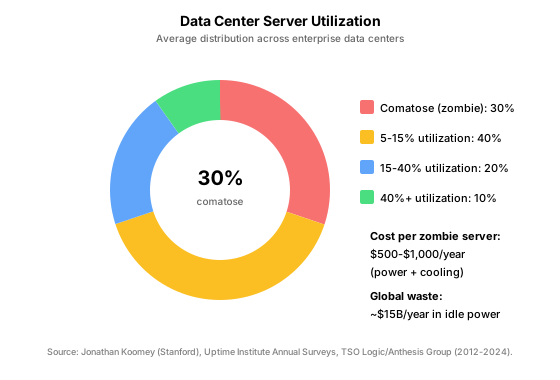
Only 24% of IT leaders trust the data in their CMDB (ITSM.tools, 2023-2024). Meanwhile, approximately 30% of data center servers are "comatose" — drawing power and cooling but performing no useful computation for six or more months (Jonathan Koomey, Stanford, 2012; Uptime Institute, 2024). These two statistics are directly related: when you cannot accurately inventory your physical assets, you cannot decommission what is not needed, cannot provision from a known-good pool, and cannot automate what you do not understand.
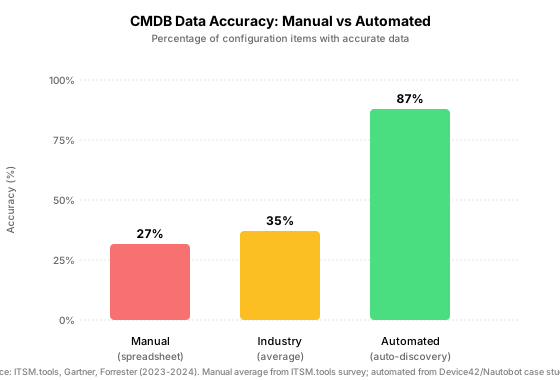
This guide walks through building an automated "check-in" workflow for physical servers: from the moment a machine is racked and powered on, through BMC-based discovery, to a fully populated Configuration Management Database (CMDB) as the Source of Truth (SoT). The result is a self-maintaining asset inventory that achieves 87% accuracy — compared to the 27% average of manual tracking — and eliminates the ghost servers that waste 1,000 per machine per year in power and cooling (TSO Logic/Anthesis Group, 2015-2024).
Key Takeaways
- Only 24-30% of enterprises maintain accurate CMDB data; automated discovery can achieve 80-95% accuracy.
- Approximately 30% of data center servers are comatose (zombie servers), each costing 1,000/year in wasted power.
- The check-in workflow: rack → power on → BMC registers → discovery agent runs → CMDB updated → resource pool assignment.
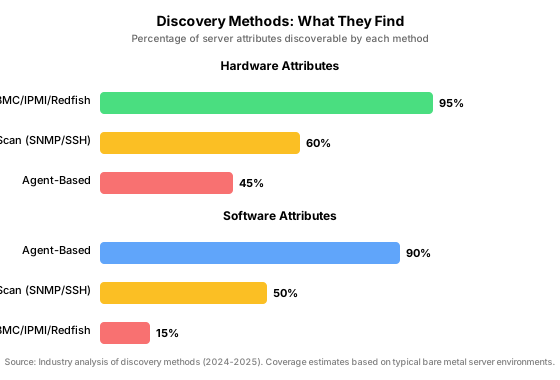
- BMC/IPMI/Redfish discovery covers 95% of hardware attributes — far more than network scan (60%) or agent-based (45%).
- Nautobot and NetBox serve as the modern Source of Truth; choose Nautobot for Golden Config and SSOT capabilities, NetBox for battle-tested IPAM/DCIM.
What Does "Check In" Mean for a Physical Server?
A physical server "checks in" when it automatically registers itself in your CMDB without human intervention. The workflow follows a precise sequence: the server is racked and cabled, power is applied, the Baseboard Management Controller (BMC) obtains a DHCP address on the management network, a discovery trigger fires (DHCP hook, webhook, or scheduled scan), the discovery agent queries the BMC for hardware inventory (CPU, memory, disks, NICs, firmware versions), the results are pushed to the CMDB via API, and the machine is assigned to a resource pool based on its capabilities.
Why does this matter? Because without accurate, automated discovery, every downstream automation — provisioning, monitoring, patching, decommissioning — operates on stale or incomplete data. A provisioning engine that does not know a machine exists cannot deploy to it. A monitoring system that does not know a machine exists cannot alert on its failures. A decommissioning workflow that does not know a machine is idle cannot reclaim its resources.
The DCIM (Data Center Infrastructure Management) market reflects this need: projected to reach $5.01 billion by 2029, growing at 10.6% CAGR (MarketsandMarkets, 2024). Organizations are investing in accurate asset data because the cost of inaccuracy — in wasted power, failed provisioning, and compliance gaps — is too high.
Why Is Manual Asset Tracking Broken at Scale?
Manual asset tracking — spreadsheets, periodic audits, technician data entry — fails at scale for three reasons: it is slow, it is error-prone, and it is always out of date. The average CMDB accuracy across enterprises hovers between 24-30% (Gartner, 2023-2024; ITSM.tools, 2023-2024). This means over 70% of configuration items in a typical CMDB contain at least one inaccurate attribute.
The "spreadsheet problem" compounds with scale. Tracking 100 servers in Excel is tedious but feasible. Tracking 10,000 servers across multiple data centers in Excel is impossible: the data entry burden alone consumes hundreds of staff-hours per quarter, and the data is stale the moment it is entered. A server replaced on Tuesday is still listed as the old model until the next audit cycle — which may be quarterly or annual.
The consequence is tangible. Comatose servers — machines drawing power but doing no useful work — account for approximately 30% of the typical data center (Jonathan Koomey, Stanford, 2012; Uptime Institute, 2024). Each zombie server costs 1,000 per year in power and cooling alone (TSO Logic/Anthesis Group, 2015-2024). For a 10,000-server data center with 30% comatose, that is 3 million per year in wasted infrastructure. Automated discovery identifies these machines by detecting zero network traffic, zero CPU utilization, and no associated workloads — triggering decommissioning workflows that manual tracking would miss.
How Does Automated Discovery Work?
Automated discovery uses three primary methods to inventory physical servers, each with different strengths and coverage profiles. The most effective bare metal discovery strategies combine all three.
BMC/IPMI/Redfish discovery queries the server's Baseboard Management Controller — a dedicated microcontroller on the motherboard that operates independently of the host OS. IPMI (Intelligent Platform Management Interface) provides hardware-level inventory: CPU model and count, memory capacity and configuration, disk models and serial numbers, NIC MAC addresses, firmware versions, power consumption, and thermal sensor data. Redfish, the modern RESTful successor to IPMI, is now the primary management interface for Dell iDRAC9, HPE iLO 5/6, Lenovo XCC, and Supermicro X12/X13 (DMTF, 2024-2025). BMC-based discovery covers approximately 95% of hardware attributes — the highest coverage of any method — and works without an installed OS, making it ideal for bare metal provisioning scenarios.
Network-based discovery uses SNMP, SSH, or ARP scanning to identify devices and gather information. It excels at network infrastructure (switches, routers, firewalls) and can identify running servers by their OS-reported attributes. Coverage for hardware attributes is approximately 60% — limited to what the OS chooses to expose. Network discovery is agentless and works on any device that responds to the query protocol, making it a good complement to BMC-based discovery for mixed environments.
Agent-based discovery runs software on the target server that reports detailed inventory to a central collector. Agents provide the deepest software-level information: installed packages, running processes, application dependencies, and configuration files. However, for hardware attributes, agents cover only approximately 45% — less than what the BMC reports directly. The fundamental limitation is that agents require an installed OS and deployed agent software, making them unsuitable for bare metal discovery (pre-OS) and operationally expensive at scale.
Citation capsule: Only 24% of IT leaders trust their CMDB data, and average accuracy hovers between 24-30% across enterprises (ITSM.tools, 2023-2024; Gartner, 2023-2024). Automated discovery using BMC/IPMI/Redfish can achieve 80-95% accuracy by eliminating manual data entry errors and providing real-time hardware inventory.
What Does a Modern CMDB Architecture Look Like?
A modern CMDB for bare metal management serves as the single Source of Truth that all downstream automation queries. The two dominant open-source platforms are NetBox and Nautobot — both provide IPAM (IP Address Management), DCIM (Data Center Infrastructure Management), and the relationship modeling that distinguishes a CMDB from a simple asset spreadsheet.
NetBox, originally created by DigitalOcean in 2016 and now a Linux Foundation project, is the battle-tested standard with over 21,500 GitHub stars and 3,100 forks (GitHub, 2025). Its data model covers racks, devices, cables, IP addresses, VLANs, circuits, and power — purpose-built for network infrastructure. NetBox exposes a REST API and webhooks that provisioning, monitoring, and orchestration tools consume. The trade-off: NetBox is deliberately focused on networking use cases and does not natively include configuration management or SSOT (Single Source of Truth) sync frameworks.
Nautobot, forked from NetBox v2.10.4 by Network to Code in 2021, extends the model with capabilities that infrastructure automation teams need: a plugin architecture ("Nautobot Apps"), Golden Config for configuration backup and compliance, built-in SSOT sync for bidirectional data federation, and GraphQL alongside REST. With 1,600+ GitHub stars (GitHub, 2025), Nautobot has a smaller but rapidly growing community. The Golden Config app is a major differentiator for organizations that need configuration drift detection and compliance reporting.
The choice between them depends on your priorities: NetBox for mature, stable IPAM/DCIM with the largest community; Nautobot for extensibility, Golden Config, and SSOT capabilities. Both can serve as the foundation for CMDB-driven bare metal management.
Integration patterns for automated discovery follow a consistent architecture: discovery agents (custom scripts, Nautobot SSOT apps, or Device42 for commercial environments) query hardware via Redfish/IPMI, transform the results into the CMDB's data model, and push updates via API. Webhooks on CMDB changes trigger downstream workflows: a new device added triggers monitoring agent registration; a device status change to "decommission" triggers data sanitization and resource pool return.
How Do You Build the Check-In Workflow?
The check-in workflow transforms a newly racked server from anonymous hardware to a fully inventoried, pool-ready resource in six stages. This is the core operational process that makes CMDB-driven management work at scale.
Stage 1: BMC credential management. Before discovery can begin, the CMDB needs credentials to query each server's BMC. Store these in HashiCorp Vault and inject them at runtime — never hardcoded in playbooks or scripts. Modern servers support per-device BMC credentials; rotate them on a schedule and trigger re-discovery after each rotation.
Stage 2: Auto-discovery trigger. The workflow needs a starting event. Three patterns work in practice: DHCP hook (when the BMC requests an address, trigger discovery), webhook (the rack technician scans a barcode that triggers discovery), or scheduled scan (periodic sweep for unregistered BMCs on the management network). DHCP hooks provide the fastest time-to-inventory: the server checks in within minutes of power-on.
Stage 3: Hardware inventory collection. The discovery agent queries the BMC via Redfish (preferred) or IPMI to collect: CPU model, core count, and frequency; memory capacity, type, and configuration; disk models, serial numbers, capacities, and interface type; NIC models, MAC addresses, and link speeds; firmware versions for BMC, BIOS, and NICs; and power state and thermal readings. This data maps directly to the CMDB's device and inventory item models.
Stage 4: CMDB record creation/update. The discovery agent pushes the collected inventory to the CMDB via API. For new servers, create the device record and associated inventory items. For existing servers, update changed attributes and flag discrepancies for review. Deduplication logic prevents duplicate records when multiple discovery sources report the same machine.
Stage 5: Validation and relationship mapping. Raw inventory data needs enrichment: assign the device to a rack and location, connect it to switch ports and VLANs, associate it with an owner team, and set its lifecycle status. Relationship mapping — what connects to what — is as important as the asset list itself. A server without network relationships cannot be provisioned; a server without ownership cannot be decommissioned.
Stage 6: Resource pool assignment. Once validated, the device enters a resource pool based on its capabilities: compute-optimized, memory-optimized, storage-optimized, or network-optimized. The provisioning engine draws from these pools when fulfilling resource requests. A server in the "available" pool is ready for deployment; a server in the "maintenance" pool is excluded from provisioning.
What Are the Common Pitfalls?
Automated discovery at scale has failure modes that are not obvious until they cause production issues. The following pitfalls account for the majority of CMDB accuracy degradation in practice.
Duplicate records from multiple discovery sources. When BMC discovery, network scanning, and agent-based discovery all report the same server, the CMDB may create three records instead of one. Deduplication must match on stable identifiers: BMC MAC address, chassis serial number, or a composite key of manufacturer + model + serial. Match on hostname alone fails because hostnames change; match on IP alone fails because IPs are reassigned.
Stale data from decommissioned servers. A server that is powered off but not removed from the CMDB pollutes the inventory. Implement a "staleness check": if a server has not responded to discovery queries for 30 days, flag it for physical verification. If confirmed absent, archive the record rather than deleting it (audit trails require retention).
Credential rotation breaking discovery. When BMC credentials change, discovery fails silently unless you monitor for authentication errors. The fix is a credential health check that validates BMC access daily and alerts on any failure. Store credentials in Vault with dynamic secret rotation, and ensure the discovery agent fetches fresh credentials before each scan cycle.
Network segmentation blocking scans. Management networks are often isolated from production networks — by design. The discovery agent must run on a host with access to the management network, or you must deploy relay agents at each site that forward discovery results to the central CMDB. For air-gapped environments, use a "sneakernet" pattern: the discovery agent writes results to a file that is physically transferred (via secure USB or one-way data diode) to the central system.
Incomplete relationship mapping. A device record without network relationships (switch port, VLAN, IP assignment) is incomplete — provisioning tools cannot use it. Automate relationship discovery using LLDP and CDP data from adjacent switches, which report exactly which device is connected to which port.
How Do You Handle Multi-Site Discovery?
Global data centers require a discovery architecture that accounts for WAN latency, network isolation, and regional autonomy. The hub-and-spoke model that works for CMDB architecture (covered in the series overview post) applies to discovery as well.
Centralized discovery runs a single discovery engine that scans all sites over the WAN. This works for organizations with reliable, low-latency connectivity to each site's management network. The advantage is a single point of control; the disadvantage is that a WAN outage silences discovery globally, and scanning across WAN links consumes bandwidth.
Distributed discovery runs a local discovery agent at each site that reports to a central CMDB. This is the recommended pattern for most multi-site deployments: local agents operate autonomously (discovery continues during WAN outages), WAN traffic is limited to API calls pushing results rather than raw scan traffic, and each site can use discovery methods appropriate to its hardware mix. The trade-off is operational complexity: you must deploy, monitor, and update discovery agents at each site.
WAN-friendly discovery protocols matter for both approaches. Redfish (REST/HTTPS) is more WAN-friendly than IPMI (UDP-based, no native encryption). SNMP v3 with encryption is preferable to SNMP v2c for cross-WAN queries. For bandwidth-constrained links, configure discovery agents to push incremental updates (only changed attributes) rather than full inventory on each scan.
For air-gapped or classified environments, discovery must operate entirely within the security boundary. Deploy a full Nautobot/NetBox instance at each site, use SSOT sync to federate data between instances when connectivity allows, and accept that the "global" CMDB is eventually consistent rather than real-time.
Frequently Asked Questions
How often should discovery run?
For environments with frequent hardware changes (new deployments, regular decommissioning), run discovery every 1-4 hours. For stable environments, daily is sufficient. The check-in workflow for new servers should be event-driven (DHCP hook or webhook) rather than polled — a new server should appear in the CMDB within minutes of power-on, not hours. Implement a "staleness threshold" (typically 30 days without a response) to flag potentially decommissioned servers for physical verification.
What if a server's BMC credentials change?
Use HashiCorp Vault for credential management with dynamic secret rotation. The discovery agent should fetch credentials from Vault before each scan cycle rather than caching them locally. Implement a credential health check that validates BMC access daily and alerts on authentication failures. When credentials rotate, trigger an immediate re-discovery of affected devices rather than waiting for the next scheduled scan.
Can I import existing CMDB data?
Yes. Both NetBox and Nautobot support CSV import for bulk data migration. The import process maps your existing asset data to the CMDB's data model: devices, inventory items, IP addresses, and cables. Expect to spend time on data cleaning — existing CMDB data typically has the 24-30% accuracy problem, and importing bad data just migrates the problem. Best practice: import the asset list, then run automated discovery to validate and correct the imported data.
How do I handle servers without BMC?
Servers without BMC (white-box hardware, some edge devices) cannot use the primary discovery path. Alternatives: network-based discovery via SNMP or SSH (if the OS is installed), manual registration with a "pending discovery" status that triggers a technician workflow, or agent-based discovery if an agent can be deployed. For homogeneous white-box environments, consider PXE-based discovery: the server network-boots a minimal OS that runs a hardware inventory script and reports results before the real OS loads.
What about virtual machines — same CMDB?
Virtual machines and physical servers serve different purposes in the CMDB. Physical servers are tracked as devices with hardware inventory (CPU, memory, disks, firmware). Virtual machines are better tracked as workloads or services — their "hardware" is abstracted by the hypervisor. Maintain separate resource pools: physical pools for bare metal provisioning, virtual pools for VM placement. The CMDB should track the relationship: which VMs run on which physical hosts. This relationship is critical for capacity planning and maintenance (you cannot patch a physical host without knowing which VMs will be affected).
What is the ROI of automated discovery?
The ROI calculation includes: power savings from identifying and decommissioning comatose servers (30% of fleet × 1,000/year each), reduced provisioning failures from accurate inventory (fewer "server not found" errors), faster incident resolution (accurate asset data means faster root cause analysis), and compliance automation (always-current inventory for audit). Device42 reports customers achieving 4.8x ROI, resolving outages 10x faster, and reducing compliance/audit time by 85% (Device42, 2024-2025). For a 10,000-server data center, the power savings alone (3M/year) typically justify the investment.

Conclusion
CMDB-driven bare metal management transforms asset tracking from a manual, error-prone process into an automated, self-maintaining system. The key numbers tell the story: manual tracking achieves 27% accuracy; automated discovery achieves 87%. Thirty percent of servers are comatose; automated discovery identifies them for decommissioning. The check-in workflow — rack → power on → BMC registers → discovery runs → CMDB updated — eliminates the data gap that breaks downstream automation.
The architecture is proven: Nautobot or NetBox as Source of Truth, Redfish/IPMI for hardware discovery, Vault for credential management, and API-driven integration with provisioning and monitoring tools. The DCIM market is growing at 10.6% CAGR because organizations recognize that you cannot automate what you cannot accurately inventory.
In the next post in this series, we will dive deep into the PXE boot process — the foundational protocol that makes bare metal provisioning possible — and walk through configuring a multi-site PXE infrastructure with DHCP relay, iPXE chainloading, and image caching.
Sources
- ITSM.tools, CMDB Data Accuracy Survey, 2023-2024, https://itsm.tools
- Gartner, ITSM/ITOM Adoption Research, 2023-2024, https://www.gartner.com
- Forrester, Discovery and Reconciliation Tools Research, 2023-2024, https://www.forrester.com
- Jonathan Koomey (Stanford), "Power, Pollution and the Internet", New York Times, 2012, https://nytimes.com/2012/09/23/technology/data-centers-waste-vast-amounts-of-energy-belying-industry-image.html
- Uptime Institute, Annual Data Center Surveys, 2024, https://uptimeinstitute.com
- TSO Logic/Anthesis Group, Zombie Server Cost Analysis, 2015-2024, https://anthesisgroup.com
- MarketsandMarkets, DCIM Market Report, 2024, https://www.marketsandmarkets.com/Market-reports/data-center-infrastructure-management-market-243340588.html
- MarketsandMarkets, Bare Metal Cloud Market Report, 2025, https://www.marketsandmarkets.com
- GitHub, netbox-community/netbox, 2025, https://github.com/netbox-community/netbox
- GitHub, nautobot/nautobot, 2025, https://github.com/nautobot/nautobot
- Device42, Customer Outcomes Report, 2024-2025, https://www.device42.com
- DMTF, Redfish Standard, 2024-2025, https://www.dmtf.org/standards/redfish