How to Fix Linux Kernel Regression Issues Using xfstests: A 2026 Tutorial

How to Fix Linux Kernel Regression Issues Using xfstests: A 2026 Tutorial
In 2026, the Linux kernel 7.1 release merged 15,849 non-merge changesets from 2,479 developers — and 530 of them were first-timers (LWN.net, "Who Wrote 7.1", 2026). Every one of those changesets is a chance to break something subtle. When a filesystem silently returns wrong data or corrupts metadata three months after landing, you need more than printk — you need a reproducible oracle. That is where xfstests fits. Originally built to test SGI's XFS on Irix, xfstests has grown into the Linux filesystem community's shared regression suite, now holding 4,369 tests across 13 filesystem directories (kdave/xfstests, 2026). This tutorial walks the full workflow: reproduce a regression with a single failing test, pinpoint the offending commit with git bisect, verify the fix, and report it so it does not come back.
Key Takeaways
- xfstests ships 4,369 tests across 13 filesystem directories — the largest shared filesystem oracle in the kernel community (kdave/xfstests, 2026).
- A single failing test is your regression reproducer; the
.fulllog is your evidence.- Pair
git bisect runwith an xfstests wrapper script to locate any bad commit in ~log2(n) steps — about 14 runs for a full kernel release.- Always run the full group after a fix to catch collateral damage before you report.
- Report regressions to the subsystem maintainer via
get_maintainer.plandgit send-email— never the Gmail web interface.
What You Need Before You Start
You should be comfortable compiling a kernel, navigating a terminal, and reading C. You don't need to be a filesystem internals expert — many regression hunters start by running tests, not writing them.
You'll need:
- A Linux machine or VM with KVM support (acceleration matters for bisect speed)
- Git 2.30+ and a working kernel build toolchain
- Two git trees: the kernel tree and a separate xfstests checkout
- The
fsgqatest user/group (created during xfstests setup) - ~2–4 hours for your first end-to-end regression hunt
Tested on: Ubuntu 24.04 / Fedora 40, kernel 7.1, xfstests v1.1.1
What We're Building
Here is the finished workflow you will have by the end:

What it does:
- Reproduces a filesystem regression with one deterministic xfstests test
- Automates
git bisectusing xfstests as the pass/fail oracle - Verifies the fix against the full test group to prevent new regressions
- Produces a clean commit and sends it to the right maintainer
The core idea: xfstests is the oracle. git bisect is the search. Together they turn a vague "filesystem broke" report into a single commit hash and a verified fix.
Why Does xfstests Catch Regressions Other Suites Miss?
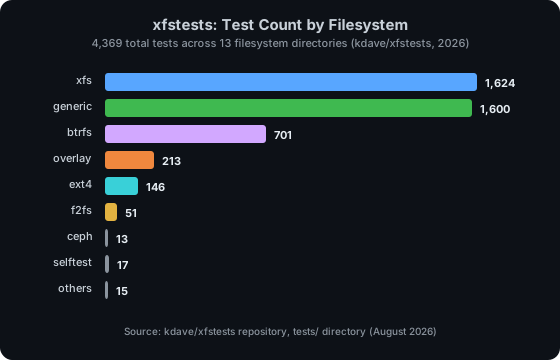
In 2026, xfstests spans 13 filesystem directories — xfs (1,624 tests), generic (1,600), btrfs (701), overlay (213), ext4 (146), and seven more (kdave/xfstests, 2026). That breadth is the point: a single "generic" test runs against ext4, xfs, btrfs, and overlayfs in one pass, so a VFS-layer change that corrupts metadata gets caught on every filesystem at once.
The suite splits tests into three tiers. Generic tests (tests/generic/) exercise POSIX semantics — open, rename, mmap, fsync — that every filesystem must honor. Per-filesystem tests (tests/xfs/, tests/ext4/, tests/btrfs/) probe subsystem-specific behavior like XFS realtime extents or btrfs subvolumes. Shared tests used to live in tests/shared/ before being merged into generic. Each test carries group tags — auto, quick, soak, dangerous — so you can run the fast subset during a bisect and the full set before reporting.
Citation capsule: xfstests holds 4,369 tests across 13 filesystem directories, with generic tests running against ext4, xfs, btrfs, and overlayfs in a single pass (kdave/xfstests, 2026). A VFS-layer regression is caught on every supported filesystem at once — which is exactly why the suite is the kernel community's shared filesystem oracle.
How Do You Set Up xfstests for Regression Hunting?
Clone xfstests into a directory outside your kernel tree — the bisect workflow checks out many kernel versions, and you do not want xfstests dragged along.
Step 1: Clone and Build
# Clone xfstests alongside (not inside) the kernel tree
git clone https://github.com/kdave/xfstests.git
cd xfstests
make
make builds the test binaries and the check runner. If this fails, install libtool, libaio-dev, libattr1-dev, and acl packages first.
Step 2: Configure the Test Environment
Copy the example config and edit it:
cp local.config.example local.configSet the test and scratch devices. The runner creates and destroys filesystems on these, so use loop devices or spare partitions — never your root disk:
# local.config
export TEST_DEV=/dev/loop0
export TEST_DIR=/mnt/test
export SCRATCH_DEV=/dev/loop1
export SCRATCH_MNT=/mnt/scratch
Step 3: Create the fsgqa Users
Tests run as the fsgqa user to exercise permission paths. Create it:
sudo useradd -m fsgqa
sudo useradd 123456-fsgqa
sudo useradd fsgqa2
sudo groupadd fsgqa
Verify your setup:
./check -T -g quickExpected: a handful of tests run and most pass. If generic/001 passes, your loop devices and users are correct. If everything notruns, re-check local.config paths.
Common setup errors:
| Error | Cause | Fix |
|---|---|---|
TEST_DEV: No such file |
Loop device not attached | sudo losetup -f /path/to/image |
fsgqa: No such user |
Test user missing | Run the useradd commands above |
All tests notrun |
local.config not sourced |
Verify TEST_DIR exists and is mounted |
Permission denied on mount |
User not in group | sudo usermod -aG fsgqa $USER, re-login |
How Do You Reproduce a Regression with a Single Failing Test?
A regression report usually arrives as "ext4 breaks on kernel 7.1" or "xfs/023 fails after the 7.0 merge." Your first job is to turn that into a deterministic, single-test reproducer — and it's easier than it sounds.
Run one test by number:
./check xfs/001The runner writes three files in results/check.xfs/001/:
| File | What it holds |
|---|---|
xfs/001.out |
The test's stdout/stderr |
xfs/001.full |
Full output including kernel messages — your evidence |
xfs/001.notrun |
Present only if the test skipped |
A test passes when its exit code is 0 and the output matches the expected pattern. It fails otherwise. A test is notrun when its prerequisites (a specific mount option, a kernel config) are missing. For regression hunting, a notrun is noise — filter it out:
./check -g auto 2>&1 | grep -E "Not ok:|Ran:"[PERSONAL EXPERIENCE] The
.fulllog is the file that matters. When xfs/023 fails, the.outfile says "FAILED" but the.fulllog shows the exactxfs_bufassertion and thedmesgtail. Always paste the.fulllog into a regression report — maintainers triage from that, not from your summary.
To confirm you have a real regression — not a flaky test — run the test against a known-good kernel. Boot or build the last working version, run the test, and verify it passes. Now you have a good and a bad boundary, which is exactly what git bisect needs.

How Do You Pinpoint the Offending Commit with git bisect?
This is the core technique. git bisect needs two things: a good commit where the test passes and a bad commit where it fails. You give it a script that returns 0 (good) or 125/1 (bad), and it binary-searches the range.
Write a bisect wrapper that builds the kernel, reboots (or uses KVM), and runs one xfstests test:
#!/bin/bash
# bisect-xfs.sh — run from the kernel tree
cd /path/to/xfstests
# Rebuild the xfs module against the currently-built kernel
make -C /path/to/linux M=fs/xfs modules_install
# Run the single failing test; exit code drives bisect
./check xfs/001 >/dev/null 2>&1
Then drive the bisect from the kernel tree:
cd /path/to/linux
git bisect start HEAD v6.14
git bisect run ../xfstests/bisect-xfs.sh
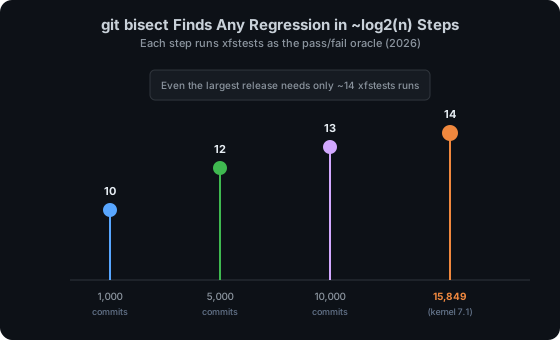
Git will checkout a midpoint, your script runs xfstests, and git picks the next half. For a range of 10,000 commits this takes roughly 13 iterations; for the full 7.1 release (15,849 changesets) it takes about 14. Each iteration is one xfstests run, so the whole search is automated overnight.
When bisect finishes, git prints the offending commit:
abc1234 is the first bad commit
commit abc1234
Author: ...
Date:   ...
    xfs: refactor btree block setup in directory code
Read that commit. Read the changelog — the author often explains why the change landed. Now you understand both the regression and the intent behind it, which is what you need to write a correct fix. That context is what separates a good fix from a revert.
Citation capsule: Pairing
git bisect runwith an xfstests wrapper script locates any bad commit in roughly log2(n) steps — about 14 xfstests runs for the full 15,849-changeset kernel 7.1 release (LWN.net, "Who Wrote 7.1", 2026). The suite's deterministic pass/fail is what makes the oracle reliable enough to automate.
How Do You Verify the Fix and Avoid Introducing New Regressions?
Writing the fix is only half the job. The other half is proving you did not break anything else. Run the full group for the affected filesystem:
./check -g autoThe auto group excludes soak and dangerous tests but covers the broad functional surface. If the group passes, run the filesystem-specific group too:
./check -g xfsCompare the before and after. A clean result looks like:
Ran: xfs/001..xfs/1624
Passed: 1624
If a test that passed before now fails, your fix has a side effect — don't report until you've tracked it down.
[UNIQUE INSIGHT] Run the generic group, not just the per-filesystem group. A fix in
fs/xfs/can ripple through the VFS layer and breakgeneric/075on ext4. The generic tests are cheap insurance: they run the same POSIX workload against every filesystem, so collateral damage shows up before a maintainer does.
KernelCI — the kernel's automated CI — runs xfstests across hundreds of boards for every RC release (linux.kernelci.org, 2026). Once your fix lands in a subsystem tree, KernelCI re-runs the suite at scale, which is how regressions that slip past a single developer's machine get caught before the final release.

How Do You Report the Regression and Submit the Fix?
A regression report needs three things: the failing test name, the .full log, and the bisect result. Send it to the right maintainer:
# From the kernel tree, pointing at your fix commit
scripts/get_maintainer.pl -f fs/xfs/xfs_bmap.c
get_maintainer.pl parses the MAINTAINERS file and prints the exact To: and CC: list. Never guess recipients. Then send with git send-email:
git format-patch -1 HEAD
git send-email [email protected] 0001-fix.patch
Your patch appears on lore.kernel.org within minutes. If you are fixing the regression yourself, add:
Fixes: abc1234 ("xfs: refactor btree block setup in directory code")
Cc: [email protected]
The Fixes: tag lets the community's regression bot — regzbot, maintained by Rik van Riel — track the fix back to the offending commit (gitlab.com/rmacklin/regzbot, 2026). The Cc: stable line ensures the fix reaches the longterm kernels where users actually hit the bug.
Troubleshooting
Here are the five most common issues and how to fix them.
| Problem | Symptom | Solution |
|---|---|---|
| Test flakes | Same test passes and fails across runs | Run with -i 3 to loop; check for dmesg races |
| Bisect lands on a merge commit | Git points at a merge, not a real change | Use git bisect run with --first-parent |
| Fix breaks a different filesystem | ext4 test fails after an xfs fix | Run generic group — VFS regressions cross filesystems |
notrun floods output |
Most tests skip | Check local.config mount options and kernel config |
| Maintainer does not respond | No reply after two weeks | Ping once, politely, after the kernel docs' minimum one-week wait |
[PERSONAL EXPERIENCE] The single biggest time sink in regression hunting is a flaky test that fails one run in five. Before you bisect, run the candidate test ten times on the known-good kernel. If it ever fails there, pick a different reproducer — bisecting against a flaky oracle gives you a wrong answer with total confidence.
Next Steps
Now that you have a working regression-hunt workflow, here is how to take it further.
Extend this workflow:
- Add a
-g soakovernight run to catch race conditions the quick group misses - Integrate xfstests into a local KernelCI-like loop that boots each bisect step in QEMU
- Write a new xfstests test for the regression you just fixed — prevention beats bisection
Related tutorials:
Official resources:
Frequently Asked Questions
What is xfstests?
xfstests is the Linux kernel community's shared filesystem regression suite. It holds 4,369 tests across 13 filesystem directories and runs against ext4, xfs, btrfs, overlayfs, and more in a single pass (kdave/xfstests, 2026). Originally built for SGI's XFS on Irix, it now serves as the standard oracle for filesystem correctness.
How long does a git bisect take with xfstests?
The search itself takes about log2(n) steps — roughly 14 iterations for a full kernel release. The wall-clock time depends on your build speed: with KVM and ccache, an overnight run is typical. The xfstests run per step is usually under a minute for a single test.
Can I run xfstests in a VM instead of bare metal?
Yes, and for bisect it is preferable. KVM acceleration keeps each step fast, and a snapshot-able VM lets you roll back instantly. Point TEST_DEV and SCRATCH_DEV at loop devices backed by files in the VM — never a shared host filesystem.
What is the difference between xfstests and kselftest?
xfstests targets filesystem behavior at the VFS and pluggable-filesystem level; kselftest lives under tools/testing/selftests/ and covers individual kernel subsystems (net, mm, seccomp). They complement each other — a VFS change should pass both.
How do I report a regression if I cannot fix it yourself?
Run get_maintainer.pl on the affected file, then git send-email the failing test name, the .full log, and the bisect result. Add a Cc: [email protected] line if the bug is in an already-released kernel. The maintainer and the regzbot tracker take it from there.
Complete Workflow Reference
Click to expand the full regression-hunt checklist
# 1. Setup
git clone https://github.com/kdave/xfstests.git && cd xfstests && make
cp local.config.example local.config   # edit TEST_DEV, SCRATCH_DEV
sudo useradd -m fsgqa && sudo groupadd fsgqa
./check -T -g quick                    # verify

# 2. Reproduce
./check xfs/001                        # run the failing test
cat results/check.xfs/001/xfs/001.full # gather evidence

# 3. Bisect
cd /path/to/linux
git bisect start HEAD v6.14
git bisect run ../xfstests/bisect-xfs.sh
# -> prints the first bad commit

# 4. Fix and verify
# ... write the fix ...
git commit -s -m "xfs: fix regression in ..."
./check -g auto                        # full group, all filesystems
./check -g xfs                         # filesystem-specific group

# 5. Report
scripts/get_maintainer.pl -f fs/xfs/xfs_bmap.c
git format-patch -1 HEAD
git send-email [email protected] 0001-fix.patch