Why Isn't Your Linux Server Using Swap? — Page Reclaim, Swap Cache, and the Real Story Behind Swappiness

Why Isn't Your Linux Server Using Swap? — Page Reclaim, Swap Cache, and the Real Story Behind Swappiness
If you have ever watched a production server's memory graph and felt alarm at the rising swap usage, you are not alone. Swap has a reputation problem. Developers see "swap used" and think "performance is dying." Operations teams set vm.swappiness=0 to "disable swap" and declare victory.
Both reactions misunderstand what Linux swap actually does. Swap is not a failure mode — it is a proactive optimization. The kernel swaps out cold anonymous pages precisely to keep the hot working set in RAM. High swap usage often means the kernel is doing its job correctly.
This article walks through the page reclaim source in mm/vmscan.c and mm/swap_state.c to explain three things: how the kernel decides what to reclaim (the LRU lists), how it decides whether to swap or drop page cache (vm_swappiness), and why a page can be "swapped" while still consuming RAM (the swap cache).
Key Takeaways
- Swap is not failure: kswapd proactively swaps cold anonymous pages to keep the working set in RAM. High swap usage often means the kernel is working correctly.
vm_swappiness(default 60) is NOT "use/don't use swap" — it controls the relative cost of evicting anon vs file pages. The real proportion isswappiness : (200 - swappiness).- LRU uses 4 lists (active/inactive × anon/file), not 2. Pages promote to active on access and demote to inactive when cold.
- SwapCached counts pages that are BOTH in swap AND in memory. High SwapCached means pages were recently swapped in.
- LRU_GEN (Multi-Gen LRU) uses generation counters and Bloom filters to identify hot pages in O(1), scaling to terabytes of RAM.
- The "Cache Trap" detection in
prepare_scan_control()prevents file reclaim from appearing artificially attractive when file LRU is small.
The Myth: "Swap Usage = Poor Performance"
The instinctive reaction to swap usage is to eliminate it. But this instinct is backwards. Linux swap exists because disk is cheaper than RAM, and the kernel optimizes for overall system performance, not for any single metric.
Here is what actually happens: the kernel identifies pages that haven't been accessed recently (cold pages) and writes them to disk. This frees RAM for pages that ARE being accessed (hot pages) and for page cache. The result: the working set stays in RAM, cold pages move to disk, and overall throughput improves.
The confusion comes from conflating swap usage with thrashing. They are different:
| Condition | What Happens | Performance Impact |
|---|---|---|
| Proactive swap | Cold pages moved to disk, not accessed again | Minimal (disk I/O one-time cost) |
| Thrashing | Pages swapped out, immediately accessed, swapped back in | Severe (continuous disk I/O) |
The kernel's goal is to do proactive swap without crossing into thrashing. The LRU lists are the mechanism for telling them apart.
The Three Watermarks: kswapd's Decision Boundaries
Before understanding swap, you need to understand when the kernel decides to reclaim pages. Each NUMA node maintains three watermarks that trigger different behaviors:
     Free Memory ──────────────────────────────────────────►

  ▲ pages_high  ─┬─  kswapd sleeps
                 │    Normal operation
                 │    No reclaim activity
                 │
  ▲ pages_low   ─┼─  kswapd wakes up
                 │    Background reclaim begins
                 │    Direct reclaim if allocation fails
                 │
  ▲ pages_min   ─┼─  Direct reclaim stalls
                 │    GFP_ATOMIC only
                 │    kswapd reclaims aggressively
                 │
  ▼ 0           ─┴─  OOM killer
pages_high
When free pages are above pages_high, the system is in the safe zone. kswapd is sleeping. No reclaim is happening. This is where the kernel wants the system to operate.
pages_low
When free pages drop below pages_low, kswapd wakes up. It begins background reclaim — scanning LRU lists, moving cold pages to the inactive list, and eventually reclaiming them. If an allocation fails and free pages are between low and high, the allocator triggers direct reclaim.
pages_min
When free pages drop below pages_min, the system is in serious trouble. Direct reclaim stalls — only GFP_ATOMIC allocations (which cannot sleep) are allowed. kswapd reclaims aggressively, scanning all LRU lists.
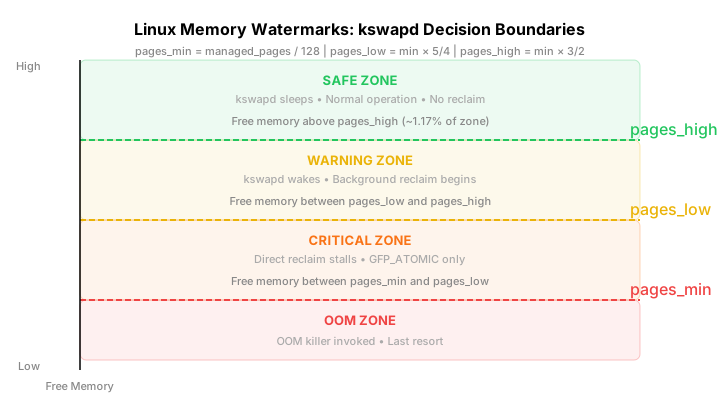
How Watermarks Are Calculated
The watermarks are calculated per-zone during initialization (init_per_zone_wmark_min() in mm/page_alloc.c):
// Simplified watermark calculation
pages_min = managed_pages / 128;    // ~0.78% of zone
pages_low = pages_min * 5 / 4;      // ~0.98% of zone
pages_high = pages_min * 3 / 2;     // ~1.17% of zone
On a 64 GB system with a single Normal zone:
pages_min≈ 512 MBpages_low≈ 640 MBpages_high≈ 768 MB
These values are adjustable via /proc/sys/vm/min_free_kbytes.
LRU Lists: The Four-Quadrant Page Classification
The kernel does not use a single "least recently used" list. It uses four LRU lists that track both page type and recency:
                    ┌─────────────────────────────────────────┐
                    │           LRU List Architecture          │
                    │                                         │
                    │   ANON (anonymous)    FILE (file-backed) │
                    │   ┌───────────────┐   ┌───────────────┐ │
                    │   │  ACTIVE_ANON  │   │  ACTIVE_FILE  │ │
         Hot ◄──────│   │  (hot pages)  │   │  (hot pages)  │ │
                    │   └───────┬───────┘   └───────┬───────┘ │
                    │           │ demote            │ demote  │
                    │           ▼                   ▼         │
                    │   ┌───────────────┐   ┌───────────────┐ │
                    │   │ INACTIVE_ANON │   │ INACTIVE_FILE │ │
         Cold ◄─────│   │ (cold pages)  │   │ (cold pages)  │ │
                    │   └───────────────┘   └───────────────┘ │
                    │    swap candidate     drop candidate     │
                    └─────────────────────────────────────────┘
The Four Lists
| List | Contents | Reclaim Action |
|---|---|---|
ACTIVE_ANON |
Recently accessed anonymous pages (heap, stack) | Lowest priority — these are hot |
INACTIVE_ANON |
Cold anonymous pages (not accessed recently) | Write to swap, then free |
ACTIVE_FILE |
Recently accessed file-backed pages (executables, libraries) | Medium priority — drop if clean |
INACTIVE_FILE |
Cold file-backed pages (not accessed recently) | Highest priority — drop from cache |
UNEVICTABLE |
Locked pages (mlocked, SHM_LOCKED) | Never reclaimed |
Promotion and Demotion
Pages move between active and inactive lists based on access:
// mm/swap.c — mark_page_accessed()
void mark_page_accessed(struct page *page)
{
    if (!PageReferenced(page)) {
        SetPageReferenced(page);  // Mark as accessed
    } else if (!PageActive(page)) {
        ActivatePage(page);       // Promote to active list
        ClearPageReferenced(page);
    }
}
Promotion (inactive → active): When a page on the inactive list is accessed a second time, it is promoted to the active list. This is the kernel's signal: "this page is being used."
Demotion (active → inactive): shrink_active_list() scans the active list and moves pages that haven't been referenced recently to the inactive list. This happens during reclaim.
The Reclaim Asymmetry
Not all pages cost the same to reclaim:
| Page Type | Reclaim Cost | What Happens |
|---|---|---|
| Clean file | Near zero | Drop from page cache, re-read from disk if needed later |
| Dirty file | Moderate | Write back to disk, then drop |
| Anonymous | High | Write to swap, update PTE, only free after swap write completes |
This asymmetry is why vm_swappiness exists — it biases the reclaim decision based on these costs.
vm_swappiness: The Misunderstood Knob
vm_swappiness is the most misconfigured parameter in Linux memory management. The man page says "this control is used to define how aggressive the kernel will swap memory pages." Most administrators interpret this as "higher = more swapping."
The reality is more nuanced. vm_swappiness controls the relative cost of evicting anonymous pages versus file pages. It is not a probability or a threshold.
The Real Formula
The actual calculation happens in get_scan_count() (mm/vmscan.c:~5800):
// mm/vmscan.c — get_scan_count()
anon_prio = swappiness;           // default 60
file_prio = 200 - swappiness;     // default 140

// For each LRU list, calculate scan count:
// scan = (LRU_size * swap_ratio) / priority
// where swap_ratio accounts for zone reclaim and NUMA
The scan proportion is:
anon_scan : file_scan = anon_prio : file_prio = swappiness : (200 - swappiness)
What Each Value Means
| Value | anon_prio | file_prio | Behavior |
|---|---|---|---|
| 0 | 0 | 200 | "Prefer file reclaim over swapping" (but still swaps if needed) |
| 1 | 1 | 199 | Almost never swap — extreme file preference |
| 60 | 60 | 140 | Balanced (default) — file pages 2.3x more likely to be reclaimed |
| 100 | 100 | 100 | Equal cost — anon and file equally likely |
| 200 | 200 | 0 | "Prefer swapping over file reclaim" |
The swappiness=0 Trap
On kernels before 3.5, swappiness=0 meant "never swap." Since kernel 3.5, it means "prefer file cache eviction." The difference matters:
- swappiness=0 on old kernel: Never swap. If anon pages dominate, OOM.
- swappiness=0 on modern kernel: Prefer file eviction, but swap if file cache is small.
This is why servers with swappiness=0 still show swap usage and can still OOM. The kernel will swap anonymous pages when there is no file cache to reclaim.
Swap Cache: Pages That Live in Two Places
When a page is swapped out, it does not immediately disappear from memory tracking. It enters the swap cache — a tracking structure that holds the page until the swap slot is reused.
How Swap Cache Works
  Page Fault (swap in)
         │
         ▼
  ┌──────────────┐     ┌──────────────┐     ┌──────────────┐
  │ Check swap   │────►│  Swap cache  │────►│   Map page   │
  │ cache first  │ hit │  (xarray)    │     │  into PTE    │
  │ (fast path)  │     │              │     │              │
  └──────────────┘     └──────────────┘     └──────────────┘
         │                    │
         │ miss               │ page stays in cache
         ▼                    ▼
  ┌──────────────┐     ┌──────────────┐
  │ Read from    │     │ SwapCached++ │
  │ swap device  │     │ (counts as   │
  │ (slow path)  │     │  "in cache") │
  └──────────────┘     └──────────────┘
The swap cache lives in mm/swap_state.c. It is an xarray indexed by swap cluster. Key functions:
// mm/swap_state.c
struct address_space swap_space = {
    .a_ops = &swap_aops,
    .i_pages = XARRAY_INIT(swap_space.i_pages, swap_xa_lock),
};
The Swap Entry Format
When a page is swapped out, its PTE becomes a swap entry (not a present page):
swp_entry_t encoding (64-bit):
┌────────────┬──────────────────────────────────────┐
│ Type (5bit)│           Offset (59bit)             │
│ (which     │           (page slot index           │
│  device)   │            on device)                │
└────────────┴──────────────────────────────────────┘
Why Swap Cached Matters
SwapCached in /proc/meminfo counts pages that are both in swap AND in memory. This is not double-counting — it is a safety mechanism:
- Page is swapped out → PTE becomes swap entry, page stays in swap cache
- Process faults page back in → page is mapped, PTE updated
- Page REMAINS in swap cache (SwapCached++)
- If the page is swapped out again → no disk write needed (swap cache hit)
High SwapCached means pages were recently swapped in and the kernel kept the swap copy as a backup. It is a sign of recent memory pressure, not ongoing thrashing.
LRU_GEN: The Next-Generation Page Selection
Traditional LRU linked lists have a scalability problem: scanning millions of pages is O(n). On servers with terabytes of RAM, the kernel can spend more time scanning LRU lists than the pages spend being used.
LRU_GEN (Multi-Gen LRU) solves this with generation counters and Bloom filters.
The Problem with Linked Lists
- Scan cost: Scanning 10 million pages takes milliseconds — time the CPU could spend on useful work
- List thrashing: Pages bounce between active and inactive lists as access patterns change
- Access bit clearing: The kernel must periodically clear accessed bits, requiring a full scan
How LRU_GEN Works
Instead of maintaining ordered linked lists, LRU_GEN groups pages into generations:
  ┌─────────────────────────────────────────────────────────┐
  │                    LRU_GEN Generations                   │
  │                                                         │
  │  Generation 0 (oldest/coldest)                          │
  │  ┌─────────────────────────────────────────────────┐   │
  │  │ Pages not accessed for longest time             │   │
  │  │ Scanned first during reclaim                    │   │
  │  └─────────────────────────────────────────────────┘   │
  │                          │                              │
  │                          ▼ (accessed → promote)         │
  │  Generation 1                                         │
  │  ┌─────────────────────────────────────────────────┐   │
  │  │ Pages accessed some time ago                    │   │
  │  └─────────────────────────────────────────────────┘   │
  │                          │                              │
  │                          ▼                              │
  │  Generation 2                                         │
  │  ┌─────────────────────────────────────────────────┐   │
  │  │ Pages accessed recently                        │   │
  │  └─────────────────────────────────────────────────┘   │
  │                          │                              │
  │                          ▼                              │
  │  Generation 3 (newest/hottest)                          │
  │  ┌─────────────────────────────────────────────────┐   │
  │  │ Pages just accessed                            │   │
  │  │ Scanned last (protected)                       │   │
  │  └─────────────────────────────────────────────────┘   │
  └─────────────────────────────────────────────────────────┘
Each generation has an access timestamp. When a page is accessed, it is promoted to a newer generation. During reclaim, the kernel scans the oldest generation first.
The key innovation: Bloom filters approximate access patterns without maintaining per-page access bits. lru_gen_look_around() exploits spatial locality by checking nearby pages during an rmap walk.
When LRU_GEN Takes Over
When CONFIG_LRU_GEN is enabled, lru_gen_shrink_lruvec() replaces shrink_lruvec() as the main reclaim entry point:
// mm/vmscan.c
static void shrink_lruvec(struct lruvec *lruvec, struct scan_control *sc)
{
    if (lru_gen_enabled())
        return lru_gen_shrink_lruvec(lruvec, sc);
    // ... traditional LRU path
}
The "Cache Trap" Detection
One subtle problem in page reclaim: when the file LRU is very small, it appears infinitely more attractive than the anon LRU. The kernel would evict and re-read file pages in a loop while anon pages build up until OOM.
prepare_scan_control() detects this "cache trap":
// mm/vmscan.c — prepare_scan_control()
sc->file_is_tiny = file + free <= total_high_wmark
                 && !(sc->may_deactivate & DEACTIVATE_ANON)
                 && anon >> sc->priority;
When file_is_tiny is true:
file + free <= total_high_wmark: File cache + free memory is below the high watermark!(may_deactivate & DEACTIVATE_ANON): Anon pages cannot be deactivatedanon >> sc->priority: Anon pages dominate file pages
In this case, the kernel forces anon scanning to prevent:
- File LRU from appearing infinitely more attractive
- Thrashing where file pages are constantly evicted and re-read
- Anon pages building up until OOM
How to Observe Swap Behavior
bpftrace Script for Swap Events
#!/usr/bin/env bpftrace
// trace_swap.bt — trace page reclaim and swap events

kprobe:swap_writepage
{
    printf("[%s] swap OUT: page=%lx order=%d\n", comm, arg1, arg2);
}

kprobe:do_swap_page
{
    printf("[%s] swap IN: entry=%lx\n", comm, arg1);
}

tracepoint:vmscan:mm_vmscan_kswapd_wake
{
    printf("kswapd woken on node %d (order=%d)\n", args->nid, args->order);
}

tracepoint:vmscan:mm_vmscan_kswapd_sleep
{
    printf("kswapd slept on node %d\n", args->nid);
}

kprobe:shrink_lruvec
{
    printf("[%s] shrink_lruvec: nr_to_reclaim=%lu\n", comm, arg1);
}
Run with: sudo bpftrace trace_swap.bt
Reading /proc for Swap Insights
# Swap usage breakdown
cat /proc/meminfo | grep -i swap
# Output:
# SwapTotal:       8388608 kB
# SwapFree:        6291456 kB
# SwapCached:       524288 kB  ← pages in both swap AND memory

# Per-process swap usage
for pid in $(ls /proc | grep -E '^[0-9]+$'); do
    if [ -f /proc/$pid/status ]; then
        swap=$(grep VmSwap /proc/$pid/status 2>/dev/null | awk '{print $2}')
        if [ -n "$swap" ] && [ "$swap" -gt 0 ]; then
            echo "$swap kB $(cat /proc/$pid/comm 2>/dev/null)"
        fi
    fi
done | sort -rn | head -10

# LRU list sizes
cat /proc/vmstat | grep -E "nr_(active|inactive)_(anon|file)"
# Output:
# nr_active_anon     1048576
# nr_inactive_anon    262144
# nr_active_file      524288
# nr_inactive_file    131072

# Swap I/O rate (cumulative)
cat /proc/vmstat | grep -E "pswpin|pswpout"
Detecting Thrashing
# Check for thrashing indicators
# High pswpin AND pswapout = thrashing
vmstat 1 10 | awk '{print $7, $8}'  # si (swap in) and so (swap out)

# High file re-reads + swap = cache trap
cat /proc/vmstat | grep -E "pgswapin|pgswapout|pgpgin|pgpgout"
Frequently Asked Questions
Does swap slow down my server?
Not necessarily. Proactive swapping of cold pages keeps the active working set in RAM. The performance cost is a one-time disk write when the page is swapped out. If the page is never accessed again, this cost is never paid back. Performance degradation comes from thrashing — pages that are swapped out, immediately accessed, and swapped back in, causing continuous disk I/O.
Why is my server OOM with swappiness=0?
swappiness=0 means "prefer file cache eviction over swapping," not "never swap." When file cache is small and anonymous pages dominate, the kernel has no choice but to swap — or OOM if swap is full. On modern kernels (≥ 3.5), swappiness=0 still allows swapping as a fallback.
What is the difference between swap usage and SwapCached?
Swap usage (SwapTotal - SwapFree) is the total swap space allocated on disk. SwapCached counts pages that are both in swap AND in memory — pages that were swapped out, then faulted back in, but the kernel kept the swap copy as a safety net. High SwapCached means pages were recently swapped in.
Should I disable swap on a server with enough RAM?
No. Even with plenty of RAM, swapping cold anonymous pages improves performance by freeing RAM for page cache. The kernel is better at deciding what to swap than a binary on/off switch. Disabling swap removes a safety valve — when a memory spike occurs, the kernel cannot swap cold pages and must either OOM or stall.
What is zswap?
zswap is a compressed swap cache. Before writing pages to disk, zswap compresses them in RAM using a compressed page allocator (zsmalloc). If the compressed page fits in RAM, no disk I/O occurs. When memory pressure increases, compressed pages are written to disk via swap_writepage(). zswap reduces I/O for compressible pages and acts as a fast front-end to disk swap.
How do I detect if my server is thrashing?
Watch for simultaneously high pswpin and pswpout in /proc/vmstat, or high si/so in vmstat. A healthy system has low swap I/O. Thrashing shows as continuous swap activity — pages going out and coming back in within seconds. The fix is usually to reduce the working set (optimize the application) or add more RAM.
Conclusion
Linux swap is not a failure indicator — it is a proactive optimization mechanism. The kernel uses kswapd to continuously identify cold pages and move them to disk, keeping the working set in RAM. The LRU lists (active/inactive × anon/file) classify pages by type and recency, enabling targeted reclaim decisions.
vm_swappiness is not a binary on/off switch but a relative cost ratio between anon and file reclaim. The swap cache tracks pages that exist in both swap and memory, providing a safety net for re-swap scenarios. LRU_GEN replaces traditional linked lists with generation counters and Bloom filters for O(1) scalability on large memory systems.
For production systems, the key takeaways are: monitor for thrashing (not swap usage), understand that swappiness=0 does not disable swap, and trust the kernel's reclaim decisions — they are designed to optimize overall throughput, not minimize any single metric.
Sources
- Linux kernel source,
mm/vmscan.c,shrink_lruvec()andkswapd(), https://git.kernel.org - Linux kernel source,
mm/swap_state.c, swap cache implementation - Linux kernel source,
mm/page_io.c,swap_writepage()and swap I/O - Linux kernel source,
mm/memory.c,do_swap_page()and swapin path - Linux kernel Documentation, admin-guide/sysctl/vm.rst, https://www.kernel.org/doc/html/latest/admin-guide/sysctl/vm.html
- Linux kernel source,
mm/vmscan.c, LRU_GEN implementation