From dmesg to FTL: Layer-by-Layer SD Card Fault Diagnosis on Linux
Introduction
My Orange Pi 3B's 64GB SD card passed f3 with flying colors — zero bad sectors across 58GB of writes and reads. Yet apt install vim took 45 seconds instead of the expected 5. The card was physically healthy but functionally broken.
This is the story of how I traced four cryptic dmesg errors through the Linux kernel source code — from the block layer down to the SD card's internal FTL firmware — to diagnose a failure that no filesystem check could fix. Along the way, I discovered that NAND flash can be perfectly fine while the Flash Translation Layer (FTL) inside the SD card controller is permanently damaged.
If you've ever wondered why your embedded Linux device's storage is inexplicably slow despite passing all surface-level checks, this article will give you a systematic 4-layer diagnosis methodology. We'll read kernel source code, decode dmesg messages at the register level, and understand why some SD card failures are unfixable by design.
Key Takeaways
- SD card failures can be logical (FTL corruption) not physical (NAND damage) —
f3passes but performance is destroyed- Four
dmesgerrors map to four distinct kernel subsystems: host controller, MMC core, block layer, and card-internal FTL- Random write IOPS is the canary for FTL health: 340 IOPS (healthy) vs 38 IOPS (damaged) — an 8.9x difference
- Full formatting cannot fix FTL corruption; only workarounds (disable TRIM, underclock) or card replacement work
- The Linux kernel source code reveals exactly how each error is generated — and why
What Happens When Power Dies Mid-Write?
NAND flash memory has a fundamental asymmetry: you write in small pages (4-16KB) but erase in large blocks (256-512KB). When power is lost mid-operation, the consequences depend entirely on what was happening at that exact moment.
The damage cascades through four distinct layers:
Power Loss Event
    │
    ├── NAND Flash Layer ─── Partial page programming, interrupted block erase
    │
    ├── FTL Firmware Layer ── L2P mapping table inconsistency, GC journal corruption
    │
    ├── Filesystem Layer ─── ext4 inode corruption, directory checksum failure
    │
    └── User Data Layer ─── Slow operations, I/O errors, system instability
Why erase operations are most vulnerable. NAND flash cells store data as electrical charge in floating-gate transistors. Programming adds charge incrementally; erasing removes it with a high-voltage pulse. If power fails during an erase, cells are left in an intermediate voltage state — neither fully charged nor fully erased. The FTL cannot read these cells reliably, and it cannot re-erase them because it doesn't know they need erasing.
The SD card's FTL (Flash Translation Layer) is firmware running on a small MCU inside the card controller. It maintains a Logical-to-Physical (L2P) mapping table in volatile SRAM, periodically flushing backups to NAND. When power is lost during a mapping table update, the FTL may come up with an inconsistent view of which blocks contain valid data and which are free.
Consumer-grade SD cards have minimal power-loss protection — no supercapacitors, no redundant metadata, no journaled FTL. A single unexpected power cycle can permanently damage the FTL's internal state.
How Do You Read the dmesg Tea Leaves?
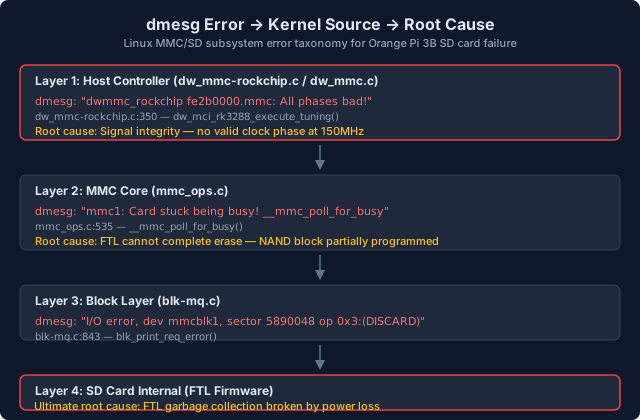
After reinstalling the system on the "healthy" SD card, the new system booted but apt was painfully slow. dmesg revealed a flood of errors. Let me trace each one through the Linux kernel source code to show exactly where and why it's generated.
Error 1: "All phases bad!" — Tuning Failure at 150MHz
The first error appears during SD card initialization:
[15.548378] dwmmc_rockchip fe2b0000.mmc: All phases bad!
[15.554788] mmc1: tuning execution failed: -EIO
[15.554804] mmc1: error -5 whilst initialising SD card
Source: drivers/mmc/host/dw_mmc-rockchip.c:350, function dw_mci_rk3288_execute_tuning()
┌─────────────────────────────────────────────────────────────────┐
│ dw_mci_rk3288_execute_tuning(slot, opcode)                      │
│ dw_mmc-rockchip.c:282                                            │
├─────────────────────────────────────────────────────────────────┤
│                                                                  │
│  for (i = 0; i < num_phases; ) {        ← try each phase        │
│    │                                                              │
│    ▼                                                              │
│  rockchip_mmc_set_phase(host, true, phase)  ← set clock phase    │
│    │                                                              │
│    ▼                                                              │
│  mmc_send_tuning(mmc, opcode, NULL)  ← send CMD19/CMD21          │
│    │                                                              │
│    ▼                                                              │
│  v = !mmc_send_tuning(...)           ← true = phase works        │
│    │                                                              │
│    ├── v=true  → record valid range[start..end]                  │
│    │             increment i by 1                                 │
│    │                                                              │
│    └── v=false → skip 20 degrees (optimization)                  │
│                  increment i by (20 * num_phases / 360)           │
│                                                                  │
│  }                                                                │
│    │                                                              │
│    ▼                                                              │
│  if (range_count == 0)                    ← NO valid phase!      │
│    │                                                              │
│    ▼                                                              │
│  dev_warn(host->dev, "All phases bad!")     ← LINE 350           │
│  ret = -EIO                                                    │
└─────────────────────────────────────────────────────────────────┘
The Rockchip SDHCI driver tries every clock phase (typically 360 steps covering 360 degrees) to find one where the card can reliably sample data at 150MHz (UHS-I SDR104 mode). If signal integrity is too poor — due to PCB trace length mismatch, power ripple, or card quality — no phase works. The driver prints "All phases bad!" and the card falls back to 50MHz High Speed mode.
In our case, the card successfully initialized at 50MHz after this failure. But the signal integrity issues that caused tuning failure also contribute to data errors during high-speed operations.
Error 2: "Card stuck being busy!" — Erase Operation Timeout
Once the system was running, dmesg began flooding with:
[534.136848] mmc1: Card stuck being busy! __mmc_poll_for_busy
[534.136955] I/O error, dev mmcblk1, sector 5890048 op 0x3:(DISCARD) flags 0x0
Source: drivers/mmc/core/mmc_ops.c:535, function __mmc_poll_for_busy()
┌─────────────────────────────────────────────────────────────────┐
│ __mmc_poll_for_busy(host, period_us, timeout_ms, busy_cb)       │
│ mmc_ops.c:510                                                     │
├─────────────────────────────────────────────────────────────────┤
│                                                                  │
│  timeout = jiffies + msecs_to_jiffies(timeout_ms) + 1            │
│  udelay = 32us (initial polling interval)                        │
│                                                                  │
│  do {                                                            │
│    ├── expired = time_after(jiffies, timeout)                    │
│    ├── busy_cb(cb_data, &busy)   ← sends CMD13, checks state    │
│    │                                                              │
│    ├── if (expired && busy)              ← TIMEOUT + STILL BUSY  │
│    │     │                                                          │
│    │     ▼                                                          │
│    │   pr_err("Card stuck being busy!")    ← LINE 535            │
│    │   return -ETIMEDOUT                                          │
│    │                                                              │
│    └── if (busy) {                                               │
│          usleep_range(udelay, udelay*2)  ← exponential backoff   │
│          udelay *= 2                     ← 32→64→128...→32768us  │
│        }                                                          │
│  } while (busy);                                                 │
│                                                                  │
│  return 0;  ← card no longer busy, erase completed               │
└─────────────────────────────────────────────────────────────────┘
This function is called after every erase/discard operation. It sends CMD13 (SEND_STATUS) repeatedly to check if the card has finished the internal erase. The polling interval starts at 32μs and doubles (exponential backoff) up to 32,768μs. If the timeout expires and the card is still busy, it prints "Card stuck being busy!" and returns -ETIMEDOUT.
The timeout value is calculated by mmc_erase_timeout() based on the card's erase group size and the number of groups being erased. For a 64GB card, this can be several seconds. But if the FTL is stuck in an infinite retry loop trying to erase a partially-programmed block, no timeout is long enough.
Error 3: "Timeout sending command (cmd 0x202000)" — CMD Start Bit Timeout
When the failure is severe enough, even command transmission fails:
[682.389886] mmc_host mmc1: Timeout sending command (cmd 0x202000 arg 0x0 status 0x80202000)
Source: drivers/mmc/host/dw_mmc.c:248, function mci_send_cmd()
┌─────────────────────────────────────────────────────────────────┐
│ mci_send_cmd(slot, cmd, arg)                                     │
│ dw_mmc.c:234                                                      │
├─────────────────────────────────────────────────────────────────┤
│                                                                  │
│  1. mci_writel(host, CMDARG, arg)       ← write argument reg    │
│     wmb()                               ← drain write buffer    │
│                                                                  │
│  2. dw_mci_wait_while_busy(host, cmd)   ← wait for card ready   │
│                                                                  │
│  3. mci_writel(host, CMD, SDMMC_CMD_START | cmd)                │
│     │                                    ← set START bit        │
│     ▼                                                            │
│                                                                  │
│  4. readl_poll_timeout_atomic(CMD_REG, cmd_status,               │
│                               !(cmd_status & SDMMC_CMD_START),   │
│                               1us, 500ms)                        │
│     │                                    ← wait for HW to clear │
│     │                                      START bit            │
│     ▼                                                            │
│                                                                  │
│  if timeout:                                                     │
│    dev_err("Timeout sending command (cmd %#x arg %#x status %#x)"│
│            cmd, arg, cmd_status)          ← LINE 248             │
│                                                                  │
│  0x202000 = SDMMC_CMD_START | MMC_ERASE (CMD38) | flags        │
└─────────────────────────────────────────────────────────────────┘
The DesignWare MMC controller sets the SDMMC_CMD_START bit to begin command transmission. Hardware automatically clears this bit when the command is sent. If the card doesn't respond — because the FTL is stuck in an internal operation — the bit never clears. After 500ms of polling, the driver gives up and prints the timeout.
The value 0x202000 decodes as: SDMMC_CMD_START (bit 0) | MMC_ERASE (CMD38 = 0x26) shifted to bits 6-11 | command flags. This tells us the timed-out command was CMD38 (ERASE).
Error 4: "I/O error ... DISCARD" — Block Layer Error Report
The error that userspace sees comes from the block layer:
[534.136955] I/O error, dev mmcblk1, sector 5890048 op 0x3:(DISCARD) flags 0x0 phys_seg 1 prio class 2
Source: block/blk-mq.c:843, function blk_print_req_error()
┌─────────────────────────────────────────────────────────────────┐
│ Complete DISCARD call chain (4 layers)                           │
├─────────────────────────────────────────────────────────────────┤
│                                                                  │
│  Layer 1: Block Layer (block/blk-mq.c)                           │
│  ┌─────────────────────────────────────────────────────────┐    │
│  │ REQ_OP_DISCARD request queued                            │    │
│  │         │                                                │    │
│  │         ▼                                                │    │
│  │ mmc_blk_issue_rq() → mmc_blk_issue_discard_rq()         │    │
│  └─────────┼───────────────────────────────────────────────┘    │
│            ▼                                                      │
│  Layer 2: MMC Block (drivers/mmc/core/block.c:1257)              │
│  ┌─────────────────────────────────────────────────────────┐    │
│  │ mmc_blk_issue_discard_rq(mq, req)                        │    │
│  │         │                                                │    │
│  │         ▼                                                │    │
│  │ mmc_blk_issue_erase_rq(mq, req, DISCARD, SD_DISCARD_ARG) │    │
│  │         │                                                │    │
│  │         ▼                                                │    │
│  │ mmc_erase(card, from, nr, arg)                           │    │
│  │         │                                                │    │
│  │         ▼                                                │    │
│  │ status = BLK_STS_IOERR  ← if erase failed                │    │
│  │         │                                                │    │
│  │         ▼                                                │    │
│  │ blk_mq_end_request(req, BLK_STS_IOERR)                   │    │
│  └─────────┼───────────────────────────────────────────────┘    │
│            ▼                                                      │
│  Layer 3: MMC Core (drivers/mmc/core/core.c:1777)                │
│  ┌─────────────────────────────────────────────────────────┐    │
│  │ mmc_erase() → mmc_do_erase()                             │    │
│  │         │                                                │    │
│  │         ├── CMD32 (SD_ERASE_WR_BLK_START)                │    │
│  │         ├── CMD33 (SD_ERASE_WR_BLK_END)                  │    │
│  │         └── CMD38 (MMC_ERASE)                            │    │
│  │              │                                           │    │
│  │              ▼                                           │    │
│  │         mmc_poll_for_busy() → CMD13 until not busy       │    │
│  │              │                                           │    │
│  │              └── -ETIMEDOUT → "Card stuck being busy!"   │    │
│  └─────────┼───────────────────────────────────────────────┘    │
│            ▼                                                      │
│  Layer 4: Error Report (block/blk-mq.c:843)                       │
│  ┌─────────────────────────────────────────────────────────┐    │
│  │ blk_print_req_error(req, BLK_STS_IOERR)                  │    │
│  │         │                                                │    │
│  │         ▼                                                │    │
│  │ printk_ratelimited(KERN_ERR                              │    │
│  │   "I/O error, dev %s, sector %llu op 0x%x:(%s) ..."     │    │
│  │                                                          │    │
│  │ 0x3 = REQ_OP_DISCARD                                     │    │
│  └──────────────────────────────────────────────────────────┘    │
└─────────────────────────────────────────────────────────────────┘
The op 0x3 in the error message is REQ_OP_DISCARD — the block layer's TRIM/unmap operation. This error is the end result of a 4-layer failure chain: block request → MMC block driver → MMC core → card internal FTL.
Is Your SD Card Controller the Hidden Culprit?
The SD card is not a passive storage device. Inside that tiny package is a complete embedded system:
┌─────────────────────────────────────────────────────────────┐
│                    SD Card Internal Architecture              │
│                                                             │
│  ┌─────────────────────────────────────────────────────┐   │
│  │           SD Card Controller (MCU + FTL)             │   │
│  │                                                       │   │
│  │  ┌──────────┐  ┌──────────────┐  ┌──────────────┐   │   │
│  │  │ CPU Core │  │ FTL Firmware │  │ ECC Engine   │   │   │
│  │  │ (8/16bit)│  │ (Mask ROM)   │  │ (BCH/LDPC)  │   │   │
│  │  └──────────┘  └──────────────┘  └──────────────┘   │   │
│  │                                                       │   │
│  │  ┌──────────┐  ┌──────────────┐  ┌──────────────┐   │   │
│  │  │ SRAM     │  │ DRAM Cache   │  │ ROM (FW)     │   │   │
│  │  │ 32-256KB │  │ 0-8MB       │  │ 64-256KB     │   │   │
│  │  │ (L2P     │  │ (Write       │  │ (Boot code)  │   │   │
│  │  │  cache)  │  │  buffer)     │  │              │   │   │
│  │  └──────────┘  └──────────────┘  └──────────────┘   │   │
│  └─────────────────────────────────────────────────────┘   │
│                           │                                 │
│                    NAND Interface (8-bit)                    │
│                           │                                 │
│  ┌─────────────────────────────────────────────────────┐   │
│  │           NAND Flash Array                           │   │
│  │  ┌─────────┐ ┌─────────┐ ┌─────────┐ ┌─────────┐   │   │
│  │  │ SLC     │ │ SLC     │ │ TLC     │ │ TLC     │   │   │
│  │  │ Cache   │ │ Cache   │ │ Main    │ │ Main    │   │   │
│  │  └─────────┘ └─────────┘ └─────────┘ └─────────┘   │   │
│  └─────────────────────────────────────────────────────┘   │
└─────────────────────────────────────────────────────────────┘
The FTL (Flash Translation Layer) firmware performs five critical functions:
- Address mapping: Translates logical block addresses (LBA) to physical NAND locations
- Wear leveling: Distributes writes evenly across all NAND blocks
- Garbage collection: Reclaims invalid pages by erasing blocks
- Bad block management: Marks and replaces failed blocks
- Power-loss recovery: Attempts to rebuild consistent state after unexpected power loss
When power is lost during a garbage collection operation, the FTL may have:
- Partially moved valid data from source to destination block
- Updated the L2P table for some pages but not others
- Left the source block in an indeterminate state
On next power-up, the FTL attempts to recover by scanning NAND metadata. But if the metadata itself was being written when power was lost, recovery fails. The FTL enters a degraded state where it can read existing data but cannot reliably perform new erase operations.
Why sequential write is normal but random write is 9× slower. Sequential writes go to the SLC cache — a small area of NAND operated in single-level-cell mode for speed. The FTL absorbs these writes and folds them to TLC later. Random writes, however, trigger garbage collection: the FTL must find free blocks, erase them, and move valid data. With a broken GC process, every random write triggers a timeout-and-retry cycle.
How Do You Quantify the Damage?
To confirm the diagnosis, I ran comparative benchmarks between the damaged 64GB card and a known-healthy 16GB card.
Test setup: Ubuntu PC, USB 2.0 card reader, fio 3.33
# Random 4K write (simulates apt behavior)
fio --name=randwrite --ioengine=libaio --iodepth=32 \
  --rw=randwrite --bs=4k --size=256M --numjobs=4 --runtime=30 \
  --filename=/dev/sdX --direct=1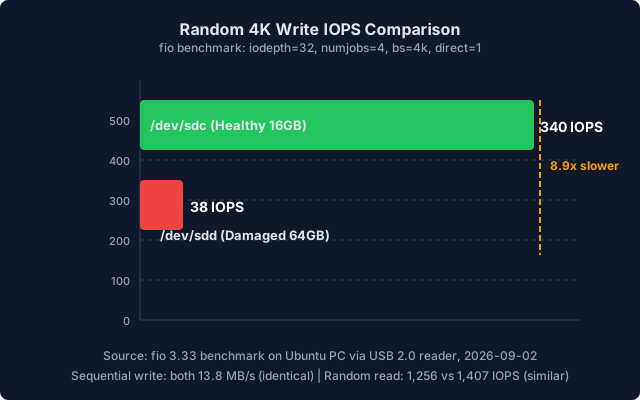
| Metric | Healthy 16GB | Damaged 64GB | Difference |
|---|---|---|---|
| Sequential Write | 13.8 MB/s | 13.8 MB/s | None |
| Sequential Read | 36.2 MB/s | 34.1 MB/s | ~6% |
| Random 4K Read | 1,256 IOPS | 1,407 IOPS | +12% |
| Random 4K Write | 340 IOPS | 38 IOPS | -89% |
The data tells a clear story: sequential operations and random reads are unaffected. Only random writes — which require the FTL to perform garbage collection and block erasure — are devastated. This is the signature of FTL corruption, not NAND degradation.
Why apt is slow. Package installation involves thousands of small file writes (uncompressed package files, dpkg database updates, iconv conversions). These are random I/O patterns that trigger constant garbage collection. With the FTL broken, each write triggers a timeout-retry cycle, turning a 5-second install into 45 seconds.
Can You Fix a Broken FTL?
I tried four approaches. Here's what works and what doesn't:
Method 1: Full Overwrite (dd zero)
# WARNING: This will kernel panic if run on a mounted system card!
sudo dd if=/dev/zero of=/dev/mmcblk1 bs=4M status=progress conv=fsyncResult: Risky. If the SD card is your root filesystem, this immediately destroys the running kernel. Even from a USB boot, the results are mixed — it may force the FTL to rebuild its mapping table, but partially-programmed blocks may survive the overwrite.
Method 2: Secure Erase / Sanitize
# Requires native SD slot (not USB reader)
sudo mmc extcsd read /dev/mmcblk1 | grep -i "sanitize\|erase"
sudo mmc sanitize /dev/mmcblk1Result: The most thorough reset — tells the card firmware to erase all data and rebuild FTL metadata. But many consumer cards don't support sanitize, and USB readers can't send the required commands.
Method 3: Disable TRIM (Recommended Workaround)
# Immediate effect
sudo mount -o remount,nodiscard /

# Permanent: edit /etc/fstab
# Change: defaults,x-systemd.growfs
# To: defaults,nodiscard,x-systemd.growfsResult: This is the most practical fix. By disabling TRIM, you stop sending DISCARD commands to the card. The FTL's broken garbage collection is no longer triggered by the filesystem. Performance improves because the card only handles read and write commands, not erase. The downside: no wear leveling optimization, and the card may fill up faster.
Method 4: Underclock to 50MHz
/* Device tree overlay: /boot/overlays/sd-50mhz.dts */
&sdmmc0 {
    max-frequency = <50000000>;  /* 50MHz instead of 150MHz */
};Result: Reduces signal integrity issues that compound the FTL problems. The card runs slower but more stably. Combined with nodiscard, this gives the best chance of continued use.
The Hard Truth
FTL corruption cannot be truly fixed by the user. The firmware inside the SD card is proprietary and there's no factory-reset mechanism available to consumers. The best you can do is work around the broken functionality.
For critical applications, replace the card. For non-critical use, disabling TRIM and underclocking can extend the card's useful life.
How Do You Prevent This Nightmare?
Filesystem-Level Protection
# Reduce journal commits (fewer writes)
mount -o commit=600 /dev/mmcblk1p2 /mnt

# Disable atime updates (fewer writes)
mount -o noatime /dev/mmcblk1p2 /mnt

# Errors → read-only (prevents further damage)
mount -o errors=remount-ro /dev/mmcblk1p2 /mnt

# Disable TRIM (avoids triggering broken GC)
mount -o nodiscard /dev/mmcblk1p2 /mnt
System Architecture Protection
Recommended: Read-Only RootFS + OverlayFS

┌─────────────────────────────────────────┐
│  squashfs (read-only root filesystem)   │  ← Cannot be corrupted by power loss
├─────────────────────────────────────────┤
│  tmpfs overlay (writable layer)         │  ← All writes go to RAM
└─────────────────────────────────────────┘
         │
         ▼
    On power loss: overlay is lost,
    but root filesystem is intact.
    System boots cleanly next time.
Hardware Protection
| Measure | Cost | Effectiveness |
|---|---|---|
| Supercapacitor UPS | $30-100 | High — gives time to flush buffers |
| Power monitoring IC | $15-35 | Medium — detects power loss, triggers emergency sync |
| Industrial SLC/pSLC card | $150-350 | High — better FTL, wider temperature range |
| Quality power supply ($60-150) | $60-150 | Medium — reduces voltage ripple |
SD Card Selection for Embedded Linux
| Use Case | Recommended Type | Why |
|---|---|---|
| Root filesystem (frequent writes) | Industrial SLC/pSLC | High reliability, power-loss tolerant |
| Data storage (moderate writes) | Industrial MLC | Balance of endurance and cost |
| Read-only/boot | Consumer TLC | Low cost, read-mostly workload |
| Critical data | High-endurance / A-grade | Higher write endurance rating |
Frequently Asked Questions
Can fsck fix SD card corruption?
fsck.ext4 can fix filesystem-level corruption (inode errors, directory corruption, journal replay). But it cannot fix FTL-level corruption — the SD card controller's internal state. If fsck finds no errors but the card is still slow, the problem is below the filesystem layer.
Why does my SD card show 0 bad blocks but is still slow?
f3 and badblocks test the NAND physical layer. They write patterns and read them back. But they don't test the FTL's garbage collection efficiency. A card can have perfect NAND but a broken FTL — the mapping table is corrupted, so erase operations fail even though all pages read correctly.
Should I disable TRIM on SD cards?
For consumer-grade SD cards in embedded systems, yes. TRIM commands trigger the card's garbage collection, which is the most failure-prone operation. Disabling TRIM reduces write amplification and avoids triggering broken GC. The tradeoff is slightly reduced long-term endurance.
How do I check my SD card's health in Linux?
# Read EXT CSD registers (requires native SD slot, not USB)
sudo apt install mmc-utils
sudo mmc extcsd read /dev/mmcblk1

# Key fields to check:
# - LIFE_TIME_EST_TYP_A/B: 0x01=healthy, 0x0A+=near end-of-life
# - PRE_EOL_INFO: 0x01=normal, 0x03=urgent
What's the best SD card for embedded Linux?
For root filesystem use: Industrial-grade SLC or pSLC cards from manufacturers like Swissbit, ATP, or Delkin. They offer power-loss protection, wide temperature ranges, and higher write endurance (10-100× consumer cards). For read-only or light-write applications, quality consumer cards (SanDisk Industrial, Samsung PRO Endurance) are acceptable.
Conclusion
The four dmesg errors that plagued my Orange Pi 3B were not random — they were a precise diagnostic trail leading from the host controller through the MMC core, through the block layer, down to the SD card's broken FTL firmware.
The key insight: SD card failures are not always physical. NAND flash can be perfectly healthy while the FTL firmware is permanently corrupted by power loss. Standard tools like f3 and fsck only test the physical layer — they miss FTL corruption entirely.
The diagnosis methodology:
- Read
dmesg— identify the error pattern and frequency - Map errors to kernel source — determine which subsystem is failing
- Benchmark with
fio— random write IOPS reveals FTL health - Check EXT CSD — read the card's internal health registers
- Decide: workaround or replace — disable TRIM/underclock, or install a new card
For embedded Linux developers, the lesson is clear: treat SD cards as unreliable storage, design your system to tolerate their failure, and always have a recovery plan that doesn't depend on the card being writable.
Sources
- Linux Kernel 6.1,
drivers/mmc/host/dw_mmc-rockchip.c,drivers/mmc/host/dw_mmc.c,drivers/mmc/core/mmc_ops.c,drivers/mmc/core/core.c,drivers/mmc/core/block.c,block/blk-mq.c - SD Association, "Physical Layer Simplified Specification", https://www.sdcard.org/downloads/pls/
- Linux Kernel Documentation, MMC/SD subsystem, https://www.kernel.org/doc/html/latest/driver-api/mmc/index.html
- USENIX FAST '13, "Understanding the Impact of Power Loss on Flash Memory"
- JEDEC JESD218, SSD endurance testing standard
- Microsoft Research, "Characterizing Flash: Observations from Microbenchmarks", 2009
- fio 3.33 benchmark results, Orange Pi 3B + 64GB SDXC (SL64G), 2026-09-02