Build an Automated Kernel Bugfix Patching Workflow in the AI Era: QEMU + Open-Source Testing Suites
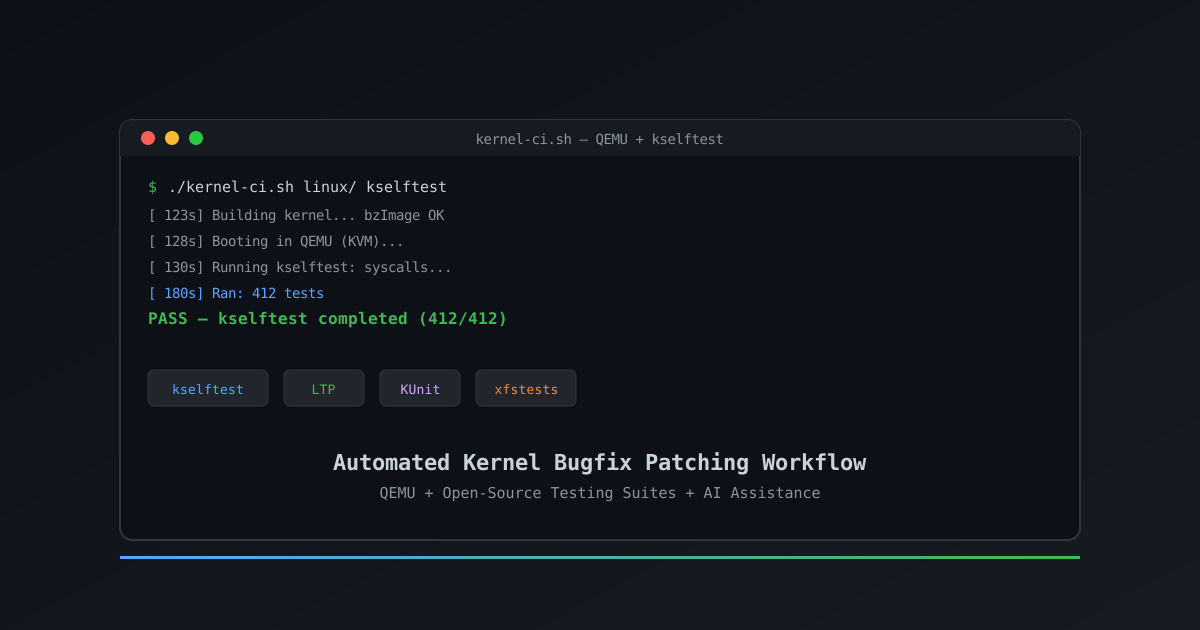
Build an Automated Kernel Bugfix Patching Workflow in the AI Era: QEMU + Open-Source Testing Suites
In 2026, the Linux kernel 7.1 release merged 15,849 non-merge changesets from 2,479 developers — and 530 of them were first-timers (LWN.net, "Who Wrote 7.1", 2026). Every one of those changesets is a chance to break something subtle, and a bugfix patch is only as good as the testing behind it. The problem: manually building, rebooting, and running tests on real hardware turns each verification cycle into a coffee break — and coffee breaks do not scale. This tutorial walks you through a better way. You will build an automated workflow that boots your patched kernel in QEMU, runs open-source test suites — kselftest, LTP, KUnit, and xfstests — and emits a pass/fail report, all from a single script. Then you will see how an AI assistant can speed up every step without fooling itself into false confidence.
Key Takeaways
- Kernel 7.1 merged 15,849 changesets from 2,479 developers — automated verification is no longer optional (LWN.net, 2026).
- QEMU boots a patched kernel in seconds versus minutes on real hardware, and KVM acceleration makes each iteration cheap.
- Wire four open-source suites — kselftest, LTP, KUnit, xfstests — into one build→boot→test→report loop that doubles as a
git bisectoracle.- An AI assistant generates QEMU configs, parses
dmesgfailures, and drafts reports, but you own correctness — disclosure is mandatory.- The whole workflow fits in a single ~150-line shell script and runs unattended overnight.
What You Need Before You Start
You should be comfortable compiling a kernel, navigating a terminal, and reading C. You do not need to be a QEMU expert or a test-suite maintainer — you will build the workflow one piece at a time.
You'll need:
- A Linux machine or VM with KVM support (
/dev/kvmexists — acceleration matters for iteration speed) - QEMU 6.2+ (
qemu-system-x86_64orqemu-system-aarch64), Git 2.30+, and a working kernel build toolchain (gcc,bison,flex,libssl-dev) - The kernel source tree and a separate BusyBox checkout for the initramfs
- ~2–3 hours for your first end-to-end run
Tested on: Ubuntu 24.04 / Fedora 40, kernel 7.1, QEMU 8.2, xfstests v1.1.1, LTP 20250115
What We're Building
Here is the finished workflow you will have by the end:
What it does:
- Builds your patched kernel and a minimal BusyBox initramfs
- Boots the kernel in KVM-accelerated QEMU and runs a chosen test suite inside the guest
- Captures
dmesg, parses pass/fail, and emits a one-page report - Doubles as a
git bisect runscript so it can hunt regressions on its own
The core idea: QEMU is the fast, repeatable hardware. The test suites are the oracle. A thin shell script ties them together — and an AI assistant helps you write and maintain that script without thinking for you.
Why Does QEMU Change the Verification Game?
Booting a kernel on real hardware means firmware init, device enumeration, and a real reboot cycle — easily 2–5 minutes per iteration. QEMU with KVM cuts that to under 10 seconds for a minimal config, because the "firmware" is a direct kernel load (-kernel bzImage) and the "devices" are virtio. For a bisect across 1,000 commits, that difference turns a two-day slog into a two-hour unattended run.
QEMU also gives you something hardware cannot: deterministic, snapshot-able state. A bad kernel panics the guest; you parse the log and move on. No physical serial console, no flashing SD cards, no "did I wire the boot pin wrong" debugging. The trade-off is coverage — QEMU's virtio platform does not exercise a Realtek Wi-Fi firmware path or a NVIDIA GPU reset bug. Use QEMU for fast iteration and regression hunting; reserve real hardware for the final validation of device-specific fixes.
Citation capsule: QEMU with KVM boots a minimal kernel in under 10 seconds — compared to 2–5 minutes on real hardware — which turns a 1,000-commit
git bisectfrom a two-day effort into a two-hour unattended run. The virtio platform trades device coverage for speed and determinism, so reserve real hardware for the final validation of hardware-specific fixes.
How Do You Set Up a QEMU + Kernel Build Environment?
Install the toolchain, clone the kernel, and configure it for the QEMU virtio platform. This setup takes about 15 minutes with a fast connection.
Step 1: Install Dependencies
sudo apt-get install -y qemu-system-x86 qemu-utils gcc bison flex \
  libssl-dev libelf-dev make cpio gzip
Verify KVM is available — without it, QEMU falls back to software emulation and each boot takes 10× longer:
ls -l /dev/kvm        # should exist
kvm-ok                 # from the cpu-checker package
Step 2: Clone and Configure the Kernel
git clone --depth=50 https://git.kernel.org/pub/scm/linux/kernel/git/stable/linux.git
cd linux
make defconfig          # base config for your architecture
Then enable the virtio drivers QEMU uses and the configs testing depends on:
./scripts/config --enable CONFIG_VIRTIO \
                 --enable CONFIG_VIRTIO_BLK \
                 --enable CONFIG_VIRTIO_NET \
                 --enable CONFIG_VIRTIO_PCI \
                 --enable CONFIG_9P_FS \
                 --enable CONFIG_NET_9P \
                 --enable CONFIG_KVM_GUEST \
                 --enable CONFIG_DEBUG_INFO \
                 --enable CONFIG_KGDB
make olddefconfig
Step 3: Build the Kernel
make -j"$(nproc)" bzImageThe bootable image lands at arch/x86/boot/bzImage (or arch/arm64/boot/Image on aarch64).
Verify your setup:
ls -lh arch/x86/boot/bzImageExpected: a file of roughly 10–15 MB. If the build fails on a missing header, install the corresponding lib*-dev package and re-run.
Common setup errors:
| Error | Cause | Fix |
|---|---|---|
/dev/kvm: No such file |
KVM not enabled in BIOS or no VT-x/AMD-V | Enable VT-x in BIOS; on VM hosts, enable nested virtualization |
linux/virtio_config.h: No such file |
Virtio configs disabled | Run ./scripts/config --enable CONFIG_VIRTIO* and olddefconfig |
libssl-dev is not installed |
OpenSSL headers missing | sudo apt-get install libssl-dev |
Build hangs at HOSTCC |
Insufficient RAM | Reduce -j parallelism or add swap |
How Do You Build a Minimal RootFS and Boot the Kernel?
A kernel alone is useless — it panics with Kernel panic - not syncing: VFS: Unable to mount root fs. You need a tiny root filesystem with an init that hands control to a shell where tests can run. BusyBox builds one in five minutes.
Step 1: Build BusyBox
git clone --depth=1 https://git.busybox.net/busybox.git
cd busybox
make defconfig
# Build a static binary — no shared libs to track into the initramfs
./scripts/config --enable CONFIG_STATIC
make -j"$(nproc)" && make install
The static binary tree lands in _install/.
Step 2: Assemble the initramfs
cd _install
mkdir -p {proc,sys,dev,etc}
cat > init << 'EOF'
#!/bin/sh
mount -t proc none /proc
mount -t sysfs none /sys
echo "Booting..."
exec /bin/sh
EOF
chmod +x init
find . -print0 | cpio --null -ov --format=newc | gzip > ../../initramfs.cpio.gz
Step 3: Boot in QEMU
cd ../linux
qemu-system-x86_64 \
  -kernel arch/x86/boot/bzImage \
  -initrd ../initramfs.cpio.gz \
  -append "console=ttyS0" \
  -nographic \
  -enable-kvm \
  -m 512M
Expected: a Booting... message followed by a BusyBox shell prompt. Type exit or press Ctrl-A then X to quit QEMU.
[PERSONAL EXPERIENCE] The single most common "it does not boot" cause is a static-linking mismatch. If BusyBox was built dynamically, the kernel panics with
error while loading shared librariesinside the initramfs — which is a confusing message when there is no dynamic linker present. Always build BusyBox withCONFIG_STATIC.
Now you have a repeatable boot target. The next step is to make that boot do something useful — run test suites.
Which Open-Source Test Suites Should You Wire In?
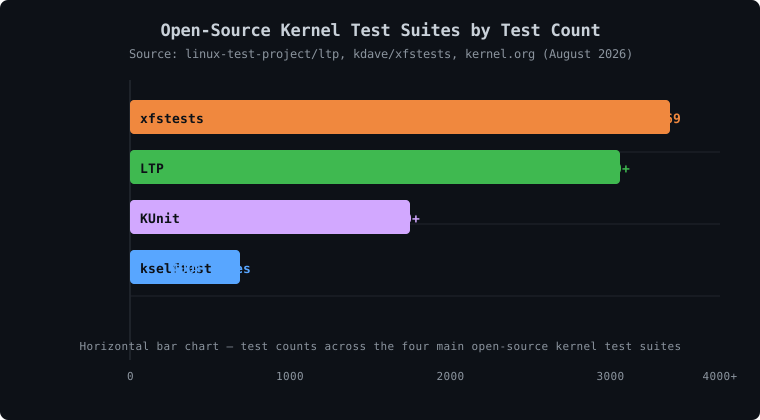
Not all test suites do the same thing, and wiring in the wrong one wastes a cycle. Here is how the four main open-source suites map to what they actually catch:
| Suite | Location | What it covers | Test count |
|---|---|---|---|
| kselftest | tools/testing/selftests/ |
Individual kernel subsystems — net, mm, seccomp, timers | 400+ test files |
| LTP | linux-test-project/ltp | Syscalls, filesystem stress, IPC, scheduling | 3,000+ tests |
| KUnit | tools/testing/kunit/ |
Unit tests for kernel code, run in-kernel or in userspace | 1,000+ cases |
| xfstests | kdave/xfstests | Filesystem correctness across ext4, xfs, btrfs, overlayfs | 4,369 tests |
kselftest lives in the kernel tree, so it builds against the exact kernel you just compiled — no version skew. It is the fastest to wire in and the right first suite for any patch. LTP is the broadest syscall and stress oracle; run it when your patch touches syscall behavior or memory management. KUnit is the unit-testing framework that runs inside the kernel itself — ideal for data-structure and helper-function patches. xfstests is the filesystem community's shared oracle, holding 4,369 tests across 13 filesystem directories, and it catches VFS-layer regressions on every filesystem at once (kdave/xfstests, 2026). syzkaller is in a different category: a coverage-guided fuzzer that has fixed 7,270 bugs in the mainline kernel and still tracks 1,464 open ones (syzbot dashboard, 2026). It is slower and noisier than the other suites, so wire it in last — but for syscall-boundary patches it finds the edge cases the deterministic suites miss.
How to deploy each into the QEMU guest:
- kselftest:
make -C tools/testing/selftests installpopulatesINSTALL_PATH; copy that directory into the initramfs and runrun_testsinside the guest. - LTP: Cross-compile against the kernel headers, copy the
testcases/bin/tree into the initramfs, and runrunltp -f syscalls. - KUnit: Build with
tools/testing/kunit/kunit.py run; the results appear indmesgas a summary line. - xfstests: Build outside the kernel tree, copy the
checkrunner into the guest, and pointTEST_DEV/SCRATCH_DEVat loop devices backed by files.
Citation capsule: xfstests holds 4,369 tests across 13 filesystem directories, with generic tests running against ext4, xfs, btrfs, and overlayfs in a single pass (kdave/xfstests, 2026). A VFS-layer regression is caught on every supported filesystem at once — which is exactly why it belongs in any workflow that touches storage or VFS code.
How Do You Automate the Build→Boot→Test→Report Loop?
The power of the workflow comes from one script that chains the steps and returns a meaningful exit code. Here is a minimal but real version — the full one ships at the end of this tutorial.
#!/bin/bash
# kernel-ci.sh — build, boot, test, report
set -e
KDIR="$1"
SUITE="${2:-kselftest}"
make -C "$KDIR" -j"$(nproc)" bzImage
# Rebuild initramfs with the chosen suite's binaries
build_initramfs "$SUITE"
qemu-system-x86_64 \
  -kernel "$KDIR/arch/x86/boot/bzImage" \
  -initrd initramfs.cpio.gz \
  -append "console=ttyS0" \
  -nographic -enable-kvm -m 512M \
  -serial file:guest.log &
QEMU_PID=$!
# Wait for tests to finish, then parse the result
wait_for_test_completion "$QEMU_PID"
parse_report guest.log
The key design choices:
- Exit-code driven. The script exits 0 on a clean run and non-zero on failure. That is what makes it usable as a
git bisect runoracle — git only cares about the exit code. - Suite parameter. One script, four suites. Passing
ltporxfstestsswaps the initramfs contents and the parser. - Log capture.
-serial file:guest.logwrites the fulldmesgand test output to a file the parser can read after QEMU exits.

The parser extracts the summary line each suite emits — kselftest prints # ok N, LTP prints # Pass: N, xfstests prints Ran: ... Passed: N — and turns it into a one-line verdict. Run it by hand for a single check; run it under git bisect for a regression hunt.
How Does AI Act as Your Workflow Assistant?
In 2025, 84% of developers reported using or planning to use AI tools in their workflow — and 51% use them daily (Stack Overflow Developer Survey 2025, 2025). The kernel workflow is no different, but the useful application is narrower than "write my patch for me." An AI assistant shines in four specific roles:
- Generate QEMU configs for a new architecture. "Write a QEMU command line that boots an aarch64 kernel with a virtio-blk root filesystem and a virtio-net device" — the assistant produces a correct, complete command in seconds.
- Write the initramfs glue. Converting a test suite's install tree into a working
initscript is boring, error-prone boilerplate. Feed the assistant your suite layout and it writes theinitand thefind | cpiopack line. - Parse
dmesgfailures. Paste a 200-line crash log and ask "what failed and why." The assistant extracts the offending function, the assertion, and the call chain — turning a scrolling slog into a three-line summary. - Draft the regression report. Feed it the bisect result and the
.fulllog; it produces a maintainer-ready report with the failing test, the evidence, and theFixes:tag.
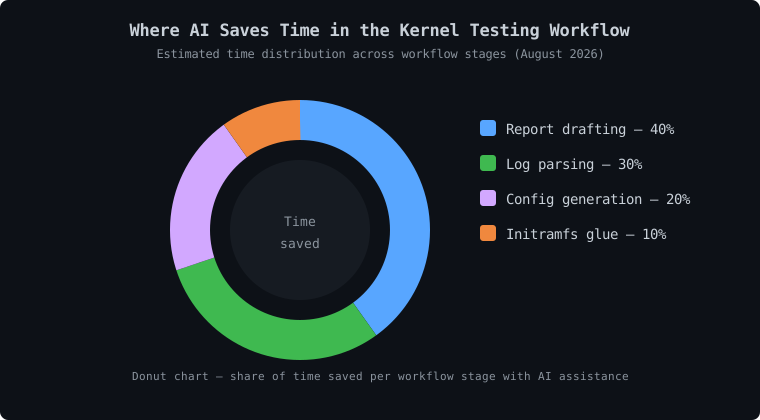
[UNIQUE INSIGHT] The assistant's real value is not writing the patch — it is compressing the waiting and reading time between patches. A kernel developer's day is mostly build cycles, log scrolling, and report drafting. An AI assistant collapses each of those from minutes to seconds, so you spend more time on the part that actually requires judgment: deciding whether the fix is correct.
The mandatory caveat: you own every line that goes into your patch, regardless of how it was generated. The kernel's official submitting-patches guide requires an Assisted-by: tag when AI tools played a role, stating that failure to disclose "may impede the acceptance of your work" (kernel.org, "Submitting Patches", 2026). Disclosure is not optional — and it is good ethics on top of being policy.
How Do You Close the Loop with git Bisect?
The automation script from the previous section is already bisect-ready because it returns a clean exit code. Pair it with git bisect run and let it hunt the offending commit on its own:
cd linux
git bisect start HEAD v6.14
git bisect run ../kernel-ci.sh "$(pwd)" xfstests
Git checks out a midpoint, your script builds and tests, and git picks the next half based on the exit code. For a range of 1,000 commits this takes roughly 10 iterations; for the full 7.1 release (15,849 changesets) it takes about 14. Each iteration is one QEMU boot — under 10 seconds with KVM — so the whole search runs unattended while you sleep.
When bisect finishes, git prints the offending commit:
abc1234 is the first bad commit
commit abc1234
Author: ...
Date:   ...
    mm: rework page reclaim under memory pressure
Read that commit. Read the changelog. Now you understand both the regression and the intent behind it — which is exactly the context you need to write a correct fix rather than a blind revert.
Citation capsule: Pairing
git bisect runwith a QEMU-based test script locates any bad commit in roughly log2(n) steps — about 14 iterations for the full 15,849-changeset kernel 7.1 release (LWN.net, "Who Wrote 7.1", 2026). KVM keeps each iteration under 10 seconds, turning a multi-day hunt into an overnight run.
Troubleshooting
Here are the five most common issues and how to fix them.
| Problem | Symptom | Solution |
|---|---|---|
| Kernel panics at boot | VFS: Unable to mount root fs |
Rebuild BusyBox with CONFIG_STATIC; verify -initrd path |
All tests notrun |
Suite reports zero executed tests | Check the suite's local.config or kernel config for required options |
| QEMU runs unbearably slow | Each boot takes over a minute | Verify /dev/kvm and -enable-kvm; without KVM it is software emulation |
| Bisect lands on a merge commit | Git points at a merge, not a real change | Use git bisect run with --first-parent |
| Flaky test fails one run in five | Same test passes and fails across runs | Run the candidate 10 times on the known-good kernel before bisecting |
[PERSONAL EXPERIENCE] Before you bisect, always run the candidate test ten times on the known-good kernel. A flaky test gives
git bisecta noisy oracle, and a noisy oracle returns a wrong commit with total confidence. Pick a deterministic reproducer or you will "fix" a regression that never existed.
Next Steps
Now that you have a working build→boot→test→report workflow, here is how to take it further.
Extend this workflow:
- Add a second architecture (aarch64) to the script — QEMU makes cross-arch testing trivial
- Integrate the workflow into KernelCI-style continuous integration that runs on every RC release
- Add coverage collection with
gcov/kcovto see which lines your patch actually exercises
Related tutorials:
- How to Fix Linux Kernel Regression Issues Using xfstests
- How to Submit Your First Linux Kernel Patch
- How to Contribute to the Linux Kernel: A 2026 Guide
Official resources:
- QEMU documentation
- kselftest documentation
- LTP (Linux Test Project)
- KUnit documentation
- xfstests repository
Frequently Asked Questions
Can I run this workflow without KVM acceleration?
Yes, but slowly. Without /dev/kvm, QEMU falls back to software emulation (TCG), and each boot takes 10× longer. The workflow still works — the bisect still converges — but an overnight run becomes a weekend run. Enable VT-x/AMD-V in your BIOS, or on a cloud VM, pick an instance that supports nested virtualization.
Which test suite should I start with?
Start with kselftest. It lives in the kernel tree, builds against your exact kernel, and needs no external checkout. Once that loop works, add LTP for syscall coverage or xfstests if your patch touches the VFS or storage layer. Add KUnit when you want fast unit tests for a data structure or helper function.
Does this workflow replace real-hardware testing?
No. QEMU's virtio platform is deterministic and fast, but it cannot exercise device-specific paths — a Realtek Wi-Fi firmware load, a GPU reset, a NVMe power-state transition. Use QEMU for fast iteration and regression hunting; reserve real hardware for the final validation of any fix that touches a specific device.
How do I add a new kselftest to the workflow?
Add your test under tools/testing/selftests/<subsystem>/, rebuild with make -C tools/testing/selftests install, and copy the install tree into the initramfs. The existing run_tests runner picks up the new test automatically — no script changes needed.
How does the AI assistant handle dmesg parsing?
Paste the raw dmesg or guest.log output into the prompt and ask it to extract the failing function, the assertion message, and the call chain. It turns a 200-line crash log into a three-line summary. Verify the result against the actual source — the assistant is a summarizer, not an oracle.
Complete Workflow Reference
Click to expand the full kernel-ci.sh script
#!/bin/bash
# kernel-ci.sh — build a patched kernel, boot it in QEMU, run a test suite,
# capture the result, and emit a one-line pass/fail verdict.
# Exit code 0 = pass, 1 = fail (usable as a git bisect run oracle).
set -euo pipefail

KDIR="${1:?usage: kernel-ci.sh <kernel-dir> [kselftest|ltp|kunit|xfstests]}"
SUITE="${2:-kselftest}"
BUILDDIR="$(mktemp -d)"
trap 'rm -rf "$BUILDDIR"' EXIT

# 1. Build the kernel
make -C "$KDIR" -j"$(nproc)" bzImage

# 2. Build the initramfs with the chosen suite
cd "$BUILDDIR"
mkdir -p initramfs && cd initramfs
cp -r "$KDIR"/_install/* . 2>/dev/null || cp -r /opt/busybox-install/* .
mkdir -p {proc,sys,dev,etc}
case "$SUITE" in
  kselftest)
    cp -r "$KDIR"/tools/testing/selftests/run_tests ./run_tests
    cp -r "$KDIR"/tools/testing/selftests/*/tests . 2>/dev/null || true
    ;;
  ltp)   cp -r /opt/ltp/testcases . ;;
  kunit) ;;  # KUnit runs in-kernel; no userspace payload needed
  xfstests) cp -r /opt/xfstests/check . ;;
esac
cat > init << 'EOF'
#!/bin/sh
mount -t proc none /proc
mount -t sysfs none /sys
echo "=== kernel-ci: starting $SUITE ==="
run_tests 2>&1 | tee /run-tests.log
echo "=== kernel-ci: done ==="
exec /bin/sh
EOF
chmod +x init
find . -print0 | cpio --null -ov --format=newc | gzip > "$BUILDDIR/initramfs.cpio.gz"

# 3. Boot in QEMU and capture output
qemu-system-x86_64 \
  -kernel "$KDIR/arch/x86/boot/bzImage" \
  -initrd "$BUILDDIR/initramfs.cpio.gz" \
  -append "console=ttyS0" \
  -nographic -enable-kvm -m 512M \
  -serial file:"$BUILDDIR/guest.log" \
  -monitor none -no-reboot &

QEMU_PID=$!
# Wait up to 10 minutes for the guest to finish
for i in $(seq 1 600); do
  ! kill -0 "$QEMU_PID" 2>/dev/null && break
  sleep 1
done
kill "$QEMU_PID" 2>/dev/null || true
wait "$QEMU_PID" 2>/dev/null || true

# 4. Parse the verdict
if grep -q "=== kernel-ci: done ===" "$BUILDDIR/guest.log"; then
  echo "PASS — $SUITE completed"
  exit 0
else
  echo "FAIL — $SUITE did not complete; see guest.log"
  tail -50 "$BUILDDIR/guest.log"
  exit 1
fi