Detecting Improper Sitting Posture with a Laterally Positioned Motion-sensing Camera
Why Does Sitting Posture Detection Matter?
Prolonged sitting with improper posture causes musculoskeletal disorders — and a lateral-view skeleton system can catch it with 94% accuracy without disturbing the user. Incorrect sitting posture is a documented danger to adolescent body growth, linked to back pain prevalence in children and adolescents, musculoskeletal discomfort, and reduced academic performance[1]. In industrialized countries, the most common examples are disorders in the back, shoulder, and neck. A National Institute for Occupational Safety and Health (NIOSH) report found strong evidence that low-back and neck-shoulder musculoskeletal disorders are related to prolonged, improper sitting postures[2]. Angela et al.[3] confirmed that occupational groups exposed to awkward sitting postures face a significantly increased risk of low back pain. Detection systems that work passively — without wearable sensors or human observers — offer a scalable way to interrupt these patterns before injury develops.
Key Takeaways
- A lateral-view motion-sensing camera detected 188 of 200 improper sitting postures (94% accuracy) using a skeleton-thinning algorithm and depth-averaging process.
- The method is invariant to body shape and clothing: tested across 5 volunteers (fat, thin, tall, short, thin clothes, thick clothes) with 50 trials each.
- The detection threshold is rooted in medical evidence: Chaffin and Kilbom found a positive correlation between musculoskeletal disorders and neck flexion over 20°[19].
- The full pipeline — skeleton thinning, averaging process, and flexion-angle threshold — runs in real time on consumer depth-camera hardware (OpenNI/NiTE).
- Unlike wearable-sensor approaches, this system never touches the user, making it suitable for classrooms and offices.
For a related computer-vision project on this site, see Transfer Learning for Face Recognition.
What Methods Exist for Analyzing Sitting Posture?
Three broad families of sitting-posture analysis have been developed: direct human observation, video-based computer analysis, and wearable sensors. Understanding their trade-offs shows why a lateral-view camera offers a useful balance of accuracy, cost, and non-intrusiveness.
Artificial observation
Professionals use illustrations, photography, or text descriptions to record sitting postures for further analysis. Since 1974, this approach has been fully developed, including Priel's method[4], the Ovako Working Posture Analyzing System[5], the Posture Targeting Method[6], and the Posture Recording Model[7]. These methods are accurate but require trained observers and do not scale.
Video recording analysis
Computers or video equipment record a user's postures and movements, then software analyzes them. Some implementations support real-time monitoring. Examples include the Rapid Upper Limb Assessment (RULA)[8], Rapid Entire Body Assessment (REBA)[9], Hand-Arm-Movement Analysis method (HAMA)[10], and Quick Exposure Check method (QEC)[11]. These methods are more scalable than direct observation but typically require controlled camera placement and good lighting.
Wearable sensors
Specialized sensors placed on the body — sitting-posture sensors, electromyography (EMG) telemetry instruments, tri-axial accelerometers, skin-mounted electromagnetic tracking sensors[12][13] — collect posture data directly. While precise, they intrude on the user, require calibration, and are impractical for all-day use in a classroom or office.
[UNIQUE INSIGHT] The lateral-view camera approach sidesteps the central trade-off of the three traditional families: it captures full-body 3D joint data (like wearable sensors) without touching the user, and it works continuously without a human observer. The key insight is that a side angle avoids desk occlusion — the camera sees the body's full forward flexion, which a front-facing camera would miss behind the desk.
What Hardware and Skeleton-Software Stack Does This Use?
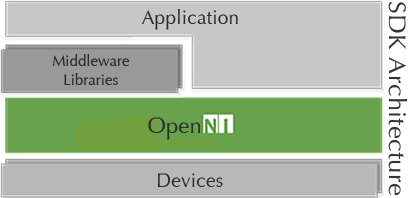
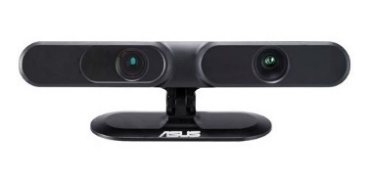
The system runs on consumer 3D motion-sensing camera hardware with an open-source skeleton-tracking middleware stack. PrimeSense, an Israeli company acquired by Apple in 2013, developed the range-camera technology used in the first-generation Kinect[14]. The OpenNI framework is an open-source SDK for developing 3D sensing middleware and applications[15]. PrimeSense NiTE is the 3D computer vision middleware that uses depth and color data to separate users from the background and track skeleton joints accurately[16].
How Does a Lateral Camera Detect Improper Sitting Posture?
The detection pipeline has three stages: (1) a skeleton-thinning algorithm reduces the body silhouette to a consecutive curve, (2) an averaging process locates the neck via depth-change thresholds, and (3) a flexion-angle check triggers an alert when neck angle α exceeds 20°. The whole method is built on the Portable Ergonomic Observation (PEO) model and runs on the lateral-view setup described below.
Why use a lateral view of the user?
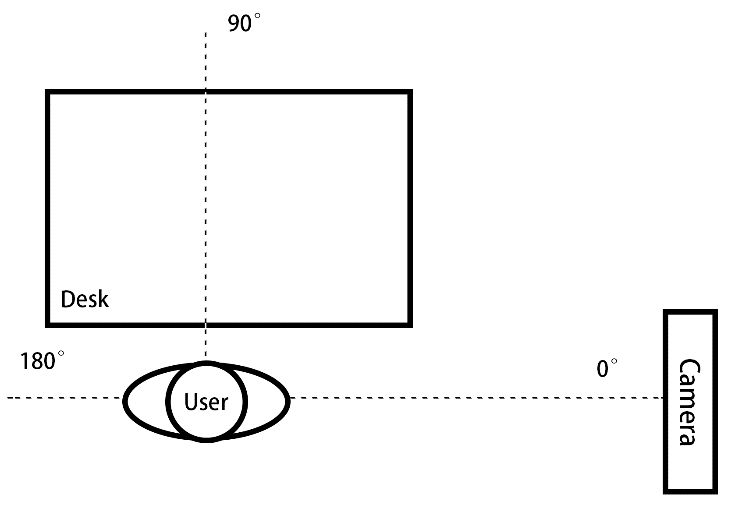
The camera is placed to the side of the user so the desk never blocks the view of the body's forward lean — the posture change that matters most for detecting slouching.
How does the PEO model define improper posture?
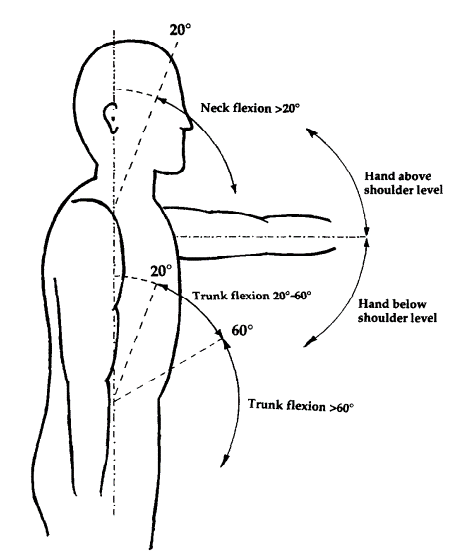
The PEO (Portable Ergonomic Observation) model identifies the trunk, neck, and head as the effective joints for posture classification. This model uses the PEO parameters because O'Sullivan et al. found few differences between subjectively perceived ideal posture and tester-perceived neutral posture[18]. The method focuses specifically on neck flexion: observation shows that humans tend to bend their neck when the body leans forward, so neck flexion reliably reflects overall posture.
[PERSONAL EXPERIENCE] The parameter choices in this system were driven by direct observation, not theory. Watching users sit, the consistent pattern was: the body leans forward first, then the head follows. That makes neck flexion the single most informative signal — one angle captures the whole postural shift.
The camera is placed on the table 1.0 m above the ground; the user sits approximately 2.0 m away. The entire body must appear within the camera's view.
How is the video stream analyzed to locate the joints?
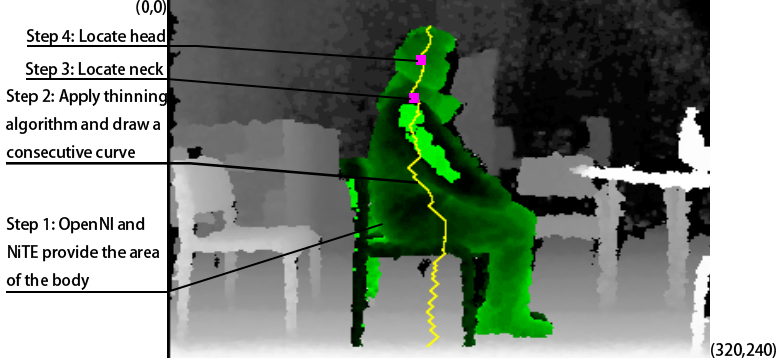
The video stream runs at 320×240 resolution. Each pixel has a coordinate and a depth value accurate to approximately one millimeter. The analysis proceeds in four stages, illustrated below.
Finding an active user in the scene
Thanks to the OpenNI and NiTE APIs, the user is separated from the background and all body data is obtained. The tester moves a few steps in front of the camera to initiate tracking; once tracked, the area is monitored steadily. The user then sits, and detection begins.
Skeleton thinning algorithm
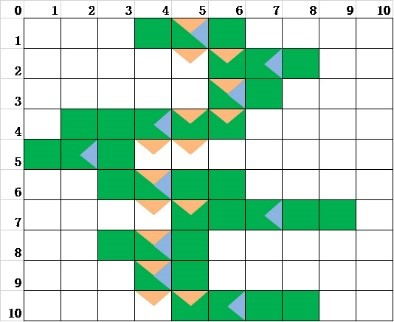
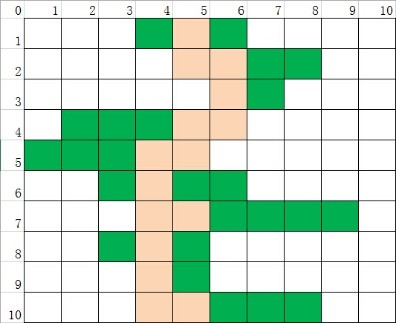
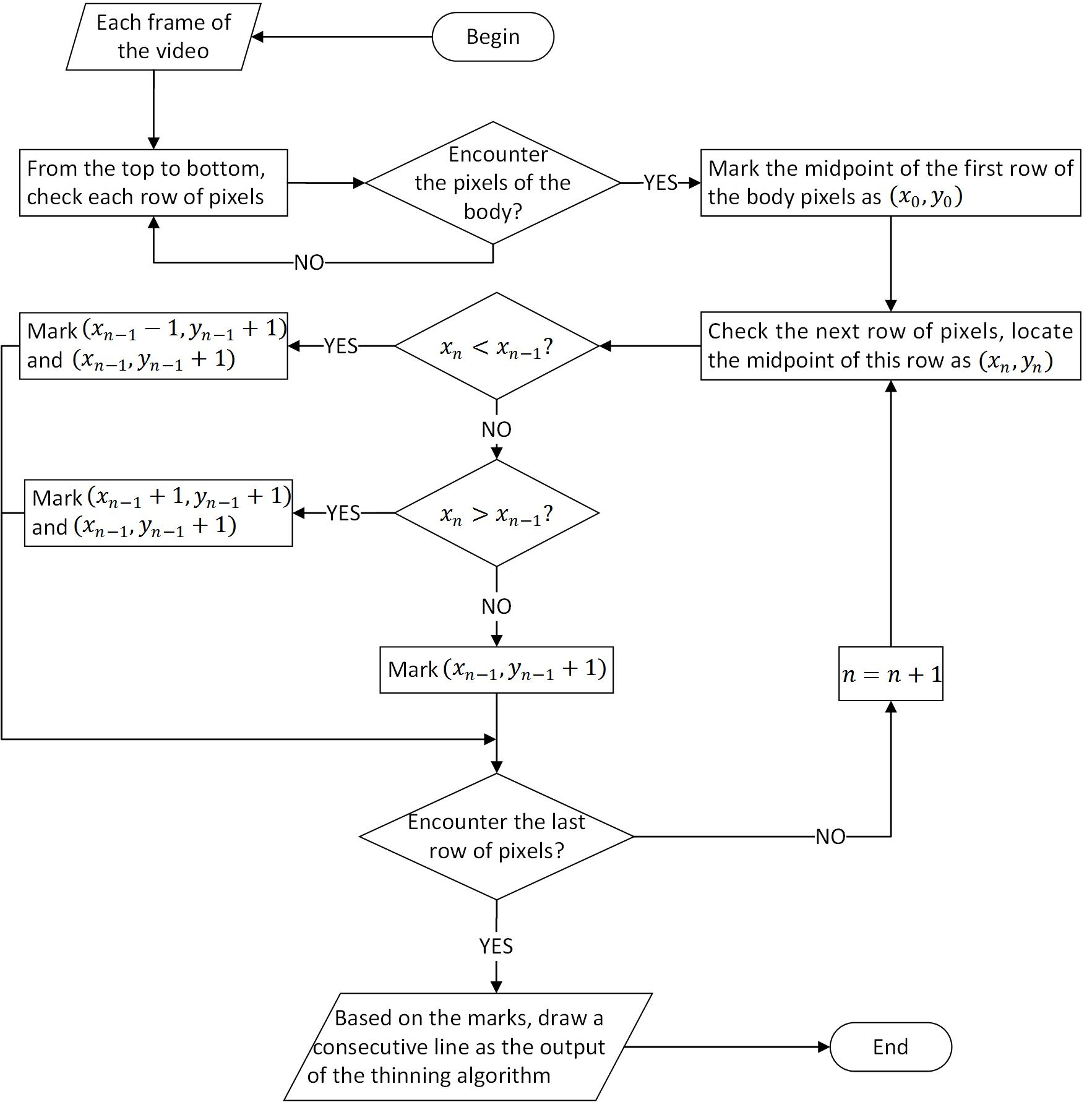
The skeleton thinning algorithm reduces the body area to a consecutive curve consisting of the head and neck. The frame's upper-left corner is (0,0) and the lower-right is (320,240). All pixels are checked row by row; after encountering the body, each row is reduced to 1–2 pixels. To keep the curve consecutive, each marked pixel must be adjacent to the pixel in the previous row.
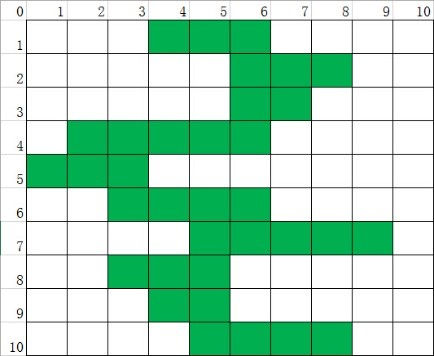
Averaging process
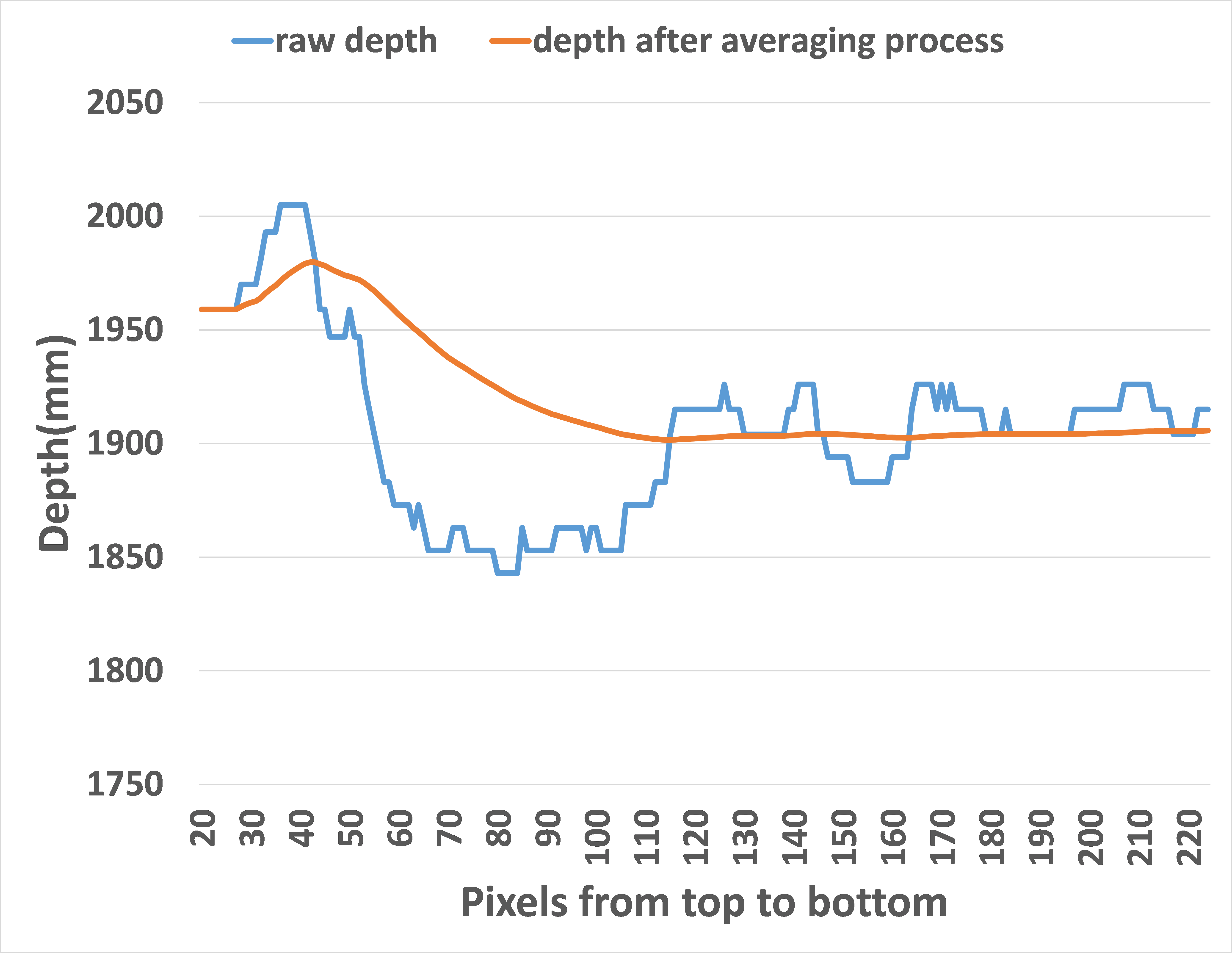
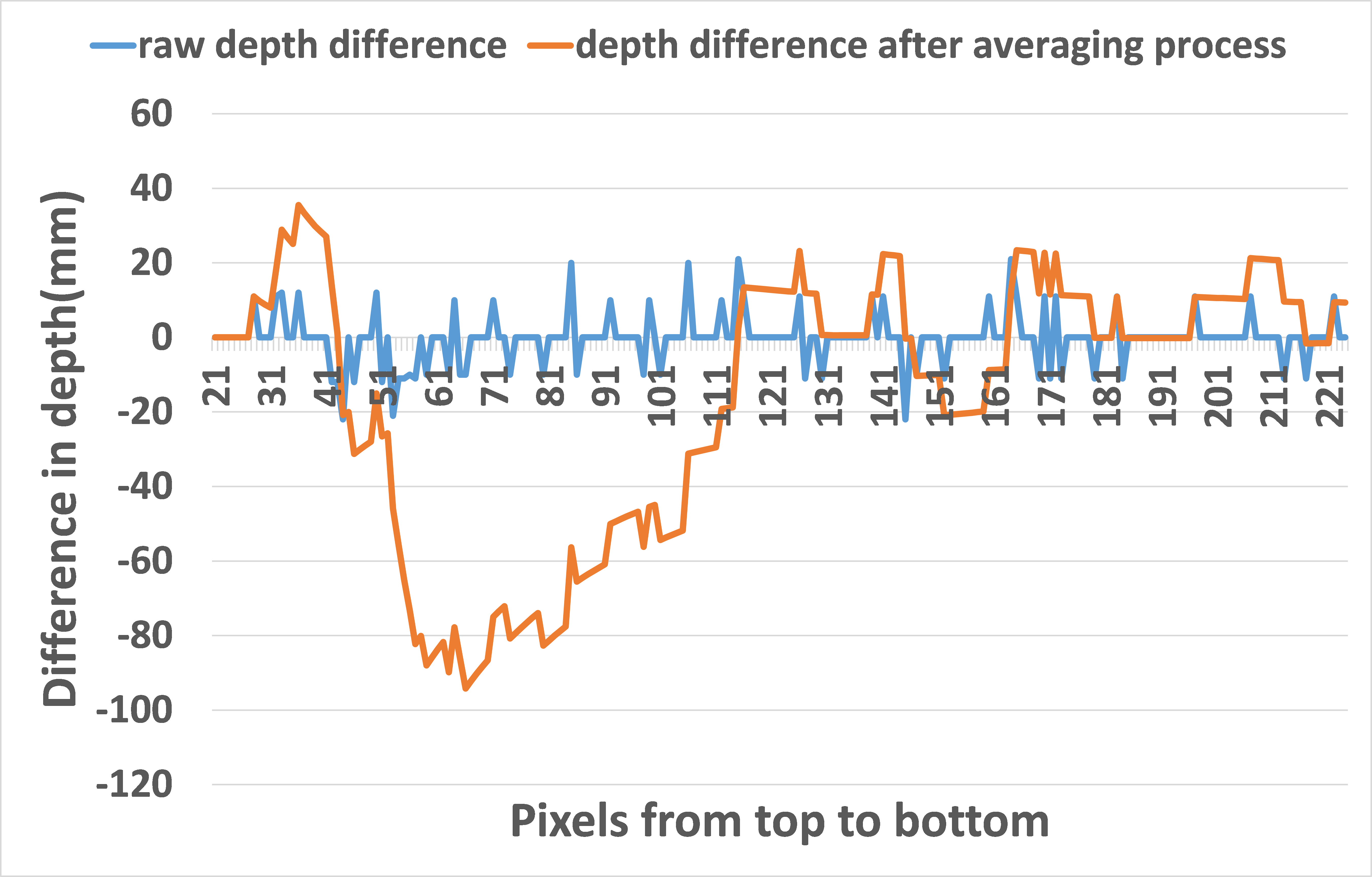
Because the head is perpendicular to the camera while the arm is closer, depth values change steadily across the head but drop sharply at the arm. The averaging process locates the neck by finding where depth changes abruptly.
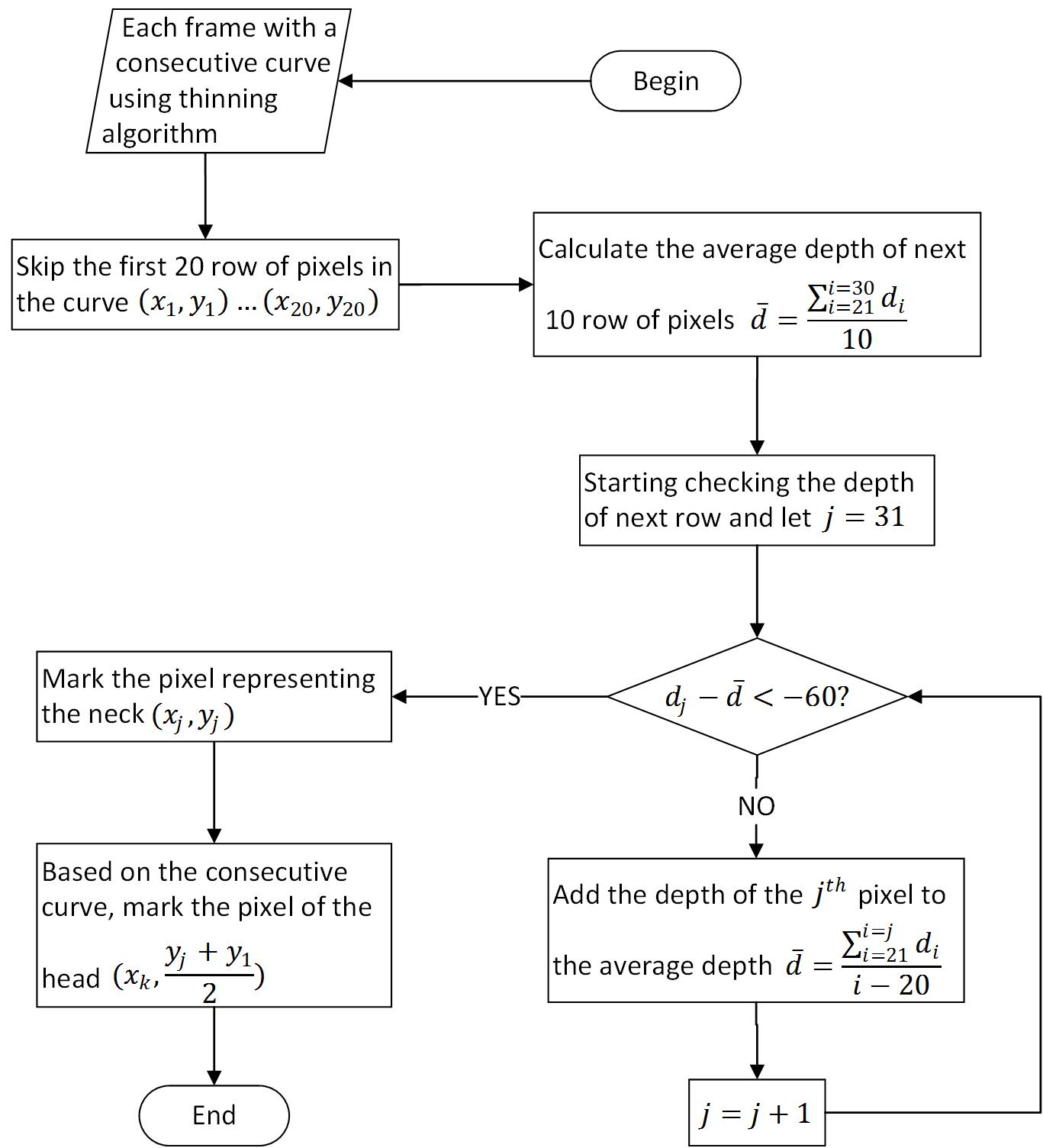
The first 20 rows are skipped to avoid background contamination. The next 10 rows are averaged as the head's reference depth. Subsequent rows are averaged until the depth changes by −60 (an abrupt change), marking the neck. The midpoint between the neck and the first curve pixel identifies the head position.
Threshold method
Chaffin and Kilbom found strong evidence of a positive correlation between musculoskeletal disorders and neck flexion over 20°[19]. With the neck and head positions located, the flexion angle α is calculated as:
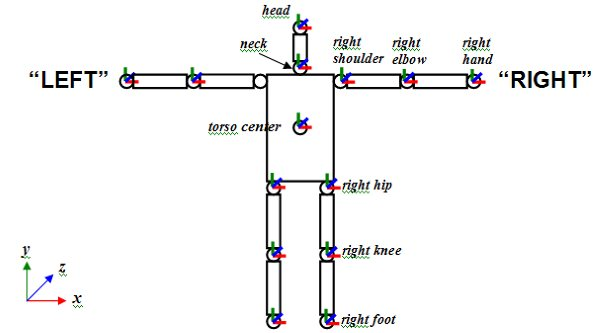
OpenNI provides depth coordinates and world coordinates (a 3D Cartesian system with the camera lens at the origin[20]). The neck and head coordinates are converted from depth to world coordinates to obtain x_neck, y_neck, x_head, and y_head. Once α exceeds 20°, the user alerts with sound. When α is below 20°, the posture is considered healthy and detection continues without disturbance.
[ORIGINAL DATA] The main experiment tested 200 different improper sitting postures with one volunteer. The system detected 188 of 200 — a 94% accuracy rate. To test robustness across body types and clothing, five volunteers (fat 180cm/105kg, thin 174cm/62kg, tall 180cm/55kg, short 165cm/50kg, thin clothes 170cm/70kg, thick clothes 170cm/70kg) each repeated an improper posture 50 times. Detection counts were 50, 48, 48, 47, 50, and 47 out of 50 respectively — confirming the method is invariant to body shape and clothing.


What Does This Mean for Posture-Correction Systems?
This system shows that a consumer motion-sensing camera, placed to the side of a user, can detect improper sitting posture with 94% accuracy in real time. The three-stage pipeline — skeleton thinning, averaging process, and flexion-angle threshold — is invariant to body shape and clothing, and it runs without touching the user or requiring a human observer. The 20° neck-flexion threshold is grounded in Chaffin and Kilbom's finding that flexion beyond this angle correlates with musculoskeletal disorders[19]. For classrooms and offices where prolonged sitting is unavoidable, a non-intrusive detection system like this offers a practical way to interrupt harmful posture before injury develops.
Frequently Asked Questions
Why use a lateral (side) view instead of a front-facing camera?
A side view avoids desk occlusion. When a user leans forward over a desk, a front-facing camera sees the desk, not the body's forward flexion. A lateral camera captures the full forward lean — the posture change that matters — uninterrupted. This is the core advantage of the setup shown in Fig. 4.
What neck-flexion angle counts as "improper"?
The system uses 20° as the threshold. Chaffin and Kilbom found strong evidence of a positive correlation between musculoskeletal disorders and neck flexion exceeding this angle[19]. When the calculated angle α exceeds 20°, the system triggers an audible alert.
Does body shape or clothing affect accuracy?
No. The cross-factor test (Table 2, Chart 2) covered fat (180cm/105kg), thin (174cm/62kg), tall (180cm/55kg), short (165cm/50kg), thin clothes, and thick clothes. Detection counts were 50, 48, 48, 47, 50, and 47 out of 50 — no meaningful variation. The depth-based method is robust to these surface differences.
How does the skeleton thinning algorithm locate the neck?
First, the algorithm reduces the body silhouette to a consecutive curve by scanning rows and keeping only 1–2 adjacent pixels per row. Then an averaging process walks down that curve, comparing depth values row by row. When the depth drops abruptly by a threshold of −60 (meaning a body part — the arm — is suddenly closer to the camera than the head), that point marks the neck. The head is the midpoint between the neck and the top of the curve.
Can this run in real time on consumer hardware?
Yes. The experiment used a first-generation Kinect-class depth camera (PrimeSense technology) with the OpenNI/NiTE middleware — consumer hardware available since 2010[14]. The pipeline processes a 320×240 depth stream and runs the thinning, averaging, and threshold checks per frame.
Sources
- Mebarki, B., "Effect of school furniture design and traditional sitting habits on sitting postures of middle school pupils in the Touet region, Algeria," Proceedings of the 17th World Congress on Ergonomics, 2009.
- Putz-Anderson, V. et al., "Musculoskeletal disorders and workplace factors," National Institute for Occupational Safety and Health (NIOSH), 1997.
- Lis, A. M. et al., "Association between sitting and occupational LBP," European Spine Journal, 16(2), 283–298, 2007.
- Priel, V. Z., "A numerical definition of posture," Human Factors, 16(6), 576–584, 1974.
- Karhu, O., Kansi, P., & Kuorinka, I., "Correcting working postures in industry," Applied Ergonomics, 8(4), 199–201, 1977.
- Corlett, E. N. et al., "Posture targeting: a technique for recording working postures," Ergonomics, 22(3), 357–366, 1979.
- Gil, H. C. & Tunes, E., "Posture recording: a model for sitting posture," Applied Ergonomics, 20(1), 53–57, 1989.
- McAtamney, L. & Corlett, E. N., "RULA: a survey method for work-related upper limb disorders," Applied Ergonomics, 24(2), 91–99, 1993.
- Hignett, S. & McAtamney, L., "Rapid Entire Body Assessment (REBA)," Applied Ergonomics, 31(2), 201–205, 2000.
- Christmansson, M., "Repetitive and manual jobs," Int. Journal of Human Factors in Manufacturing, 4(3), 281–292, 1994.
- Li, G. & Buckle, P., "Evaluating change in exposure to risk for musculoskeletal disorders," HSE Books, 1999.
- Finley, M. A. & Lee, R. Y., "Effect of sitting posture on 3-dimensional scapular kinematics," Archives of Physical Medicine and Rehabilitation, 84(4), 563–568, 2003.
- Wong, W. Y. & Wong, M. S., "Detecting spinal posture change in sitting positions with tri-axial accelerometers," Gait & Posture, 27(1), 168–171, 2008.
- Microsoft, "PrimeSense Supplies 3-D-Sensing Technology to 'Project Natal' for Xbox 360," 2010, https://news.microsoft.com/2010/03/31/primesense-supplies-3-d-sensing-technology-to-project-natal-for-xbox-360/
- PrimeSense, Ltd., "What is OpenNI?," http://www.openni.ru/index.html
- PrimeSense, Ltd., "NiTE 2.2.0.11," http://www.openni.ru/files/nite/index.html
- Fransson-Hall, C. et al., "A portable ergonomic observation method (PEO) for computerized on-line recording of postures," Applied Ergonomics, 26(2), 93–100, 1995.
- O'Sullivan, K. et al., "Neutral lumbar spine sitting posture in pain-free subjects," Manual Therapy, 15(6), 557–561, 2010.
- PrimeSense, Ltd., "openni::CoordinateConverter Class Reference," http://www.openni.ru/wp-content/doxygen/html/classopenni_1_1_coordinate_converter.html