How to Learn the Linux Kernel: A Subsystems Overview for Software Engineers
How to Learn the Linux Kernel: A Subsystems Overview for Software Engineers
The Linux kernel is one of the largest open-source projects in history — roughly 30 million lines of code across 68 top-level directories in the 7.2 release (GitHub torvalds/linux). For a software engineer, the challenge isn't finding information; it's figuring out where to start. The kernel's six core subsystems — interrupts, scheduler, memory, I/O, network, and drivers — each form a self-contained world with its own data structures, algorithms, and source files.
This overview maps those subsystems from a learner's perspective. Instead of reading the source bottom-up (which leads to early burnout), we'll look at the kernel through the lens of its diagnostic and observability tools — the same approach used by engineers who debug production systems. Each section below opens with the key idea, then points you to the exact source files worth reading first.
Key Takeaways
- The Linux kernel has six core subsystems: interrupts, scheduler, memory, I/O, network, and drivers. Each maps to a set of source directories under
doc/linux/that you can read top-down.- The scheduler evolved from CFS (kernel 2.6.23) to EEVDF (kernel 6.6) — understanding both explains how Linux handles interactive vs. batch workloads today.
- Memory management splits into physical (buddy allocator + slab), virtual (multi-level page tables + demand paging), and reclaim (kswapd + OOM killer).
- The VFS → block layer → device driver stack is the I/O path; the sk_buff → NAPI → netfilter → XDP stack is the network path. Both follow a layered design you can trace through the source.
- Start with the subsystem that matches your goal: device drivers for hardware work, networking for distributed systems, memory for performance tuning.
How Is the Linux Kernel Structured?
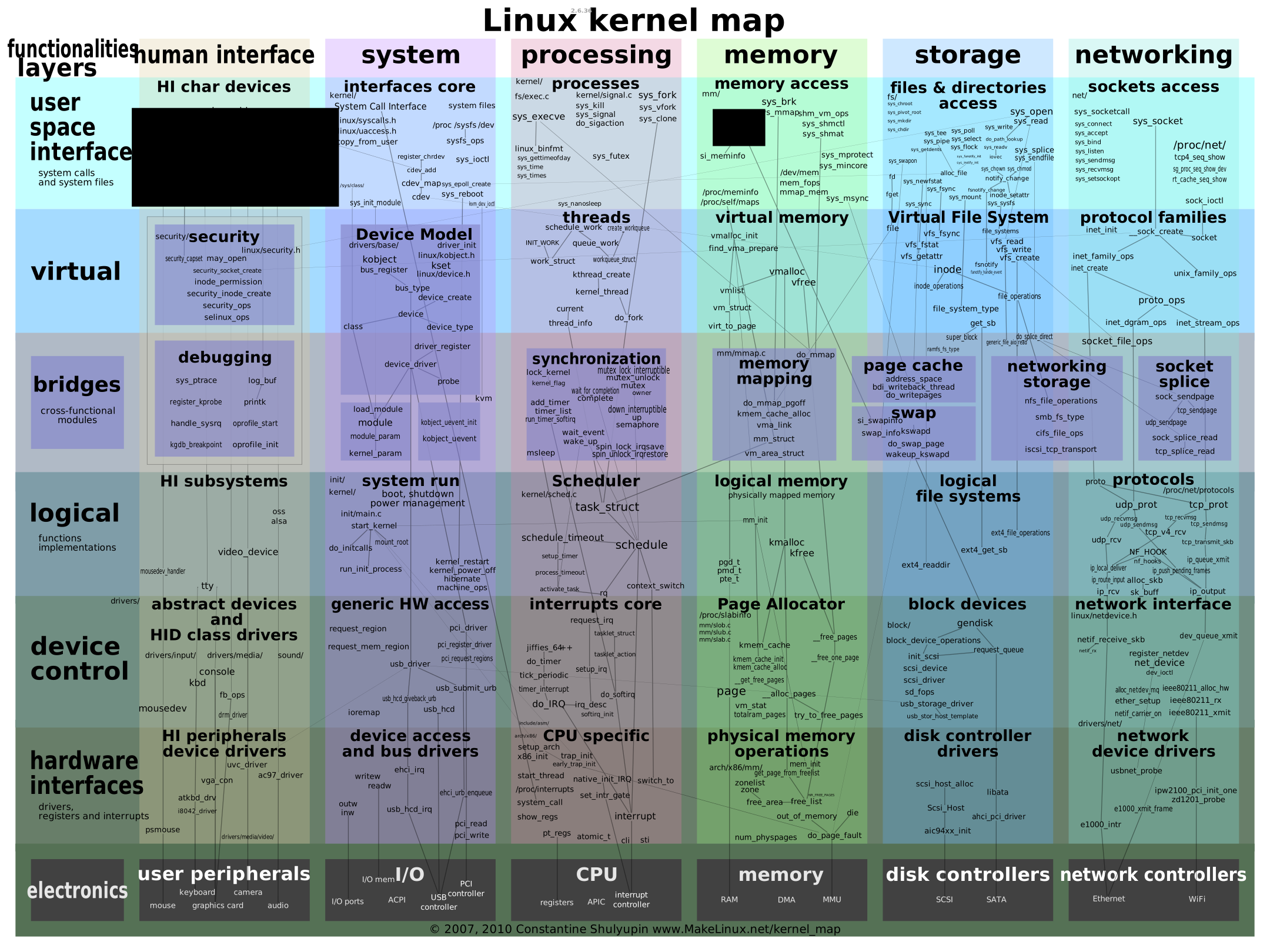
The kernel source is organized by subsystem, and the top-level directory layout reflects the architecture. The six core areas — kernel/, mm/, fs/, net/, drivers/, and arch/ — account for the bulk of the code. Understanding this map is the first step to navigating the source without getting lost.
┌─────────────────────────────────────────────────────────────────────┐
│                         Linux Kernel                                │
│                                                                     │
│  ┌──────────┐  ┌──────────┐  ┌──────────┐  ┌──────────┐           │
│  │ kernel/  │  │   mm/    │  │   fs/    │  │   net/   │           │
│  │ scheduler│  │ memory   │  │ VFS      │  │ protocol │           │
│  │ irq      │  │ manage   │  │ filesys  │  │ stack    │           │
│  │ time     │  │          │  │ block    │  │ socket   │           │
│  └────┬─────┘  └────┬─────┘  └────┬─────┘  └────┬─────┘           │
│       │              │              │              │                 │
│  ┌────┴──────────────┴──────────────┴──────────────┴────┐          │
│  │                    drivers/                           │          │
│  │   char devices  │  block devices  │  network devices  │          │
│  └───────────────────────────────────────────────────────┘          │
│                                                                     │
│  ┌──────────┐  ┌──────────┐  ┌──────────┐                         │
│  │  arch/   │  │ include/ │  │ lib/     │                         │
│  │ x86 arm  │  │ headers  │  │ common   │                         │
│  │ riscv    │  │          │  │ helpers  │                         │
│  └──────────┘  └──────────┘  └──────────┘                         │
└─────────────────────────────────────────────────────────────────────┘
The kernel/ directory holds the scheduler, interrupt handling, and time management. mm/ manages physical and virtual memory. fs/ contains the VFS layer, individual filesystems, and the block layer. net/ implements the protocol stack. drivers/ is the largest directory — every device driver lives here. include/ has the header files that define the core data structures shared across subsystems.
For a practical starting point, see our guide on how to compile the Linux kernel from source — building the kernel yourself makes the source tree tangible.
How Do Interrupts Work in the Linux Kernel?
Hardware interrupts are how devices signal the kernel that they need attention. Linux splits interrupt handling into two halves: the top half (hard interrupt) runs with interrupts disabled and does minimal work, then the bottom half (soft interrupt / tasklet / workqueue) finishes the rest later with interrupts re-enabled. This design keeps the system responsive under load.
┌──────────────┐     ┌──────────────────┐     ┌─────────────────────┐
│ Hardware     │     │   Top Half       │     │   Bottom Half       │
│ Device       │     │   (hard irq)     │     │   (softirq /        │
│              │     │                  │     │    tasklet /        │
│  IRQ signal  │────►│  • ack device    │────►│    workqueue)       │
│              │     │  • record state  │     │                     │
│              │     │  • raise softirq │     │  • process data     │
│              │     │  • return fast   │     │  • notify userspace │
└──────────────┘     └──────────────────┘     └─────────────────────┘
      │                     │                          │
      │              interrupts OFF             interrupts ON
      │              atomic context              can sleep (wq)
Hard interrupts are triggered by peripheral devices via the interrupt controller. The interrupt number comes from the controller (e.g., APIC on x86). Hard interrupts are maskable — the CPU can disable them temporarily. They can be nested: a higher-priority interrupt can preempt a lower-priority one.
Soft interrupts are generated by executing an INT instruction (software-triggered). The interrupt number is specified directly in the instruction — no controller needed. Soft interrupts are not maskable. They cannot be nested.
The bottom-half mechanisms differ in context and capability:
- Tasklet — runs in softirq context on the same CPU that scheduled it. Cannot sleep. Fast.
- Workqueue — runs in process context (a kernel thread). Can sleep. Used when the deferred work might block.
- Threaded IRQ — a dedicated kernel thread per IRQ, registered via
request_threaded_irq(). Keeps the hard-irq handler minimal.
The key source files: kernel/irq/ (interrupt registration and handling), kernel/softirq.c (soft interrupt dispatch), and include/linux/interrupt.h (bottom-half declarations).
How Does the Linux Scheduler Decide What Runs Next?
The scheduler picks the next runnable task from a per-CPU runqueue. Linux uses a scheduling class chain — each class gets a chance to run its own tasks before deferring to lower-priority classes. The chain is: stop → deadline → rt → fair → idle. Most tasks are SCHED_NORMAL and run under the CFS or EEVDF fair class.
Priority chain (high ──────────────────────────────────────► low)

  ┌─────────┐   ┌─────────────┐   ┌──────┐   ┌─────────┐   ┌──────┐
  │  stop   │──►│  deadline   │──►│  rt  │──►│  fair   │──►│ idle │
  │         │   │SCHED_DEADLINE│   │FIFO/RR│   │CFS/EEVDF│   │      │
  └─────────┘   └─────────────┘   └──────┘   └─────────┘   └──────┘
   highest                                              lowest
   priority                                            priority

  CFS/EEVDF internal: red-black tree keyed by vruntime
  ┌──────────────────────────────────────────────────┐
  │              rb tree (vruntime)                   │
  │                  [task A: 5]                      │
  │                 /                \                 │
  │         [task B: 3]          [task C: 8]         │
  │           /        \                               │
  │    [task D: 1]  [task E: 4]                       │
  │                                                   │
  │  pick leftmost (smallest vruntime) → task D       │
  └──────────────────────────────────────────────────┘
CFS (Completely Fair Scheduler) — the default fair class since kernel 2.6.23. It models an "ideal multitasking processor" where every runnable task gets an equal share of CPU. Each task accumulates a virtual runtime (vruntime in struct sched_entity); the task with the smallest vruntime runs next. Tasks live in a red-black tree keyed by vruntime, so picking the next task and re-inserting after a timeslice are both O(log n). SCHED_NORMAL, SCHED_BATCH, and SCHED_IDLE tasks are all served by CFS.
EEVDF (Earliest Eligible Virtual Deadline First) — introduced in kernel 6.6 as the intended CFS replacement. Each task carries a virtual deadline; the scheduler always runs the task whose deadline is earliest, giving stronger latency guarantees than pure fairness. A task that has used less of its time slice gets an earlier deadline, so interactive work is favored without a separate heuristic.
Real-time schedulers — SCHED_FIFO and SCHED_RR are fixed-priority classes that always preempt CFS. SCHED_DEADLINE uses EDF with a runtime budget for hard real-time workloads.
Per-CPU runqueues (struct rq) hold the runnable tasks. Periodic load balancing and idle balancing migrate tasks across runqueues to keep all cores busy. The context_switch() function swaps page tables (switch_mm) and CPU register state (switch_to); the scheduler tick (scheduler_tick) updates vruntime and may set TIF_NEED_RESCHED. NO_HZ_IDLE / NO_HZ_FULL stop the periodic tick on idle or quiet CPUs to save power and reduce jitter.
Key source files: kernel/sched/fair.c (CFS and EEVDF — EEVDF was integrated into fair.c in kernel 6.6, with pick_eevdf() at line 1177), kernel/sched/core.c (runqueue and class chain), kernel/sched/sched.h (struct rq, scheduling classes).
How Does Linux Manage Memory?
Memory management splits into three layers: physical allocation (buddy allocator hands out page groups, slab caches kernel objects), virtual memory (multi-level page tables translate virtual to physical, demand paging handles faults), and reclaim (kswapd reclaims pages, OOM killer is the last resort).
Physical memory                          Virtual memory
┌─────────────────────┐                 ┌─────────────────────┐
│      NUMA node      │                 │   Process address   │
│  ┌───────────────┐  │                 │       space         │
│  │    zones      │  │                 │  ┌───────────────┐  │
│  │ DMA|DMA32|    │  │                 │  │     VMA       │  │
│  │ Normal|HighMem│  │                 │  │ (vm_area_     │  │
│  └───────┬───────┘  │                 │  │  struct)      │  │
│          │          │                 │  └───────┬───────┘  │
│  ┌───────┴───────┐  │                 │          │          │
│  │  buddy        │  │                 │  ┌───────┴───────┐  │
│  │  allocator    │──┼─── pages ───────┼─►│  page table   │  │
│  │  (page groups)│  │                 │  │  PGD→PUD→    │  │
│  └───────┬───────┘  │                 │  │  PMD→PTE     │  │
│          │          │                 │  └───────┬───────┘  │
│  ┌───────┴───────┐  │                 │          │          │
│  │  slab/slub    │  │                 │  ┌───────┴───────┐  │
│  │  (task_struct,│  │                 │  │  physical     │  │
│  │   inode, ...) │  │                 │  │  page frame   │  │
│  └───────────────┘  │                 │  └───────────────┘  │
└─────────────────────┘                 └─────────────────────┘
Physical memory is organized into NUMA nodes (struct pglist_data), each divided into zones (DMA, DMA32, Normal, HighMem) reflecting hardware addressing limits. The smallest unit is the page (usually 4 KiB), tracked by struct page (one per physical page, held in mem_map). The buddy allocator hands out contiguous power-of-two page groups and coalesces freed buddies to fight external fragmentation. The slab allocator (SLUB by default) caches frequently allocated kernel objects — task_struct, inode, dentry — to avoid repeated init and buddy-level fragmentation.
Virtual memory: each process has its own address space described by struct mm_struct; contiguous logical regions are VMAs (struct vm_area_struct) with their own flags and file backing. A multi-level page table (PGD → PUD → PMD → PTE) translates virtual to physical addresses; x86-64 and AArch64 typically use 4 levels, with 5-level support for larger address spaces. Demand paging means a first access triggers a page fault (handle_mm_fault), which maps a zero page, reads from swap, or maps a file. kmalloc returns physically contiguous memory (good for DMA); vmalloc returns virtually contiguous memory that may be physically scattered. Huge pages (2 MiB / 1 GiB) and Transparent Huge Pages (THP) reduce TLB pressure for large mappings.
Reclaim and OOM: when free memory shrinks, kswapd reclaims page cache and anonymous pages; zswap / zram compress pages in RAM to cut swap I/O. If reclaim cannot free enough memory, the OOM killer selects a victim process by a badness score and kills it to keep the system alive.
Key source files: mm/page_alloc.c (buddy allocator), mm/slub.c (SLUB), mm/vmalloc.c, mm/vmscan.c (kswapd), mm/oom_kill.c, include/linux/mm_types.h (struct page, struct mm_struct).
How Does Linux Handle I/O, Filesystems, and Networking?
I/O and networking share a layered design: a virtual layer presents a uniform interface to userspace, a block/protocol layer queues and schedules requests, and a device driver handles the hardware. A single read() call traverses VFS → page cache → block layer → driver — understanding this path is essential for performance work.
User read() call — the I/O path through the kernel
┌──────────┐    ┌──────────┐    ┌──────────┐    ┌──────────┐    ┌──────────┐
│ App      │    │   VFS    │    │  page    │    │  block   │    │  device  │
│ read(fd) │───►│ sys_read │───►│  cache   │───►│  layer   │───►│  driver  │
│          │    │          │    │ (hit?)   │    │ bio/blk  │    │ DMA/IRQ  │
│          │    │          │    │          │    │   -mq    │    │          │
└──────────┘    └──────────┘    └────┬─────┘    └──────────┘    └──────────┘
                                     │
                                miss │ → read from disk
                                     ▼
                              ┌──────────────┐
                              │  filesystem  │
                              │  (ext4/xfs)  │
                              └──────────────┘
VFS (Virtual File System) gives userspace a single open / read / write / close interface regardless of the underlying filesystem. Core objects: struct superblock (a mounted FS), struct inode (file metadata), struct dentry (directory-entry cache that speeds path lookup), and struct file (an open file instance with its own offset and file_operations). The file_operations table (open, read, write, ioctl, mmap, release, …) is how a filesystem or device driver plugs its own behavior into the VFS.
Block layer: file I/O becomes bio structures (struct bio), each describing one or more contiguous memory-buffer segments. BIOs are merged into a request queue; the blk-mq (multi-queue) framework maps submissions to per-CPU or hardware queues for modern fast storage. I/O schedulers — mq-deadline, kyber, bfq, none — reorder and merge requests to trade off throughput, latency, and fairness. The page cache holds recently read file pages; dirty pages are written back to disk by periodic writeback threads.
Memory-mapped and direct I/O: mmap maps a file directly into a process address space so reads/writes become memory accesses (demand-paged through the page cache). Direct I/O (O_DIRECT) bypasses the page cache and DMA-s straight from user buffers to the device — used by databases and qemu.
Network stack: struct sk_buff is the central packet descriptor — it carries protocol headers, a scatter-gather list of data fragments, and metadata (timestamp, priority, ingress device). SKBs are allocated from a slab cache and reference-counted; the same sk_buff is cloned and handed down the stack layers without copying payload.
NAPI (New API) starts with interrupt-driven packet receipt, then switches to a polling loop inside a single hard-IRQ to amortize interrupt overhead under high traffic. netif_napi_add registers a driver's poll function; napi_schedule raises NET_RX_SOFTIRQ to run it.
Protocol stack and netfilter: ingress runs L2 (netif_receive_skb) → L3 (ip_rcv → ip_route_input) → L4 (tcp_v4_rcv / udp_rcv) → socket buffer → userspace. Netfilter hooks (NF_INET_PRE_ROUTING, LOCAL_IN, FORWARD, LOCAL_OUT, POST_ROUTING) are where iptables / nftables filter, NAT, and mangle packets. Egress: dev_queue_xmit hands a packet to the device; qdisc (queuing disciplines like fq_codel, htb) shape and pace outbound traffic.
eBPF / XDP: XDP (eXpress Data Path) runs an eBPF program at the earliest point in the driver, before an sk_buff is even allocated — used for DDoS mitigation, load balancing, and fast forwarding. TC eBPF attaches to the traffic-control layer for richer in-stack processing.
Key source files: include/linux/fs.h (struct inode, struct file), include/linux/fs/super_types.h (struct super_block), include/linux/dcache.h (struct dentry), include/linux/blk_types.h (struct bio), include/linux/skbuff.h (struct sk_buff), net/core/dev.c (NAPI).
For a concrete walkthrough of how VFS forwards requests to userspace, see our FUSE kernel module deep dive.
How Do Device Drivers Fit Into the Kernel?
Device drivers are the kernel's hardware interface. The driver model is a bus → device → driver tree: a driver registers on a bus; when a matching device is found, the kernel calls probe(). This same model covers everything from a keyboard to a network card.
Character devices (struct cdev) are accessed as a stream of bytes. The driver registers a major/minor number pair and an file_operations table. register_chrdev_region reserves a static major/minor range; alloc_chrdev_region requests a dynamic one. cdev_add makes the device live. class_create + device_create populate sysfs (/dev, /sys/class/…) so udev can create device nodes automatically.
Device model and buses: the kernel device model is a bus → device → driver tree. A driver (struct device_driver) registers on a bus (struct bus_type); when a matching device is found, probe() is called. Platform devices represent devices baked into a SoC (no discoverable bus); device tree (*.dts) or ACPI describe their resources (MMIO ranges, IRQs). PCI and USB are discoverable buses with their own core drivers that enumerate devices and match them to function drivers.
Interrupts and bottom halves in drivers: a driver requests an IRQ with request_irq (or the threaded variant request_threaded_irq); the top half does the minimal ack + notify work, the rest is deferred. Bottom-half mechanisms: tasklet (softirq context, same CPU), workqueue (process context, can sleep), and threaded IRQ (dedicated kernel thread per IRQ).
DMA and IOMMU: DMA lets a device read/write RAM without CPU copies; dma_alloc_coherent gives a device-accessible, cache-coherent buffer. The IOMMU (VT-d, SMMU) remaps device-visible "IO virtual addresses" to physical pages, so a device can address scattered memory and is isolated from accessing unrelated RAM.
Key source files: drivers/char/, drivers/base/ (device model), include/linux/interrupt.h (request_irq inline wrapper), kernel/irq/manage.c (request_threaded_irq implementation), include/linux/dma-mapping.h (dma_alloc_coherent inline), kernel/dma/ (DMA coherent pool), drivers/pci/, drivers/usb/.
How Should You Start Reading the Linux Kernel Source?
The best learning path depends on your goal. Rather than reading the source linearly, pick a subsystem that matches your work and trace a single operation end-to-end.
| Goal | Start here | Then read |
|---|---|---|
| Build/compile the kernel | Compile the kernel from source | Makefile, Kconfig, scripts/ |
| Understand a subsystem in depth | FUSE kernel module deep dive | fs/fuse/, fs/ |
| Trace a specific function | ftrace: filter by parent function | kernel/trace/ |
| Contribute a patch | Kernel contribution guide | Documentation/process/ |
| Debug a regression | Kernel regression with xfstests | tools/testing/ |
| Run the kernel in a VM | QEMU aarch64 Linux in WSL | drivers/virtio/ |
| Submit your first patch | Submit a kernel patch | Documentation/process/submitting-patches.rst |
A practical first exercise: pick a system call (e.g., read()), then trace it from the VFS entry point (fs/read_write.c) through the page cache, block layer, and into a driver. You'll touch four subsystems in one trace — and that cross-subsystem view is exactly how the kernel fits together.
Frequently Asked Questions
How large is the Linux kernel source?
The 7.2 release contains roughly 30 million lines of code across 68 top-level directories. The largest subsystems are drivers/ (the most code by far), arch/ (architecture-specific code for x86, ARM, RISC-V, etc.), fs/, net/, mm/, and kernel/. The core scheduler in kernel/sched/ is comparatively compact — a few thousand lines — but it's one of the most algorithmically dense parts of the kernel.
Which subsystem should I start with?
Start with the subsystem that matches your goal. If you're doing performance work, begin with mm/ (memory) and kernel/sched/ (scheduler). If you're building hardware support, start with drivers/. If you're working on distributed systems, net/ is the natural entry point. The VFS layer (fs/) is a good second stop regardless of your focus — almost every subsystem eventually interacts with files.
What is the difference between CFS and EEVDF?
CFS (since kernel 2.6.23) uses a virtual runtime (vruntime) to give each task a fair share of CPU — the task with the smallest vruntime runs next. EEVDF (since kernel 6.6) replaces vruntime with a virtual deadline, giving stronger latency guarantees for interactive work. EEVDF is intended to eventually replace CFS as the default fair scheduler. Both use a red-black tree for O(log n) task selection.
How do I read the kernel source without getting lost?
Don't read linearly. Pick a concrete operation (a system call, an IRQ, a packet) and trace it through the source using grep or an IDE. The include/linux/ and kernel/ headers define the core data structures — read those first. The Documentation/ directory (and https://www.kernel.org/doc/html/latest/) explains the design rationale. And build the kernel yourself first — it makes the source tree tangible.
Conclusion
The Linux kernel's six subsystems — interrupts, scheduler, memory, I/O, network, drivers — each form a self-contained world with its own data structures and algorithms. The key to learning them is to follow a single operation (a system call, an interrupt, a packet) across subsystem boundaries rather than reading each subsystem in isolation.
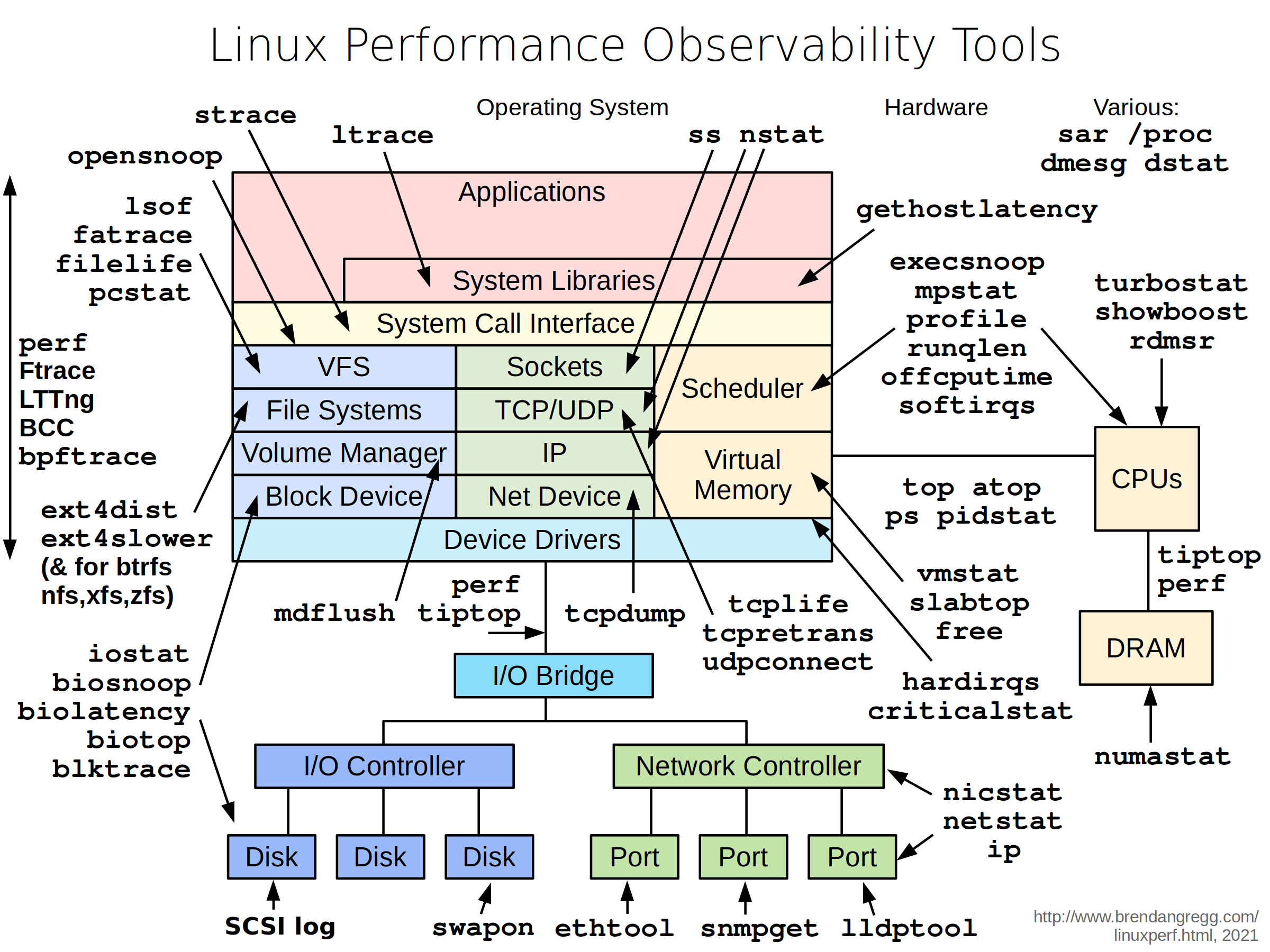
Start with the subsystem that matches your work, trace a concrete path through the source, and use the observability tools (ftrace, perf, eBPF, /proc) to connect the code to real behavior. The source is large, but it's also remarkably consistent in its patterns — once you've traced one path, the rest follow the same layered design.
This is Part 1 of a kernel learning series. The next step is to pick a subsystem and go deep — the FUSE kernel module deep dive and ftrace internals post are good follow-ups for the I/O and tracing paths.
Sources
- Linux kernel source (torvalds/linux), https://github.com/torvalds/linux
- Kernel documentation, https://www.kernel.org/doc/html/latest/
- Linux kernel map (interactive subsystem diagram), https://makelinux.github.io/kernel/map/
- Kernel scheduling documentation (CFS, EEVDF), https://www.kernel.org/doc/html/latest/scheduler/
- Kernel memory management documentation, https://www.kernel.org/doc/html/latest/mm/